Difference Between a Camera and a Sensor: A Practical Guide
Explore the difference between a camera and a sensor with practical guidance for photographers and home-security enthusiasts. Learn how sensors influence image quality, exposure, and workflow, and how to choose gear that fits your goals.


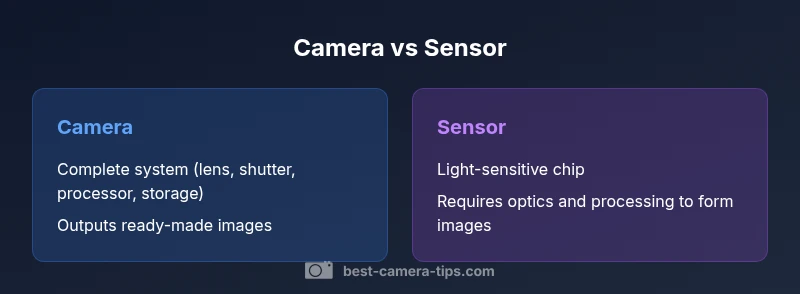
In short, a camera is a complete imaging system, while a sensor is the light-sensitive chip inside it. The sensor drives image quality, but the camera governs optics, exposure, processing, and workflow. Understanding this distinction helps you choose gear that fits your goals.
What is the difference between a camera and a sensor?
The difference between a camera and a sensor is a foundational concept for anyone learning imaging. According to Best Camera Tips, the difference between a camera and a sensor is best understood by separating the imaging system into two parts: the complete camera (the device you pick up and use) and the sensor (the light-sensitive chip that records information). The camera includes the lens, shutter, processor, storage, and interface for handling exposure, color, and output. The sensor, by contrast, is the core of the image capture process: it converts photons into electrical signals that become digital data. The same sensor can produce different results depending on the surrounding hardware and software, while a camera’s design determines how that data is captured, processed, and delivered to you. This distinction matters whether you’re buying a new body, evaluating a surveillance setup, or planning a studio workflow, because it affects cost, upgrade paths, and long-term compatibility.
Core Components: From Light to Image
Light enters through the lens and is modulated by the aperture and shutter. The sensor then records the light as an electronic signal, which the camera’s processor converts into a digital image. Along the way, autofocus systems, image stabilization, and color processing play critical roles. The takeaway: a camera is not just the sensor; it is the entire chain from light to final file. For aspiring photographers and home security enthusiasts alike, recognizing this chain helps in diagnosing problems, planning upgrades, and optimizing your workflow. Best practices include matching lenses to sensor size, understanding exposure controls, and recognizing how processing affects output.
Sensor Technology: How it Records Light
Sensors are the heart of image capture. Most modern cameras use CMOS sensors, which integrate light sensing with readout circuitry to deliver data quickly and efficiently. The sensor’s efficiency, pixel layout, and color filter array influence sharpness, color fidelity, and noise performance. Sensor technology has advanced to reduce rolling shutter artifacts and improve low-light performance, yet all improvements depend on how the sensor is paired with optics and processing. For security-focused systems, sensor sensitivity and dynamic range often dominate cost and reliability considerations.
Sensor Size, Resolution, and Pixel Pitch
Sensor size matters because it governs light gathering, depth of field, and noise characteristics. Large sensors typically deliver better low-light performance and broader dynamic range, while smaller sensors offer greater depth of field and compact system design. Resolution, measured in megapixels, is only part of the story: pixel pitch and micro-lenses influence how efficiently a sensor converts light into usable data. In practice, two cameras with the same resolution can produce very different images if their sensors differ in size, layout, or processing pipeline. Understanding these trade-offs helps you pick gear aligned with your goals—be it street photography, portrait work, or surveillance coverage.
Dynamic Range, Noise, and Color Science
Dynamic range describes how well a sensor can capture details in bright highlights and dark shadows. Noise performance rises as you push ISO and as sensor temperature increases, which is why sensor design and readout circuits matter. Color science—how a sensor interprets color data and how the camera renders it—also affects skin tones, landscapes, and indoor scenes. In practice, you’ll see better, more natural color with sensors designed for your shooting context, even if two cameras share similar resolution. The key is to balance sensor design with lens quality and processing algorithms.
The Impact of Lenses and Optics
A sensor does not operate in isolation; lenses determine sharpness, vignette, distortion, and micro-contrast that the sensor records. A high-end sensor paired with a mediocre lens will underperform compared with a mid-range sensor using a superior lens. Conversely, excellent lenses can unlock more image quality from a given sensor. For security setups, the choice of lens, focal length, and aperture often has a larger practical impact on scene clarity than marginal sensor gains.
From Sensor to Image: Processing and RAW vs JPEG
Data captured by the sensor is only as good as the processing that follows. RAW files preserve the maximum fidelity, letting you tailor noise reduction, white balance, and color curves in post. JPEGs apply in-camera processing, which can be convenient but may mask sensor performance. Understanding the distinction between sensor data and processing helps you evaluate gear on its own merits and prevents overestimating a device’s capabilities based on sensor specs alone.
Image Stabilization and Readout Speeds
Readout speed and stabilization systems interact with sensor performance to influence motion blur and frame rate. Faster readouts reduce rolling shutter effects, benefiting sports and action work, while stabilization helps maintain sharpness in longer exposures. The sensor’s role remains fundamental, but how quickly data moves through the pipeline and how effectively the system compensates motion determine real-world usability.
Practical Scenarios: Photography vs Surveillance
In photography, the sensor’s performance matters, but the overall camera system—lenses, processing, and ergonomics—drives the experience. In surveillance and scientific imaging, modular sensor choices and dedicated processing may take precedence, allowing custom configurations. By separating the sensor’s capabilities from the camera’s control and output, you can design setups that optimize for low light, high-contrast scenes, or long-term reliability.
Common Misconceptions in Photography
A common myth is that bigger numbers on a sensor mean instantly better pictures. In reality, image quality derives from a balance of sensor size, lens quality, processing, and shooting technique. Another misconception is assuming that all ‘sensor upgrades’ yield visible gains; sometimes improvements come from better processing pipelines or smarter noise reduction rather than larger sensors. The practical goal is to match sensor capabilities to your workflow.
How to Choose Based on Your Goals
Start with your primary use case: casual photography, landscape, portrait, or security. If you value portability and depth of field control, a larger sensor with quality lenses is beneficial. If you prioritize cost, reliability, and ease of use, a well-balanced camera system might be better. Remember that the sensor is only one piece of the puzzle—the rest of the chain (lenses, processing, and workflow) determines final results.
Maintenance, Upgrades, and Future Trends
Sensors age gradually as they accumulate exposure cycles, so regular calibration and firmware updates can preserve performance. Upgrading often means replacing the camera body rather than the sensor itself, though some modular systems allow sensor swaps. Looking ahead, advances in processing, color science, and sensor efficiency will continue to widen the gap between theoretical sensor performance and real-world output. Staying informed helps you time upgrades to maximize value and ROI.
Comparison
| Feature | Camera (complete imaging system) | Standalone image sensor |
|---|---|---|
| Definition | A complete device including lens, shutter, processor, storage, and interfaces | A light-sensitive chip that records image data; relies on other hardware for optics, processing, and output |
| Primary Role | Capture, process, and deliver final images or video as a system | Provide raw data that must be combined with optics and processing to form images |
| Key Components Included | Lens, shutter, autofocus, processor, memory, body controls | Sensor alone; needs lens, electronics, and software for full function |
| Impact on Image Quality | Affected by sensor physics plus optics and processing | Predominantly set by sensor characteristics plus subsequent processing |
| Typical Use Cases | Everyday photography, professional bodies, consumer imaging | Specialized setups (research, surveillance, scientific imaging) |
| Price Range | Wide range depending on system complexity and features | Typically lower hardware cost but requires additional components |
Positives
- Clarifies budgeting and system design decisions
- Supports modular upgrades by pairing sensors with different bodies
- Helps tailor setups for photography vs security or scientific work
- Reduces confusion when evaluating gear by separating sensor from camera
Downsides
- Can be technically dense for beginners
- Risk of overemphasizing sensor specs at the expense of optics and processing
- More components can complicate maintenance and setup
- Upfront costs may rise when building a complete system
Cameras remain the default choice for general imaging; standalone sensors suit modular, specialized setups.
Understanding the distinction helps you select gear aligned with your goals, whether you prioritize ease of use or system customization. The sensor influences data quality, but the camera governs how that data is captured, processed, and delivered.
Common Questions
What is the practical difference between a camera and a sensor?
The camera is the complete imaging device, including optics, exposure control, processing, and storage. The sensor is the light-sensitive element that records data. Together they form images, but only the camera controls the user experience and workflow.
A camera includes everything you interact with; the sensor is the part that actually records light.
Can a standalone sensor replace a camera in a setup?
Standalone sensors require compatible processing hardware and interfaces to output usable images. In consumer gear, you typically use a camera with an integrated sensor. In specialized setups, modular sensors can be used with dedicated processing units.
Usually you need more than just the sensor; you need the rest of the imaging system.
Does sensor size always determine image quality?
Sensor size influences light gathering and potential noise performance, which affects image quality. However, lens quality, processing, and shooting technique also play critical roles. A smaller sensor with excellent optics can outperform a larger one in some scenarios.
Size helps, but it's not the whole story when it comes to image quality.
Are there cameras with modular sensors?
Some professional and scientific systems offer modular sensors, but for everyday photography most users work with a fixed sensor inside a camera body. The modular approach is more common in specialized fields.
Modular sensors exist in niche setups, not typical consumer gear.
How do processing and firmware affect sensor data?
Processing and firmware translate raw sensor data into usable images. They affect noise reduction, color accuracy, white balance, and compression. A great sensor can still produce mediocre results if processing is weak.
Processing can make a big difference, sometimes more than the sensor alone.
What should a beginner study first in camera systems?
Beginners should prioritize understanding exposure (aperture, shutter, ISO), followed by lenses and basic processing concepts. Sensor basics matter, but the workflow and technique drive most results early on.
Start with exposure and lenses, then learn how the sensor affects final output.
The Essentials
- Define your goal before choosing gear.
- A sensor alone cannot form an image without optics and processing.
- Lens quality and processing impact image output as much as sensor specs.
- Sensor size affects low-light performance and depth of field.
- Consider modularity for flexibility in specialized contexts.
- Upgrades often focus on the whole system, not just the sensor.