Difference Between Camera and Projector: A Practical Guide
Explore the practical difference between camera and projector devices: how they capture, display, and their typical specs, with use-case tips for photographers and home security enthusiasts.


Cameras and projectors serve opposite ends of imaging: cameras capture light to create digital images, while projectors reproduce images by emitting light onto a surface. The difference between camera and projector shapes every subsequent spec, from optics to calibration, and from use cases to maintenance. For creators and enthusiasts, choose based on whether your primary goal is capture or display, then pick gear that supports that objective.
The difference between camera and projector: Core Concepts
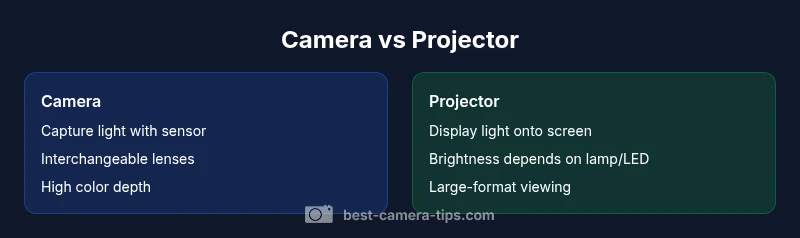
At a high level, the difference between camera and projector lies in what they do with light and how that light is processed. A camera is a capture device: it gathers light through a lens, converts photons into an electronic signal with a sensor, and records data you can edit later. A projector, by contrast, is an output device: it takes a signal, amplifies light, and projects an image onto a screen or wall for immediate viewing. This core distinction drives nearly every other specification—from optics and sensor tech to color science and maintenance needs. For aspiring photographers and home-security enthusiasts, recognizing this fundamental split helps frame the trade-offs you’ll face in practice. According to Best Camera Tips, the best choice aligns with your primary objective—capture or display.
How cameras capture light vs how projectors display
Cameras are designed to capture light and convert photons into digital information. Light passes through a lens, travels to a sensor (often a CMOS or CCD array), and variations in intensity and color are translated into raw data that software can render as a photo or video. Projectors, on the other hand, start with a signal that drives a light source and imaging element. The light is shaped and modulated to form an image on a surface. The reading is inverse: capture devices record scenes, display devices show them. Practically, this means you rarely substitute one for the other; they complement each other in workflows, storytelling, and training.
Core specs: sensor, optics, pixels vs lamp, brightness
The best way to frame the difference between camera and projector is to compare core specs side by side. Cameras emphasize sensor size, pixel density, dynamic range, lens compatibility, and autofocus performance. Projectors emphasize brightness measured in lumens, contrast ratio, throw distance, and lamp or lamp-less light engines. Sensor quality determines color fidelity and low-light performance; brightness and throw ratio determine how large an image can be in a given room. While cameras trade off portability and depth of field control with sensor sophistication, projectors trade off portability and image brightness with lamp life and calibration demands.
Image quality and color calibration
Color accuracy plays a pivotal role in both devices but in different ways. A camera aims for faithful color capture that can be color-timed during post-processing; calibration involves white balance, color profiles, and ICC profiles. A projector’s color accuracy depends on its light engine and color wheel (in older models) or a three-LCD/LED stacked engine in modern units; calibration involves screen material, ambient light control, and device-specific color management. In both cases, the environment matters: uncontrolled lighting undermines color fidelity, while proper calibration improves consistency across sessions or rooms.
Use cases: photographers vs home cinema and security displays
For photographers and videographers, cameras provide creative control over exposure, focus, frame, and subject movement. They’re essential for capturing moments, telling stories, and building portfolios. Projectors excel when you need to share images or video at large scales, in classrooms, conference rooms, or home-theater environments. In security contexts, cameras are the monitoring workhorses, while projectors offer scenarios where enlarging captured footage for analysis or presentation is valuable. Recognize that each device’s strengths align with different stages of a project: capture, edit, display, and review.
Setup and integration: connections, calibration, and workflow
Setting up a camera is about aligning optics, selecting lenses, and configuring frame rates and storage. Setup for a projector centers on brightness, throw distance, screen selection, wall paint/reflectivity, and calibration of color and keystone correction. For workflows, plan how content moves from capture to display: rigger cameras into editing pipelines, export final media, then choose a projector setup that preserves color and sharpness for your space. In security contexts, ensure cameras are wired or wireless as needed, with proper alignment to reduce blind spots, and calibrate for ambient light intrusion.
Common misconceptions about cameras and projectors
A common myth is that projectors can replace cameras for photography. In reality, projectors cannot capture the world with the fidelity and flexibility of a camera, and many projectors lack the necessary sensor arrays for imaging. Another misconception is that all projectors are bright enough for daylight viewing; many household projectors require dimmer rooms or specialized high-brightness units. Conversely, people assume cameras are only for stills; modern cameras handle high-quality video, timelapse, and RAW workflows. The difference between camera and projector becomes clear when you map intent to capability.
Budgeting and value: cost ranges and lifecycle considerations
Budgeting for these devices often comes down to use-case demands and long-term maintenance. Entry-level cameras can cover basic stills and video, often in the range of affordable to mid-tier options. Projectors run from compact, entry-level models to premium cinema-grade units; brightness, resolution, and lamp life drive the lifecycle cost. For professionals, expect higher upfront costs but longer-lasting performance and better color fidelity; for casual or home-use, consumer-grade models balance cost with acceptable quality. Note that total cost includes lenses, light sources, calibration tools, screens, and replacement lamps where applicable. Best Camera Tips analysis shows that expected lifecycles and maintenance vary widely by model and usage level, so plan accordingly.
Practical benchmarking: how to test at home
When benchmarking a camera, test dynamic range, autofocus performance, color accuracy, and noise at various ISO settings. For projectors, test brightness in your actual viewing space, color accuracy with calibrated test patterns, and throw distance across screen sizes. Use standard test images and video patterns to compare grayscale rendering, color gamut coverage, and sharpness. If you run both devices in a shared room, simulate real-world scenes—friendly daylight, mixed artificial lighting, and reflective surfaces—to assess how ambient light affects perceived performance. Document results to support objective decisions.
Decision framework: how to choose for your goals
To decide between a camera and a projector, start with the end goal: are you primarily capturing or presenting? If your priority is creating visuals—stills, portraits, landscapes, events—invest in a capable camera with a flexible lens ecosystem; prioritize sensor quality, autofocus, and RAW workflow. If your aim is sharing or teaching—presentations, home cinema, or large-format displays—opt for a projector with sufficient brightness, a good color wheel or LED light engine, and a reliable screen setup. Space, lighting, and budget are decisive factors; plan a layout that minimizes ambient light interference and ensures consistent color reproduction across devices.
Future trends in imaging devices and interoperability
The landscape for cameras and projectors continues to converge around smarter imaging pipelines, better color management, and smarter calibration workflows. Expect improvements in sensor technology, dynamic range, and computational photography in cameras, alongside brighter, more efficient light sources and better color accuracy in projectors. Interoperability features—wireless content sharing, standardized color profiles, and unified control apps—make it easier to integrate both devices into a single creative or security ecosystem. For enthusiasts, staying current on software-based calibration and room acoustics can significantly impact perceived quality.
Comparison
| Feature | Camera | Projector |
|---|---|---|
| Primary Function | Capture and create images | Display images on a screen/wall |
| Light Path | Light from scene → lens → sensor → processing | Signal → light engine → projection onto surface |
| Output Characteristics | High-resolution capture with color depth depending on sensor and pipeline | Brightness and image size depend on lamp/LED and throw optics |
| Optics/Display Tech | Interchangeable lenses, variable focal lengths | Fixed or limited optics with throw ratio considerations |
| Typical Use Case | Photography, videography, surveillance capture | Large-format viewing, presentations, classrooms |
| Calibration & Color | White balance, color profiles, LUTs | Color calibration with room/ screen considerations |
| Cost Range | Budget to pro-level cameras ($100–$3,000+) | Budget to pro-level projectors ($200–$2,500+) |
| Lifespan & Maintenance | Lens and sensor maintenance; firmware updates | Lamp/LED life, color engine maintenance |
| Best For | Content creation, documentation, surveillance | Large-venue display, education, home cinema |
Positives
- Cameras enable high-resolution capture with broad post-processing options
- Projectors support large-format viewing and group sharing
- Both devices come in broad price ranges to fit budgets
- Projectors can be portable with compact models for travel or classrooms
- Cameras support versatile workflows from stills to video
Downsides
- Cameras require skill and setup for optimal results in low light
- Projectors depend on ambient light and may require a controlled space
- Lamps or light engines in projectors add maintenance costs
- Camera gear can be bulky and expensive at higher-end levels
Choose based on your primary goal: capture with a camera, or display with a projector.
If you create or document content, prioritize a camera with good lenses and sensors. If you host large-view presentations or theater-like experiences, a projector with sufficient brightness and color accuracy is your best bet. The two devices serve complementary needs in most workflows.
Common Questions
What is the main difference between a camera and a projector?
The camera captures light to create digital images, while a projector displays images by projecting light onto a surface. They serve opposite roles in the imaging workflow.
Cameras capture; projectors display. They play opposite roles in imaging.
Can a projector replace a camera for photography?
No. A projector cannot capture real-world scenes like a camera. Some projectors may display captured content, but they do not replace camera capture capabilities.
No, projectors don’t replace cameras for photography.
Which should I buy for home security?
For security, a dedicated camera system is the standard. A projector is useful for monitoring footage on a large screen but does not improve recording capabilities.
For security, go with cameras; projectors are for display.
What factors influence image quality across both devices?
Image quality depends on sensors and lenses for cameras, and on brightness, contrast, color accuracy, and screen calibration for projectors.
Sensor quality, light source, and calibration matter most for both.
Are there devices that combine both capabilities?
Some hybrid devices exist, but true dual-capability units are uncommon. Most users rely on separate cameras and projectors to optimize each task.
Hybrid devices exist, but they’re rare and not ideal for specialized tasks.
What should a beginner consider when evaluating options?
Define your space, lighting, and primary goal. If you’re primarily capturing, invest in a solid camera kit. If you need to share content, prioritize a projector with enough brightness for your room.
Think about your space and goal—capture or display—then pick accordingly.
The Essentials
- Define your goal: capture vs display before buying
- Expect different maintenance and calibration needs
- Consider room lighting and screen size for projectors
- Budget should reflect total lifecycle costs
- Use the comparison to map best-for scenarios