How to Use a Camera for Beginners: A Practical Guide
A comprehensive, beginner-friendly guide to using a camera, covering basic controls, exposure, modes, and practical drills to boost confidence and photo quality.


Goal: Learn how to use a camera for beginners by mastering the core controls, exposure, and composition. Start with powering on, selecting a shooting mode, and understanding exposure (aperture, shutter speed, ISO). Then practice autofocus, framing, and reviewing your shots. Essential gear includes a camera, a charged battery, a memory card, and a basic tripod. This primer aligns with Best Camera Tips' guidance.
Getting started with how to use a camera for beginners
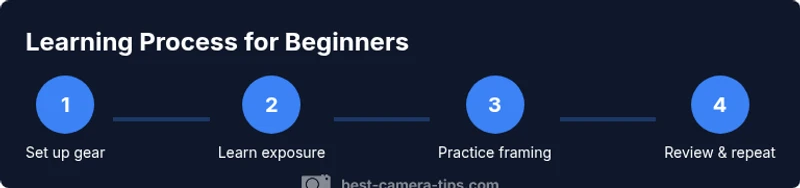
If you’re just starting out, this guide on how to use a camera for beginners will help you move from hesitation to confident shooting. The core idea behind learning is to master three pillars: basic controls, exposure, and composition. According to Best Camera Tips, the most important step is to begin shooting frequently and reviewing results to understand what changes in your settings do to the image. In this first section you’ll set expectations, define the learning path, and establish a simple practice routine you can repeat every day. You’ll also learn how to interpret your camera’s feedback, such as histograms and exposure indicators, and how to translate that feedback into faster improvement. This approach aligns with Best Camera Tips analysis, which emphasizes iterative practice over theory alone. Whether you’re using a compact point-and-shoot, a mirrorless starter, or a DSLR, the fundamentals stay the same: you observe, decide, and shoot, then adjust.
Essential gear and setup
Before you touch the shutter, gather a few basics and set up your camera for success. For beginners, the goal is to minimize variables so you can focus on learning. Start with a camera that offers manual controls or at least semi manual modes, a charged battery, and a reliable memory card. If you have a tripod, bring it along for steadier shots, but the most important step is to know how to hold the camera steady without support. Keep a small notebook or digital log to note the settings you used for each shot and what you learned. This combination gives you a stable platform for practice and avoids frustrating replay of blurry or underexposed images. According to Best Camera Tips, optimizing your first setup accelerates your progress and helps you build a repeatable routine.
Understanding the exposure triangle
The exposure triangle is the core concept controlling how bright your photos appear. It consists of three variables: aperture, shutter speed, and ISO. Aperture governs depth of field; a wide opening (low f stop) blurs the background, while a narrow opening keeps more of the scene in focus. Shutter speed affects motion; a fast speed freezes action, a slow speed creates motion blur. ISO controls sensitivity to light; higher ISO lets you shoot in dim light but introduces grain. In practice, changing one variable influences the others, so you must balance them to get a correct exposure. A practical approach for beginners is to start in auto or semi manual modes, then intentionally adjust one element at a time and observe the effect on brightness, contrast, and texture. Best Camera Tips recommends using the histogram as a guide to ensure you are not clipping highlights or shadows and that your midtones are well represented.
Shooting modes explained: auto to manual
Modern cameras offer a spectrum of shooting modes. Auto mode lets the camera decide exposure and focus, which is helpful for scenes with unpredictable lighting. Program or P mode gives you control over exposure while keeping some automatic decisions. Aperture Priority or A/Av lets you set depth of field while the camera handles shutter speed. Shutter Priority or S/Tv lets you control motion and let the camera choose aperture. Manual mode gives you full control of all three exposure elements. For beginners, start with auto or program, then practice switching to Aperture Priority to see how changing the aperture affects depth of field. As you grow more confident, try Shutter Priority for freezing or conveying motion, and eventually tailor to Manual for full creative control. Use evaluative metering and a single focal point to simplify learning.
Focus, composition, and framing basics
Begin with the basics of focus modes and how to lock onto your subject. Use single point autofocus for still subjects and switch to continuous focus for moving scenes. Practice placing your subject using the rule of thirds and consider the background for clean separation. Framing matters as much as focus; turn on grid lines if available and use symmetry or leading lines to guide the viewer’s eye. When composing, think about foreground interest, midground depth, and background simplicity. Small changes to angle, distance, or vantage point can dramatically alter the emotional tone of a shot.
Lighting basics for beginners
Lighting shapes mood and detail more than any other factor. Natural light is your friend, especially early morning or late afternoon when it’s soft. Learn basic white balance to keep colors true under different light sources, and try a simple 2–3 step approach to color temperature: set WB to daylight for outdoor scenes and adjust when indoors. If you must shoot in harsh sun, look for shade or use a reflector to soften shadows. For beginners, aim to expose for the subject’s face or main area of interest and let the background fall where it may. Small tweaks in lighting can salvage a weak shot.
Practical drills you can do today
Try a 10-minute drill: photograph something with texture, then again with smooth surfaces. Compare how lighting changes the texture you see. Another drill is the color contrast exercise: shoot a scene with strong color contrast and another with muted tones; notice how your camera handles color and saturation. Finally, practice a motion drill: ask a friend to walk and shoot at shutter speeds that freeze and blur movement. The goal is to observe how exposure, focus, and framing work together to convey intention across different scenes.
Common mistakes and how to avoid them
Avoid relying on auto mode for every shot; gradually incorporate manual or semi manual modes to learn how exposure works. Watch for blown highlights and clipped shadows by checking the histogram. Don’t shoot with crushed shadows or blown whites. Hold your camera steady; use a stable stance or tripod when possible. Finally, review your photos after each session and write down what worked and what didn’t so you can target your next practice.
Building a learning routine and tracking progress
Create a weekly practice plan that targets one skill per session—exposure, focus, composition, lighting. Keep a simple photo log noting the settings used and the result. Set a small, measurable goal for each week, such as improving focus accuracy or maintaining consistent white balance in mixed light. Reflect on your progress every Sunday, adjust your plan, and celebrate small wins. This routine aligns with Best Camera Tips guidance on deliberate, iterative practice.
Tools & Materials
- camera with manual controls(Any interchangeable-lens or fixed-lens camera; ensure you know how to adjust exposure settings.)
- charged battery(Carry a spare if you’ll shoot for long sessions.)
- memory card(Format fresh if new; back up photos regularly.)
- charger(Keep the battery topped up between shoots.)
- manual or quick-start guide(Optional but helpful for quick reference.)
- tripod or stable surface(Useful for stills and long exposures.)
- basic lens or kit lens(A versatile focal length helps beginners explore framing.)
Steps
Estimated time: 60-90 minutes
- 1
Power on and initial setup
Turn on the camera and verify that the memory card is recognized. Set your preferred language and date/time, then enable grid lines if available. This creates a consistent frame of reference for future shots.
Tip: Take a moment to locate the exposure indicators and histogram before shooting. - 2
Choose your shooting mode
Start in Auto or Program mode to get comfortable with framing. Experiment with changing to Aperture Priority to see how the depth of field changes the background blur.
Tip: Notice how the camera’s shutter speed adjusts automatically as you modify the aperture. - 3
Understand and adjust exposure
Recognize the three exposure controls: aperture, shutter speed, and ISO. Make one change at a time and observe the brightness of the image on the preview display.
Tip: Use the histogram to avoid clipped highlights or shadows. - 4
Set focus and lock onto the subject
Choose a focus point or enable single point AF for static subjects. Half-press the shutter to lock focus before fully pressing.
Tip: Keep your elbows close to your body to stabilize the shot. - 5
Frame and compose
Apply the rule of thirds or creative composition techniques. Consider foreground interest and a clean background to separate the subject.
Tip: Avoid busy backgrounds that distract from the subject. - 6
Review and reflect
Review each shot, check exposure and focus, and note what you would adjust next time. Create a short entry in your learning log.
Tip: Write down one actionable improvement for your next session.
Common Questions
Do I need a DSLR to start learning photography?
No. Any camera with manual controls or a capable app can help a beginner learn photo basics. If you have a smartphone with manual settings, you can use it too. The key is to practice exposure, focus, and composition.
No, a DSLR is not required; start with any camera that lets you control exposure and focus and practice regularly.
What is the best shooting mode for a beginner?
Auto or Program mode is a good starting point. As you gain confidence, switch to Aperture Priority to learn how depth of field changes with exposure.
Auto or program is great to begin with; then try aperture priority to explore depth of field.
How can I hold the camera steady to avoid blur?
Stand with feet shoulder-width apart, elbows in, and hold the camera with both hands. Use a stable surface or tripod when possible and avoid long holding times.
Keep your stance solid and your elbows tucked in—the steadier you are, the sharper your shots.
What is a histogram and why is it useful?
A histogram shows the brightness distribution of an image. It helps you avoid blown highlights and crushed shadows by giving you a quick exposure readout.
The histogram is a quick check for exposure without guessing.
Should beginners shoot in RAW or JPEG?
RAW offers more editing flexibility and greater latitude for adjustments. JPEG is fine for quick sharing, but you’ll have less room to correct exposure or white balance later.
RAW is preferable for beginners who plan to edit, but JPEG works for simple, fast sharing.
How often should I practice to improve quickly?
Short, frequent sessions are better than long, sporadic ones. Try 15–20 minutes most days, focusing on one skill per session.
Regular, focused practice helps you improve faster than occasional marathons.
Watch Video
The Essentials
- Master the exposure triangle through hands-on practice
- Move from auto to semi manual to manual as confidence grows
- Review and log results to accelerate learning
- Frame thoughtfully using composition rules and background control
- Practice consistently to build muscle memory and speed