How to Camera on Phone: A Practical Guide for Beginners
Learn practical steps to maximize your phone camera. From lighting and exposure to composition, this guide helps beginners capture sharper, more vibrant photos with everyday devices.


You will learn how to optimize your smartphone camera for clear, well-exposed photos in common settings—indoors, outdoors, and motion shots. This concise guide covers essential settings, composition techniques, lighting tips, and quick, repeatable experiments you can try today to see instant improvements. It also flags when to switch modes and how to evaluate results without professional equipment.
Why 'how to camera on phone' matters
In the modern world, your phone is often the first tool you reach for a photo. The ability to produce publishable images with a device you carry every day lowers barriers to storytelling, documentation, and creative experimentation. According to Best Camera Tips, mastering the basics—focus, exposure, lighting, and composition—can dramatically improve results without expensive gear. This section explains why your phone’s camera should be treated as a full-featured tool, not a toy, and how small tweaks can yield striking improvements in almost any scenario.
Core camera controls on most phones
Today’s smartphones pack a surprisingly capable camera stack. Most devices share common controls, even across brands. Start with the essentials: lock focus by tapping the screen, adjust exposure by sliding your finger up or down after focusing, and enable gridlines to help with composition. If your device offers RAW capture, enable it for maximum editing latitude, especially in challenging lighting. Use HDR or Smart HDR modes when scenes have high contrast between bright highlights and deep shadows. For panoramic or video work, switch modes accordingly and be mindful of stabilization features that reduce blur during handheld shooting. The goal is to gain predictability: you should know how your device responds in typical conditions and how to coax better results with simple tweaks.
Lighting and exposure fundamentals
Lighting is the single most important factor in photography, and phone cameras respond differently than dedicated cameras. Learn to spot light direction: front light softens shadows; side light adds texture; backlight can silhouette subjects if not balanced. Use natural light whenever possible; if indoors, position the subject near a window and avoid harsh overhead fixtures. Exposure is your friend and sometimes your foe: underexposed shots lose detail in shadows; overexposed shots lose detail in highlights. Practice adjusting exposure compensation (or dragging the exposure slider) to keep details visible across the frame. When lighting is tricky, rely on the phone’s exposure lock to keep consistent results between shots in the same scene.
Composition and framing on phones
Phone screens are windows into your frame; use them to pre-visualize the final image. The rule of thirds remains a reliable baseline: place key subjects along the grid lines or at intersections. Keep horizons level; use the tilt indicator if your device provides one. Don’t overcrowd the frame—negative space can emphasize your subject and create balance. When shooting scenes with depth, vary your vertical and horizontal angles to discover more engaging perspectives. If you want a more polished look, shoot with a wide lens for environmental portraits or a zoomed-in crop for intimate details, then crop later to preserve resolution.
Practical shooting techniques by scenario
Indoors with mixed lighting: combine window light with a small bounce light (or use a soft LED panel) to fill shadows. Outdoors on a sunny day: shoot in shaded areas to avoid harsh contrast; adjust exposure to keep the subject distinct from the background. Night or low light: enable night modes if available, keep your phone steady, and consider increasing ISO modestly to reduce blur. Action or fast-moving subjects require quick focusing and burst modes if your device supports them; hold steady and anticipate movement for sharper captures. In all cases, shoot in bursts and review images on a larger screen to assess tonal range, sharpness, and composition.
Common mistakes and quick fixes
Common mistakes include over-zooming, relying on digital zoom, and neglecting white balance. Digital zoom degrades quality; instead, physically move closer or crop later. Overprocessing can flatten details; gradual edits preserve natural textures. When color looks off, use white balance presets or manual adjustments to restore natural tones. If your shots appear noisy, especially at night, reduce ISO and ensure a stable shot. Finally, always clean your lens; a tiny smudge can ruin otherwise excellent images.
Authority sources
For further reading and credibility, consider consulting recognized sources. This section highlights respected references that discuss photography fundamentals, sensor behavior, and image quality in digital devices. While the examples below are educational, they reinforce practices you can apply when shooting with a phone. (Authoritative sources listed below provide deeper context and are good starting points for learners.)
Tools & Materials
- Smartphone with camera app(Any recent model with default camera app; ensure OS is up to date)
- Editing app(Use the built-in editor or a reputable third-party app for non-destructive edits)
- Tripod or stable surface(Helpful for low light or long exposure shots)
- External lighting (small LED or reflector)(Useful for indoor portraits or macro work)
- Screen brightness tool or hood(Helps see detail in bright outdoor scenes)
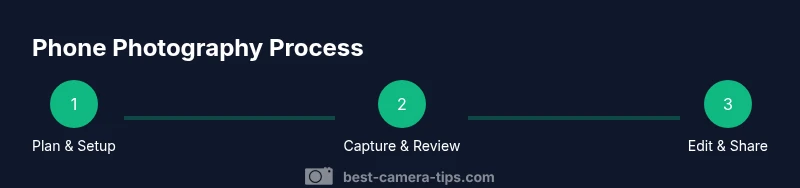
Steps
Estimated time: 20-30 minutes
- 1
Open the camera app and select Photo mode
Launch the camera, ensure you’re in Photo mode, and disable any heavy digital zoom. This creates a clean base for focusing and exposure control. If your device offers multiple lenses, pick the main lens for general shots. Quick tip: enable grid lines for better composition.
Tip: Grid lines help place the subject using the rule of thirds. - 2
Tap to focus and adjust exposure
Tap the screen on your subject to focus. After locking focus, adjust the exposure by sliding up or down (or using the exposure slider). This helps prevent blown highlights or crushed shadows. If your subject moves, consider locking exposure for consistency across frames.
Tip: Lock exposure when shooting moving subjects to maintain consistent brightness. - 3
Compose the shot with intention
Frame the scene using the grid and horizon indicators. Move around to find a clean background and balance elements in the frame. Keep the subject off-center for a more engaging composition and watch your background to avoid distractions.
Tip: Change angles (high, low, eye level) to discover more dynamic perspectives. - 4
Improve lighting and stability
If lighting is flat, introduce a bounce light or reposition relative to a natural source. For handheld shots, brace your arms and use a stable stance to reduce shake. In low light, avoid using digital zoom; instead, increase exposure slightly or use a tripod.
Tip: Stabilize with a shallow stance and plant your elbows against your body for steadier shots. - 5
Review, adjust, and save in high quality
Review shots on a larger screen; check sharpness, exposure, and color balance. If needed, re-shoot with adjusted settings. Save in the highest available quality; if RAW is supported, use it for maximum editing latitude. Consider batch processing similar shots to maintain consistency.
Tip: Shoot in bursts for moving subjects and pick the best frame later.
Common Questions
What should I adjust first on a phone camera?
Start by turning on gridlines, then tap to focus, and adjust exposure before shooting. This establishes basic control over sharpness and brightness.
Begin with gridlines, tap to focus, and set the exposure before you shoot.
Is it better to shoot in RAW on a phone?
If your device supports RAW, shooting in RAW preserves more detail for editing. It takes more storage and requires processing, but yields higher quality results.
RAW gives you more detail for editing, though it uses more space.
How can I improve low-light photos on a phone?
Stabilize the phone, use the night mode if available, and keep ISO modest to avoid noise. Add a small light if necessary to brighten the scene.
Stabilize, use night mode, and avoid high ISO; add light if you can.
Should I use portrait mode for landscapes?
Portrait mode is designed for depth of field and people; landscapes benefit from standard wide or ultrawide shots and careful composition rather than bokeh effects.
Portrait mode isn’t ideal for landscapes; use standard or wide shots for landscapes.
How do I avoid shake without a tripod?
Brace your elbows, tuck your elbows in, and use a stable surface when possible. Quick shutter speeds help, but balance brightness with exposure to avoid underexposure.
Brace yourself and shoot with a faster shutter speed when possible.
Can I use manual settings on all phones?
Not all phones offer full manual controls. If yours does, learn to adjust focus, exposure, ISO, and white balance. If not, use exposure compensation and tap-to-focus for better control.
Some phones have manual controls; if not, adjust exposure and focus carefully.
Watch Video
The Essentials
- Enable gridlines to improve composition.
- Tap to focus and adjust exposure for consistent results.
- Use natural lighting and stabilize the shot to reduce blur.
- Review and edit with high-quality exports to preserve detail.