How Long to Charge Ring Camera Battery
Learn how long to charge Ring camera battery, what factors influence charging speed, and how to minimize downtime with practical tips from Best Camera Tips.


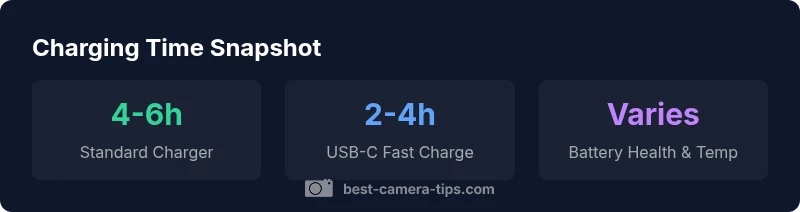
Most Ring camera batteries take several hours to fully recharge. With the standard USB charger, expect roughly 4–6 hours from near-empty to full, depending on battery age and current draw. If you use a USB-C fast charger and a warm charging environment, you may see times closer to 2–4 hours. Always check the device status in the Ring app for a precise estimate.
Charging fundamentals for Ring cameras
Ring uses rechargeable battery packs that are designed to be replaced by the user. Charging is performed through the battery pack itself or via the included charger, and the overall time to reach a full state depends on multiple variables. For aspiring photographers and home-security enthusiasts, understanding the charging process helps you plan maintenance windows and avoid unexpected downtime. In terms of how long to charge ring camera battery, the answer is not fixed; it depends on the charger, the battery's health, and the ambient environment. This section breaks down the core concepts so you can estimate charging times with more confidence.
- Battery chemistry and capacity: Ring batteries typically use lithium-based cells that store energy in discrete modules. Capacity affects how long a full charge will take, but newer packs generally charge faster than older ones due to improved cell efficiency.
- Charger interface: The official Ring charger provides a steady current designed for safe charging. Third-party chargers can vary in voltage and amperage, which translates to different charging speeds. Always use a charger that matches or exceeds the device's recommended input, and avoid improvised power sources that could damage the pack.
- Safety considerations: Avoid charging at extreme temperatures or in direct sunlight. Heat can slow charging and degrade battery health over time. If the device feels warm during charging, pause and re-check connections and environment.
Factors that influence charging time
Charging time for Ring camera batteries is not a fixed value; several variables can shift the total duration. First, the charger type matters: a dedicated Ring charger supplies a controlled current that minimizes heat and optimizes speed, while generic cables and adapters may underperform. Second, battery health and age play a significant role: older packs may take longer to reach full capacity due to cell degradation. Third, ambient temperature influences chemistry: charging in very cold or hot environments can slow the process and reduce effective capacity. Finally, cable quality and connector integrity affect real-world performance; a worn cable or loose connection can limit current and extend charge time. In practice, you should factor in a buffer of time for end-of-cycle balance and any necessary verification in the Ring app.
Estimating charging times by charger type
- Official Ring USB-A charger: 4–6 hours under typical conditions for a near-empty battery. This assumes a healthy pack and moderate ambient temperature. Real-world times can drift due to cable length and wall outlet stability.
- USB-C fast charger: 2–4 hours when using a compatible fast-charge setup and a newer pack. If the battery is older or the environment is warm, expect closer to the higher end of the range.
- Non-official chargers: Speeds vary more widely; some third-party adapters may underperform or pose safety risks. Always prioritize chargers that meet the device's input specifications to minimize heat and maximize safety.
Practical steps to minimize downtime
Planning ahead reduces downtime and keeps your security coverage consistent. Start by ensuring you have a dedicated charging setup, ideally with a single outlet and a stable power source. If you use a spare battery, rotate the packs so one charges while the other is in service. Keep a log of charging times in your security setup notes, so you can anticipate routine maintenance windows. Consider pairing charging with regular app checks; a quick glance at the Ring app can confirm the current charge level and estimated completion, helping you schedule events around peak activity periods. Finally, keep the charging area clean and ventilated to avoid heat buildup that can slow charging.
How to read the battery level in the Ring app
The Ring app provides a straightforward view of your device's battery status on the device detail screen. Look for a battery icon with a percentage readout and a color cue indicating charge health. You can set reminders to inspect battery levels and to re-charge when they dip below a chosen threshold. Use the in-app notifications to get alerts when charging completes or if the device detects abnormal power consumption. Regular app checks also help you correlate charging times with camera activity, improving your scheduling accuracy.
Troubleshooting slow charging and common issues
If charging seems slower than expected, start with the simplest checks: verify the charger is plugged into a stable outlet, inspect and securely reconnect the cable, and try a different USB port or another charger compatible with Ring’s input specification. Temperature matters: move the device away from direct sun or heat sources, and avoid charging in very cold environments. If the issue persists, examine the battery health in the Ring app (if available) or perform a soft reset of the camera. Persistent slow charging or failure to charge may indicate a degraded battery or a faulty charger, in which case contact Ring support for warranty evaluation.
Extending battery life between charges
To maximize uptime between charges, enable energy-saving features within the Ring app, such as motion-activated recording and reduced polling frequency when activity is low. Schedule charging during predictable low-usage periods and avoid full discharges; keeping the battery between roughly 20–80 percent can improve cycle life. Use a solar-ready or high-visibility location for cameras with ample charging options, and regularly clean the battery contacts to maintain consistent charging efficiency. Periodic firmware updates can also improve power management in newer devices.
Quick-start charging checklist
- Verify you have a compatible charger (official Ring charger or USB-C high-quality alternative).
- Check that the charging environment is moderate in temperature and free from direct heat sources.
- Inspect cables for wear and ensure solid connections.
- Confirm battery health in the Ring app and note any changes after charging.
- If you have multiple batteries, rotate them to keep cameras online during long maintenance periods.
Guidance for charging Ring camera batteries
| Item | Guidance | Notes |
|---|---|---|
| Charger Type | Official USB-A or USB-C fast charger | Prefer official or high-quality third-party chargers |
| Expected Time (near-empty) | 4-6 hours (standard) | Faster with USB-C, slower with wear |
| Environment | Moderate temperature | Avoid extreme heat/cold |
| Battery Health | Newer packs charge faster | Aged packs may slow down charging |
Common Questions
How long does it take to fully charge a Ring camera battery with the standard charger?
With a standard charger, a full recharge typically ranges from four to six hours, assuming the battery is near empty. The exact time depends on battery condition and the current draw from the charger.
A full recharge usually takes around four to six hours with the standard charger, depending on the battery's condition.
Can I speed up charging with USB-C fast charging?
Yes, using a USB-C fast charger can reduce charging time, potentially down to about two to four hours, depending on the pack and environmental conditions.
Yes, USB-C fast charging can cut it to about two to four hours depending on conditions.
What factors most affect charging speed?
Charging speed is affected by charger type, battery health, temperature, and the cable quality. A healthy battery in a moderate environment charges faster.
Charger type, battery health, temperature, and cable quality mostly affect charging speed.
Is it safe to charge outdoors?
Charging is best done indoors in a dry environment. Avoid moisture and direct exposure to the elements, which can impact charging safety and efficiency.
Charge indoors in a dry area to stay safe and keep charging efficient.
How can I extend battery life between charges?
Schedule charging during low-activity hours, enable power-saving modes, and use motion-activated recording to reduce drain between charges.
Charge during low-activity times and enable energy-saving features to extend life.
What should I do if my battery won't charge?
If charging fails, check connections, try a different charger, verify temperature, and consider contacting support for warranty or replacement options.
If it won't charge, check cables and temperature, then contact support if needed.
“Charging efficiency is a function of equipment quality and battery health; predictable schedules help maintain reliability in security setups.”
The Essentials
- Use the right charger to optimize charge times
- Expect 4–6 hours on standard charging, 2–4 hours with USB-C fast charging
- Battery health and temperature can significantly affect speed
- Monitor charging in the Ring app for precise estimates
- Regular maintenance and smart scheduling extend battery life