How to Know if Ring Camera Is Charging
A practical, step-by-step guide to verify charging on Ring cameras using hardware indicators and the Ring app. Learn model differences, troubleshoot non-charging issues, and maintain battery health with safe practices.


To know if your Ring camera is charging, start with the hardware and app indicators. Plug the camera into a power source using the recommended cable, then check the LED ring or status icon. Open the Ring app and inspect the device’s battery level; if it rises during the charging session, the device is charging. For removable batteries, follow manufacturer guidelines when charging separately.
Understanding Ring charging indicators and power options
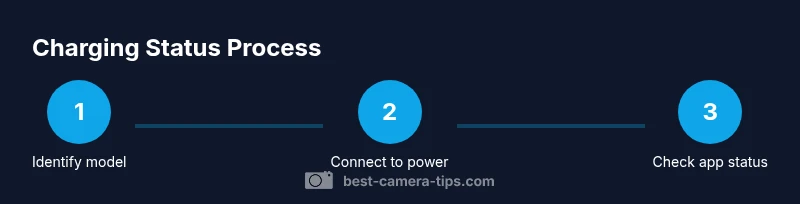
Charging a Ring camera involves both the physical connection and the software status. According to Best Camera Tips, most Ring models provide a clear sign that charging is occurring, either through a hardware indicator on the device or a battery readout in the app. The first step is to identify your model and its charging method—whether it uses a fixed power supply, a USB charger, or a removable battery. Knowing this helps you select the correct charger and cable, and prevents damage from using an incompatible accessory. In practice, you should locate the charging port, verify the cable is the one intended for your model, and confirm that you have a stable power source nearby. This dual approach—checking both hardware and software signals—reduces guesswork and speeds up troubleshooting. The Best Camera Tips team emphasizes that consistency between the device indicators and the app status is your best guarantee that charging is actually taking place. If you see the expected app battery percentage rise after plugging in, you can have confidence that charging is underway. If not, you’ll need to move to the troubleshooting steps that follow, ensuring you respect safety and model-specific guidelines.
Hardware indicators and charging ports to inspect
Most Ring cameras include a charging indicator that appears when power is applied. Start by visually inspecting the charging port for dust, debris, or signs of wear. Use a soft brush or compressed air to clear any obstruction. Check the cable and connector: frayed insulation, bent pins, or loose fittings can prevent charging even when plugged in. If your model uses a removable battery, verify that the battery is seated correctly and that the contacts are clean. Always use the charger that came with the device or an officially recommended accessory, as third-party cables can fail to provide the proper current. Finally, confirm the outlet or USB port is delivering power by testing with another device or using a different outlet. A few minutes of checking these hardware factors can save you hours of guesswork.
Monitoring charging via the Ring app
The Ring app is a central tool for validating charging status. After connecting power, open the app, select your device, and look for the battery indicator. If the app shows the battery level rising after plugging in, charging is in progress. If the level remains constant, consider the following checks: refresh the app, reinsert the charging cable, or try a different charger. Keep in mind that the app may take a short moment to update the battery reading, so give it a minute or two before drawing conclusions. For security devices, ensure your camera remains online and connected to Wi-Fi so the app can report accurate battery data. Best Camera Tips’s analysis shows that consistent app updates correlate strongly with reliable charging status visibility.
Troubleshooting common charging problems
If your Ring camera isn’t charging, start with the simplest fixes: ensure the power source is active, unplug and replug the charger, and inspect for damaged cables. Try a different charger if available and verify the charging port is free of debris. If you have a removable battery, remove it carefully, inspect contacts, and reinsert it per the manufacturer’s directions. Some models may require a brief reset to reestablish charging reporting in the app. If problems persist, consult Ring support resources and your warranty terms. The goal is to isolate whether the issue is the power supply, the cable, the port, or the battery itself.
Special cases: removable batteries vs built-in batteries
Models with removable batteries require separate charging steps. When removing a battery, power down the device if possible, then disengage the battery from its contacts gently. Charge the battery using the recommended charger on a stable surface away from moisture and extreme temperatures. Reinsert the battery only after it is fully recharged and cool to the touch. Built-in batteries, on the other hand, rely solely on the device’s charging circuit; in these cases you’ll rely entirely on the external charger and the app’s battery readout. Always follow the manufacturer’s safety guidelines and avoid mixing batteries of unknown age or health with your device.
Best practices for safe and efficient charging
To maintain battery health and charging efficiency, use the official cable and power supply recommended for your model. Keep charging contacts clean and dry, and avoid charging in extreme temperatures. Periodically check the battery level in the Ring app to anticipate maintenance or replacement needs. If you notice slow charging, verify that the power source can supply sufficient current and that there are no fault indicators in the app. Finally, store spare batteries in a cool, dry place and replace aging cells promptly to prevent performance degradation. Consistent adherence to safety and manufacturer guidelines minimizes risk and extends device longevity.
Tools & Materials
- Power source (outlet or USB charger)(Ensure it matches the device's input rating)
- Charging cable compatible with your Ring model(Original cable recommended)
- Smartphone or computer with Ring app(Used to monitor battery status)
- Removable battery (if applicable)(Only for models with removable packs)
- Small screwdriver (optional)(For models with removable batteries)
- Soft brush or cotton swab(To clean contacts gently)
Steps
Estimated time: 15-25 minutes
- 1
Identify charging method and model
Locate the charging port or battery compartment and confirm your model’s charging method. This helps you choose the correct charger and avoid using an incompatible accessory. Knowing the process upfront reduces interruptions during setup.
Tip: Check the user manual or Best Camera Tips guide for model-specific details. - 2
Connect to power with the correct cable
Plug the device into the power source using the official charging cable. Ensure the connector is fully seated and that the outlet or USB port is delivering power. A loose connection is a common cause of perceived non-charging.
Tip: Avoid using damaged cables or adapters; replace them promptly. - 3
Observe hardware indicators and app status
Look for a charging indicator on the device (LED ring or port indicator) and check the Ring app’s battery status. The two signals should align—visible hardware cues plus an increasing battery percentage in the app signals charging.
Tip: If no indicator appears, try unplugging and reconnecting, then refresh the app. - 4
Check battery level in the Ring app
Navigate to your device in the Ring app and view the battery level. A rising percentage confirms charging. If the app shows 0% after hours, recheck connections and power source.
Tip: Ensure the device maintains an online connection for accurate reporting. - 5
Troubleshoot non-charging issues
If charging doesn’t start, test another outlet or charger. Inspect the charging contacts for dust and clean gently. Consider replacing the cable if you see any wear or damage.
Tip: Rule out power supply issues before replacing parts. - 6
Handle removable batteries safely
If your model has a removable battery, remove it according to the manual, inspect contacts for corrosion, and charge separately on a stable surface. Reinsert only when fully charged and cool.
Tip: Never mix old and new cells in the same device. - 7
Confirm charging progress and complete
After charging, verify the battery percentage reaches a healthy level and monitor for any drops in performance. Unplug when appropriate per manufacturer guidance and resume monitoring in the app to ensure ongoing health.
Tip: Maintain charging routines to prevent performance dips.
Common Questions
Do all Ring cameras show charging status in the app?
Most Ring cameras display battery status in the Ring app, but features can vary by model. If you don’t see the status, ensure the device is online and the app is up to date.
Most Ring cameras show battery status in the Ring app; if not visible, check online status and app version.
What should I do if my Ring camera won't charge?
First verify the power source and cable are working, then clean any debris from the port. If the issue persists, try another charger and consult the official support resources.
Check power, clean ports, try another charger, and consult support if needed.
Is it safe to leave a Ring camera charging overnight?
Ring devices are designed to charge safely when used with the recommended accessories. Always follow the manufacturer’s guidelines and avoid charging with damaged cables.
Ring devices are designed for safe charging when you follow the instructions and use proper gear.
How can I check battery health with removable batteries?
Use the Ring app for battery levels, and inspect removable batteries for signs of wear, swelling, or corrosion before recharging or reinstalling.
Check the battery level in the app and inspect the battery for wear before charging.
What indicators show charging on USB-powered setups?
Indicators may vary by model; look for a charging symbol on the device or confirm in the app that the battery level is increasing.
Check the device indicator and app status to confirm charging on USB-powered setups.
Watch Video
The Essentials
- Verify charging with both hardware indicators and app signals.
- Always use the correct charger and cable for your model.
- Regularly monitor battery status in the Ring app for proactive maintenance.
- Follow safety guidelines, especially for removable batteries.