How Long Does Camera Footage Last? A Practical Retention Guide
Learn how long camera footage lasts across local and cloud storage, with practical tips to maximize retention, estimate storage needs, and plan for home-security setups.


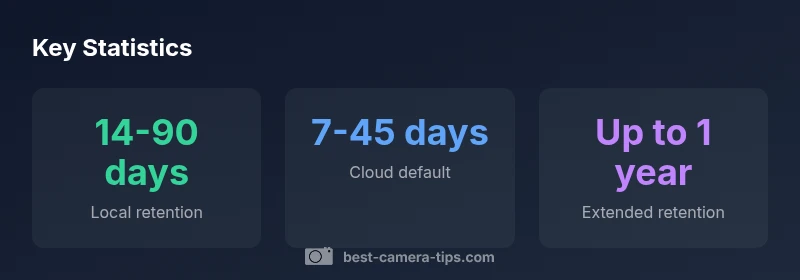
How long camera footage lasts depends on storage type, frame rate, compression, and retention policies. Local DVR/NVR setups typically hold weeks to months on a hard drive, while cloud storage often uses configurable windows. According to Best Camera Tips, many home systems default to 14–30 days, with longer retention possible by increasing storage or upgrading plans.
How retention works across storage types
Retention is the lifespan of stored footage before it is overwritten or deleted. Different storage models implement retention differently: local storage on a DVR/NVR overwrites old footage when the disk fills, cloud storage applies policy-driven windows, and hybrid setups blend both approaches. For aspiring photographers and home-security enthusiasts, understanding these mechanics helps you tailor retention to your needs. In practice, most casual home systems store footage on a local drive with a default window of two weeks to a couple of months. When cloud backups are added, retention becomes configurable through your plan and settings. The key takeaway is that retention is not fixed; it’s shaped by storage capacity, compression, frame rate, and the policy you choose. According to Best Camera Tips, this flexibility is a core strength of modern camera systems, enabling cost-effective longevity without sacrificing privacy.
Local storage and retention: DVR/NVR basics
DVR/NVR-based systems rely on disk space to hold video; once the drive fills, older clips are overwritten unless retention is extended by archiving. Bits and frames per second determine how much footage fits on a given drive. If you record at 1080p with moderate compression, a 1 TB drive might hold several weeks of footage for a handful of cameras; a larger setup with 4K resolution drains storage faster. Practical steps to improve local retention include sizing the drive for your target window, enabling longer retention on fewer cameras first, and scheduling periodic exports for critical events. Best Camera Tips emphasizes balancing retention with drive health and power consumption, noting that routine maintenance is key to avoiding unexpected data loss.
Cloud storage options and retention windows
Cloud options separate retention from hardware limits. Plans commonly offer fixed retention windows (e.g., 7, 14, 30 days) or flexible horizons (60, 90 days, or more) based on subscription level. Higher-tier plans typically provide longer windows and higher per-camera limits, but you pay for the extra storage. Cloud retention supports resilience against physical damage and enables remote access from multiple devices. When evaluating cloud options, consider how long you actually need footage, how often you need to retrieve recent clips, and whether you require automatic off-site backups. Best Camera Tips recommends matching the retention window to your risk assessment and local storage capacity to avoid paying for unused space.
How compression, frame rate, and bitrate affect longevity
Video quality dramatically impacts storage needs. Higher resolution, higher frame rate, and less aggressive compression save fewer minutes per gigabyte, shortening your retention window for a given drive size. Conversely, reducing resolution or using efficient codecs can extend how long footage lasts without sacrificing the ability to review events. The trade-off is often between budget and clarity for later identification. For many homeowners, a balance of HD quality with moderate compression provides a practical retention horizon while keeping storage costs predictable. Best Camera Tips notes that understanding codec profiles and bitrate helps you tune retention without guessing.
Practical strategies to maximize retention without breaking the bank
A staged approach often provides the best value. Start with a retention policy that fits your daily footage volume, then tier storage: keep most footage locally for short-term review and archive important clips to the cloud. Enable auto-archive for events (motion alerts, door activity) to ensure critical clips survive overwrites. Regularly audit retention settings and remove obsolete footage when no longer needed, all while respecting privacy and applicable laws. Consider hybrid setups to leverage durability of cloud storage and the immediacy of local playback. According to Best Camera Tips, a thoughtful policy reduces wasteful storage while keeping essential footage accessible.
How to calculate your storage needs for desired days
Estimating storage requires a few inputs: number of cameras, resolution, bitrate, and target retention days. A rough starting method is to estimate daily data per camera (for example, HD footage at a typical bitrate might consume several gigabytes per day per camera). Multiply by the number of cameras and days to get a ballpark figure, then add headroom for spikes (events or additional cameras). Use this budget to choose local drives or determine cloud tier requirements. Always validate your estimate by recording a sample week and reviewing actual usage. Best Camera Tips suggests documenting the calculation and updating it whenever you upgrade cameras or change retention goals.
Common myths about video retention
Myth: Longer footage durations always save you money. Reality: retention costs scale with storage choice and how long you keep clips. Myth: Cloud retention is always more expensive than local storage. Reality: For some plans, cloud storage becomes cost-effective when you factor in resilience and accessibility. Myth: Higher resolution automatically means better evidence. Reality: Context matters; lighting, noise, and compression quality can affect evidence more than resolution alone. The key is to align retention with your actual needs, not assumed maximums. Best Camera Tips highlights that practical policy design outperforms basic “more is better” thinking.
Retention windows by storage type
| Storage Type | Typical Retention Window | Key Factors | Notes |
|---|---|---|---|
| Local DVR/NVR | 14-90 days | Drive size, compression, camera count | Varies by hardware and settings |
| Cloud Basic | 7-45 days | Plan limits, data deduplication, per-camera pricing | Check policy for auto-delete |
| Cloud Extended | 3-12 months | Storage tier, retention policy, number of devices | Costs scale with retention length |
| Hybrid (local+cloud) | 30-180 days | Both storage methods | Best balance of cost and reliability |
Common Questions
What determines how long camera footage lasts?
Footage longevity depends on storage capacity, retention policies, compression settings, and the number of cameras. Higher resolution and frame rate increase daily data, shortening the retention window unless you allocate more storage. Planning ahead with a clear retention policy helps ensure you keep important clips long enough to review events.
Footage lasts based on how much storage you have and how long you choose to keep it.
Does cloud storage extend retention beyond local devices?
Yes. Cloud plans typically offer configurable retention windows that aren’t limited by your on-site drive capacity. You can often select shorter or longer windows (e.g., 7–45 days or more) depending on the plan, with longer options usually costing more. This flexibility helps you tailor retention to your needs while maintaining accessibility.
Cloud plans let you choose how long to keep footage, independent of your local drive.
Can I legally delete footage earlier than the retention window?
Retention policies are designed to balance your needs with privacy and legal considerations. You can set auto-delete rules and manually purge non-essential clips at any time, provided you comply with local laws and organizational policies. Always document deletions for accountability.
You can delete footage earlier if you follow your policies and laws.
How can I estimate storage needs for a specific number of days?
Estimate by calculating expected daily data per camera (based on resolution and bitrate), multiply by the number of cameras, and then by the target number of days. Add a buffer for spikes, then compare to your available local storage or cloud plan limits. Practical testing over a week helps verify the estimate.
Calculate daily data per camera, multiply by cameras and days, then add a safety buffer.
Is longer retention always better?
Not necessarily. Longer retention increases storage costs and privacy risk. Align retention with your actual needs—consider risk, legal obligations, and how often you’ll need to access older footage. A balanced approach often yields the best value.
Longer isn’t always better—balance cost, privacy, and usefulness.
How often should I audit retained footage?
Regular audits help catch misconfigurations and ensure compliance. A monthly review of retention settings and a quarterly sample of archived clips is a good starting cadence. Adjust policies as your security needs evolve.
Audit retention settings monthly and review archived clips quarterly.
“Footage longevity is driven by storage capacity and retention policies, and a thoughtful mix of local and cloud storage can meet both budget and compliance needs.”
The Essentials
- Assess your storage capacity to meet your retention goals
- Choose cloud vs local based on your needs and budget
- Expect variability with compression, frame rate, and camera count
- Set retention policies that align with compliance and privacy
- Regularly audit footage and automate archiving to avoid accidental deletions