How Long Can Camera Recording Last? A Practical Guide for 2026
Learn how memory, bitrate, and loop settings affect recording length. This guide explains practical estimates, maximizes duration, and helps you plan camera sessions for home security and photography in 2026.


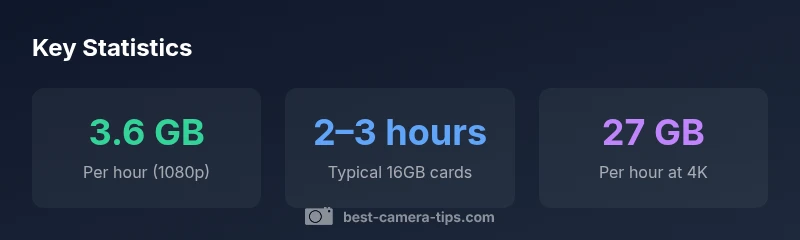
To answer how long camera recording last, you must consider memory, bitrate, and loop settings. In practice, most cameras use loop recording to overwrite old footage when the card fills. At 1080p with common codecs, a 16GB card typically holds about 1–2 hours; a 64GB card extends that to several hours. Recording at 4K shortens the duration noticeably.
Understanding Recording Durations
To answer how long camera recording last, start by recognizing that the duration is not a fixed property of the device. It depends on two main variables: how much memory you have and what quality and compression you choose. Best Camera Tips notes that most cameras use loop recording to manage continuous surveillance or hobby-shot sessions. If the card fills, the oldest clips get overwritten, ensuring you always have the latest footage for the same total card space. For hobbyists, this means you can plan a longer shoot by increasing card capacity and lowering bitrate, or by selecting a mode that overwrites the oldest segments only after your newest clip is saved elsewhere. For security cameras, you might define a fixed retention window (for example, 7 days) on the device or cloud service, but this still depends on the card size and video settings behind the scenes. Understanding these tradeoffs is the first step to predicting how long camera recording last in practice.
Key factors that influence how long you can record
Several variables combine to determine recording length. The most obvious is memory: larger cards store more footage before overwriting. Bitrate and resolution determine how much data is written per second; higher settings produce better quality but fill space faster. Codec choice matters too; modern codecs like H.265 compress data more efficiently than older formats, extending the time you can record on a given card. Other practical considerations include frame rate, whether the camera records continuously or only on motion events, and temperature or battery limits that can force a stop. By understanding these factors, you can anticipate how long your camera can record before you need to swap cards or offload files.
How memory cards affect recording length
Memory is the primary limiter for most cameras. A 1080p recording at typical bitrates consumes a few gigabytes per hour, so a 16GB card might cover only a short session, while 64GB or 128GB cards can sustain longer shoots. In general, higher-capacity cards dramatically extend total recording time, provided your camera supports looping and the data transfer is uninterrupted. If you’re using 4K or high frame-rate capture, expect larger per-hour data usage, which reduces hours per card unless you upgrade to even larger storage. Always format the card in the camera before shooting and run a quick test to confirm how much footage you can realistically capture per hour.
Practical strategies to maximize recording duration
If you need longer recording sessions, consider these approaches. First, enable loop recording and set an appropriate overwriting policy so you don’t run out of space mid-shoot. Second, increase memory capacity where possible—invest in larger cards or multiple cards and schedule periodic offloads. Third, reduce data per frame by lowering resolution, frame rate, or using a more efficient codec like H.265 when your camera supports it. Fourth, keep the camera cool and ensure the power source is reliable; overheating and battery drain are common causes of unexpected stops. Finally, test in real-world scenarios that match your planned use case to validate how long camera recording last in practice.
Troubleshooting: common stops and pitfalls
Camera recording can stop unexpectedly for several reasons. Common culprits include a full memory card, corrupted files, overheating, and depleted power. SD cards with slow write speeds can cause stutter or early termination of recordings even when capacity remains. Ensure your card meets or exceeds the camera’s recommended speed class (UHS ratings or video speed class). Regularly back up footage to avoid data loss, and consider keeping a spare power source during long shoots. If you notice frequent stops, check the camera logs if available, run a quick diagnostic test, and replace any aging components.
How settings affect per-hour data usage
| Setting | Approximate data per hour | Notes |
|---|---|---|
| 1080p (8 Mbps) | 3.6 GB | Baseline for common cameras |
| 4K (60 Mbps) | 27 GB | Higher bitrate dramatically increases size |
| Memory card capacity | Varies widely | Choose loop recording for continuous use |
Common Questions
How does memory card size affect recording length?
The bigger the memory card, the longer you can record before overwriting occurs, assuming you maintain the same bitrate and resolution. Loop recording can help you maximize footage on a fixed card by overwriting the oldest clips as new ones are saved. For longer shoots, plan card capacity in advance and offload footage regularly.
Your card size largely determines how long you can record before the system starts overwriting old footage. Use loop recording and keep backups to extend coverage.
Does recording in 4K drastically reduce duration?
Yes. 4K consumes more data per second, so a fixed card will hold far less footage at 4K than at 1080p. If you need longer sessions, either lower the resolution or invest in larger storage and a more efficient codec if supported by your camera.
Recording in 4K uses more space, so you’ll get shorter total recording time on the same card unless you upgrade storage or use a better codec.
What is loop recording, and when should I use it?
Loop recording continuously overwrites the oldest footage when the storage fills, ensuring the latest events are kept. Use it for security cameras and casual long-duration shoots where ongoing coverage matters more than keeping every second.
Loop recording keeps you covered by overwriting old footage as space runs out, which is ideal for security cameras.
How can I extend recording duration without buying more storage?
You can extend duration by lowering resolution, reducing bitrate, or choosing a more efficient codec if available. These changes reduce per-hour data usage, allowing more hours on your current card. However, note the trade-off with image quality.
Lower res or bitrate can stretch how long you can record, but quality may drop.
How should I estimate duration for a project with a specific camera model?
Check the camera’s manual for recommended data rates and storage options. Run a brief test by recording at your target settings and note how much footage a known card holds per hour. Use that to project total duration for the full project.
Look up your camera’s settings, run a quick test, and multiply by the hours you need.
“"When planning recordings, think in terms of memory, bitrate, and loop behavior; the best practice is to test with your actual card and camera to know true duration."”
The Essentials
- Estimate duration based on memory, bitrate, and loop settings
- Enable loop recording to maximize coverage
- Lower resolution or tighter compression extends duration
- Test with your actual card and camera to confirm hours
- Plan for the project by calculating required storage