Can You Get Camera Replaced on iPhone? Practical Guide 2026
Learn whether you can replace an iPhone camera, who can perform the repair, costs, and tips for a safe, reliable replacement. A complete, step-by-step guide from Best Camera Tips for 2026.


Yes—an iPhone camera can be replaced. According to Best Camera Tips, you should verify warranty status, back up your data, and choose an authorized service provider or Apple Store. The repair involves replacing the camera module and testing the system, with potential downtime and variable pricing based on model and region.
Can you get a camera replaced on iPhone? Understanding what this repair involves
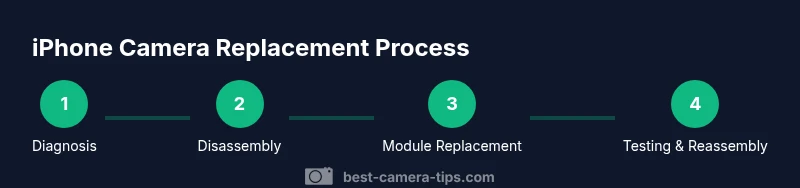
When you ask can you get a camera replaced on iPhone, the answer depends on the model and the specific camera part. Apple devices use integrated camera modules, and replacement usually means swapping the camera module and resealing the enclosure. This is a hardware repair that should be performed by authorized technicians to preserve device integrity and warranty where applicable. According to Best Camera Tips, the repair process begins with a diagnosis to confirm the issue and to identify whether any other components (like the display or logic board) are affected. Front-facing cameras and rear cameras live in different parts of the device and require different access points, which means calibration and testing are essential after installation. If the device is covered by AppleCare or a valid warranty, the service may be covered or discounted; otherwise, out-of-warranty pricing applies. After replacement, expect testing of autofocus, color accuracy, stabilization, and dependent features such as Portrait mode. The ultimate goal is a replacement that behaves like the original, with proper alignment and no visual artifacts.
Repair options: Apple, Authorized Service Providers, and third-party shops
Choosing where to have the camera replaced matters for warranty eligibility, part authenticity, and long-term reliability. Apple Stores and Apple Authorized Service Providers offer genuine camera modules and calibrated replacements, with parts and labor covered under your warranty when applicable. Best Camera Tips notes that this path tends to provide the most consistent results and preserves device integrity, especially for Face ID-enabled devices. Third-party repair shops can be faster or cheaper, but outcomes vary and there’s a higher risk of non-genuine parts or improper calibration. If you opt for a non-authorized shop, confirm they provide a warranty on parts and service and ask which camera module they use (OEM vs. aftermarket) and whether they recalibrate the system. Always request a written diagnosis, expected turnaround, and a cost estimate before any work begins. Data privacy is another consideration; choose a shop you trust and limit data exposure on the device prior to repair. If possible, take a backup and remove sensitive content before handing the phone over for service.
Costs and turnaround times
Costs for iPhone camera replacement vary widely based on model, location, and service level. Authorized providers typically quote a fixed price bracket that includes parts and labor, while unofficial shops may present an a la carte pricing model or diagnostic fees. Turnaround times can range from same-day service when parts are in stock to a few days if the component must be ordered or the device requires more extensive testing. Best Camera Tips emphasizes verifying the warranty on the replacement part and asking for a detailed invoice that lists the parts used, the labor charge, and the expected total time. Note that in some cases, additional calibration or software updates may extend the timeline by a short period. Avoid sticker shock by clarifying what is included in the price and whether there are ongoing warranty terms for the replaced camera module.
How to prepare for the repair: backups, data protection, and prerequisites
Preparation reduces risk and ensures you can recover quickly after the repair. Begin by backing up your iPhone data via iCloud or a local computer, and disable features that might complicate the repair, such as Find My iPhone, if advised by the service technician. Confirm your device’s warranty status and confirm whether the repair will affect coverage. If Face ID is a concern, clarify with the provider whether a recalibration step is required and whether they use the correct TrueDepth alignment during replacement. Gather proof of purchase or any service records, and ensure you have your device unlocked and associated with the repair destination. Finally, understand the expected downtime and arrange a loaner device if available so you’re not left without access to essential apps or work.
Post-repair testing and verification
After the camera replacement, run a thorough set of tests to ensure the module functions as intended. Check autofocus performance, image stabilization, color accuracy, and zoom behavior for rear cameras, and sharpness and exposure for front cameras. If the device uses features like Portrait mode, test those modes for edge detection and depth effects. Verify that any associated features (like Face ID, if affected) remain operational after reassembly. A reputable provider will perform a quick diagnostic pass and offer a brief test shot you can review. If issues persist, request a re-test or a part replacement under warranty if applicable.
Safety, pitfalls, and long-term considerations
Handle only after the device is powered down to minimize electric shock risk to the internal circuits. Avoid applying excessive force when disconnecting cables, and follow safety protocols for eSD (electrostatic discharge). Poor calibration or mismatched parts can lead to degraded image quality or thermal issues, so insist on proper testing and calibration after installation. Keep expectations realistic: even a successful replacement should be verified with real-world photo tests and app-based camera performance checks over several days to catch intermittent issues. Finally, weigh the benefits of replacement versus upgrading to a newer device if the cost or risk feels high.
Choosing genuine parts and avoiding counterfeits
To maximize reliability, request OEM or manufacturer-approved parts where possible and avoid counterfeit or unverified modules. Ask the technician for part numbers and warranty terms on the replacement module. If you’re unsure about a part’s authenticity, seek a second opinion from a trusted service center. Best Camera Tips recommends verifying the return policy and any calibration guarantees before agreeing to a repair.
When replacement may not be worth it: upgrade vs repair
If your device is old or has multiple other issues, replacing the camera may not be cost-effective. Compare the repair cost with the price of a newer model and the expected remaining lifespan of the current device. In some cases, upgrading to a newer iPhone with improved camera technology offers better value and a longer support horizon. Always consult a trusted service professional and, if possible, obtain a second diagnostic report before deciding.
Tools & Materials
- Replacement camera module compatible with your iPhone model(Ensure part matches model and version; verify compatibility with TrueDepth if necessary)
- Pentalobe screwdriver (P2 or equivalent)(For iPhone outer screws; use precision driver)
- Tri-point Y000 screwdriver(For internal screws holding the logic board and components)
- Spudger and opening picks(Non-metal tools to avoid short circuits)
- Suction cup or display puller(Helpful for gently lifting screens without damage)
- Tweezers and small parts tray(Keep tiny screws in labeled compartments)
- Replacement adhesive and seals(New seals prevent water ingress and keep dust out)
- Isopropyl alcohol wipes(For cleaning surface residues; ensure no liquid enters ports)
- Anti-static wrist strap or mat(Reduces risk of electrostatic damage)
Steps
Estimated time: Estimated total time: 60-120 minutes
- 1
Power down and prepare
Power off the iPhone completely and disconnect it from any accessories. This reduces the risk of short circuits during disassembly. Use a clean, static-safe workspace and gather all needed tools before starting.
Tip: Place screws on a labeled mat to prevent loss. - 2
Open the chassis carefully
Remove screws around the display assembly with the appropriate driver. Use a suction cup and gentle prying motions to lift the display without cracking the screen or loosening cables. Keep track of display connectors during separation.
Tip: Work slowly and avoid bending flex cables. - 3
Disconnect the battery safely
Open the battery connector shield and disconnect the battery to prevent arcing. Do not puncture or bend the battery; handle with non-metal tools. If the device has a non-removeable battery, follow model-specific instructions.
Tip: Never force connectors; align them before reseating. - 4
Remove the old camera module
Locate the camera module and detach its flex cables with care. Keep cables separated to avoid cross-contamination with other components. Remove any mounting brackets if required and label cable paths for reassembly.
Tip: Take a photo of cable routing as a reference. - 5
Install the new camera module
Mount the replacement module and reconnect all cables in the correct order. Re-seat connectors firmly and verify there is no loose connection. Recheck alignment with the housing before reassembly.
Tip: If the module doesn’t sit flush, power down again and reseat. - 6
Reassemble and seal
Reattach the display, screws, and any adhesive seals. Ensure all gaps are sealed and the enclosure sits evenly. Avoid pinching cables during the final clamp.
Tip: Test the seal by a light water exposure test only if you’re trained. - 7
Power on and test
Power the device and run a camera app to test autofocus, exposure, and color. Check for any system warnings and confirm functional features like Portrait mode on rear cameras. If issues appear, power down and recheck connections.
Tip: Run a quick shot in diverse lighting to spot defects. - 8
Document and verify warranty
Keep the service receipt and any part warranty information. If issues persist, contact the provider for a follow-up diagnostic or replacement under warranty terms.
Tip: Store receipts digitally for easy access.
Common Questions
Can replacing an iPhone camera void my warranty?
Yes and no. If you use Apple or an authorized provider while under warranty, the repair is typically covered. Using non-authorized shops or non-genuine parts can void coverage for related components, though some independent shops offer their own warranties. Always confirm with the provider before proceeding.
Warranty impact varies. When done by Apple or an authorized provider, you’re more likely to stay within warranty terms. Unofficial repairs may void coverage for related parts.
Will replacing the camera affect Face ID and TrueDepth sensors?
Replacing the camera module can affect Face ID if components involved in depth sensing are disturbed or miscalibrated. Reputable providers recalibrate the system during reassembly. If Face ID issues persist after replacement, request recalibration or a re-test.
Face ID can be affected if calibration is off; ensure recalibration is part of the service.
How long does iPhone camera replacement typically take?
Repair duration varies with model and part stock. In many cases, diagnosis plus replacement can be completed in a few hours, while more complex cases or out-of-stock parts may take longer. Always ask for a clear ETA before agreeing to service.
Most repairs take a few hours, but it can be longer if parts are delayed.
Can I replace the front camera only or the rear camera only?
Yes, technicians can replace either the front or rear camera module independently, depending on the fault. The procedure differs for each part, and proper calibration is essential for optimal results.
You can replace just the front or rear camera, but calibration matters.
What should I do to prepare before the repair?
Back up data, disable Find My iPhone if advised, and confirm warranty status. Gather proof of purchase and service records, and ensure the device is unlocked. Clarify diagnostic fees, part warranties, and turnaround times with the provider.
Back up data and confirm warranty; know the expected turnaround.
Is it possible to fix a blurry or scratched camera without replacing the module?
Some issues like minor focus problems or lens smudges may be improved with cleaning, recalibration, or software updates, but persistent hardware faults typically require module replacement. A professional diagnostic is the best way to decide.
Some issues can be fixed without replacement, but hardware faults usually need a module change.
Watch Video
The Essentials
- Back up your data before any repair.
- Choose authorized services to protect warranty.
- Expect downtime and variable pricing.
- Verify camera functionality after replacement.
- Keep warranty documentation for future service.