Can You Put Cameras in Your Car: A Step-by-Step Guide
Learn how to safely and legally install dash cams or interior cameras in your vehicle with a step-by-step approach, covering placement, wiring, storage, and privacy considerations.


Yes, it's possible to install cameras in your car, including dash cams, cabin cams, or discreet interior models. This guide walks you through selecting a camera, choosing safe placement, wiring options, power sources, legal considerations, and basic maintenance. You’ll finish with a clear plan to install confidently while protecting privacy and car warranties.
Legal and Privacy Considerations
According to Best Camera Tips, installing cameras inside a vehicle sits at the intersection of safety, privacy, and personal responsibility. Dash cams and cabin cameras are widely available, but legality varies by jurisdiction. In many places, video-only recordings of the public road inside a personal vehicle are legal for personal use; audio recording may be restricted and could require consent from all parties present. Before you install, check local laws, signage rules, and any governing statutes that pertain to recording in vehicles.
Beyond law, privacy considerations matter. If you routinely transport passengers, inform them about a camera and how footage will be used. Use visible mounts if you want to deter theft or discourage tailgating, but avoid surreptitious placement that could violate expectations of privacy. Data retention matters: decide how long to keep clips, and configure automatic deletion for older footage. Best Camera Tips notes that cameras should prioritize non-disruptive installation to avoid compromising airbags or safety sensors. Failing to do so can affect both safety and warranty.
From a warranty perspective, consult your vehicle’s manual and the dash camera’s installation guide. In many cases, a properly wired, aftermarket camera using a dedicated fuse or power adapter will not void the warranty, but improper wiring or invasive sensor modifications can. The Best Camera Tips team emphasizes reading the terms of service for cloud storage, storage encryption, and firmware updates, since these influence both privacy and security.
Types of Car Cameras
There are several camera configurations for cars, each with strengths and tradeoffs. A dashboard camera (dash cam) typically records the road ahead and may include a rear-facing option. A cabin or interior camera focuses on passengers or the inside of the car, helpful for rideshare drivers or family safety. Some units offer dual-channel recording: one camera facing forward and another capturing the cabin. There are wired and wireless models; wireless units may rely on battery or car power, while wired kits connect to the vehicle’s fuse box or cigarette-lighter circuit for continuous operation. When selecting, consider video resolution, frame rate, night-vision capability, loop recording, G-sensor, and parking mode. If you drive in areas with strict privacy expectations, prefer front-facing models with robust privacy controls and data encryption. The Best Camera Tips perspective emphasizes that your choice should align with how you plan to use footage, whether for accident evidence, insurance claims, or security.
In addition to dash cams, some drivers use action cameras inside the car for wide-angle captures, though battery life and stabilization are important considerations. For professional-grade use, higher-end units offer advanced features such as HDR, extended storage, and app-based live view. Remember that many jurisdictions require that audio recording comply with local laws, so disable or limit audio capture if needed. The Best Camera Tips team recommends evaluating whether you need coverage of both the road ahead and the interior, and then selecting a model whose app ecosystem is regularly updated to maintain compatibility with your smartphone.
Placement and Field of View
Effective placement determines whether the footage is usable. A common approach is mounting behind or just below the rear-view mirror, which keeps the camera out of the driver’s line of sight while still capturing the roadway ahead. Avoid placing cameras where airbags can deploy or where the device could interfere with windshield wipers, sensors, or sun visors. Use a stable mounting surface and a clean windshield to maximize lens clarity. The field of view (FOV) should be wide enough to capture multiple lanes and oncoming traffic without distortion; look for values that describe a broad view and review sample footage to verify useful coverage. If the lens is too wide, you may see distortion; if it’s too narrow, you’ll miss details at the side of the frame. The Best Camera Tips recommends test-driving the setup in daylight and at night to confirm lighting and exposure balance. Also ensure the camera is level so the horizon appears straight in footage.
Placement also affects parking mode. For parked-car surveillance, ensure the device is angled to minimize capturing interiors of adjacent vehicles while still recording potential incidents near your car. In some flashpoint scenarios, discreet interior cameras placed high on the rear parcel shelf can capture cabin activity without being obvious. Always verify that the camera’s mounting does not block vital visibility or safety features.
Power and Wiring Options
Powering your camera reliably is essential. A plug-in, cigarette-lighter adapter is the easiest option and suits temporary setups or rental cars, but it can drain the car battery if left on for extended periods. Hardwiring to the ignition-switched circuit helps ensure the camera only runs when the car is in use, reducing risk of an unexpected drain. If you choose hardwiring, use a fuse tap or a dedicated camera power kit that provides protection against surges and assists with constant power for parking mode. Route cables neatly along weather-sealed channels and secure them with zip ties away from pedals and moving parts. Consider a separate micro-USB or USB-C cable for charging and data transfer, and keep connectors protected from moisture. For those who want wireless operation, verify battery life and the ability to manage footage via a companion app; ensure the camera supports secure Wi-Fi or Bluetooth connections.
A discreet power solution reduces cable clutter and improves reliability. Keep the camera’s ground connection clean and isolated from metal components to avoid interference. Always consult installation guides for your model and refer to your car’s manual for fuse-box diagrams. The Best Camera Tips guidelines suggest selecting a power method that matches your driving patterns and safety needs, and checking that the vehicle’s CAN bus communications aren’t disrupted by aftermarket wiring.
Data Management and Security
Footage management can be a privacy and security challenge. Most dash cams save video to microSD cards; many models also offer cloud storage options or transfer via mobile apps. Choose a camera that supports encryption, password protection, and secure cloud access if you rely on remote backups. Format a fresh memory card before first use and enable loop recording so that new footage overwrites oldest clips once the card fills up. Set a sensible emergency lock program to keep important clips from being overwritten. Regularly verify file integrity by playing back recent clips and checking time stamps. If your car is shared or rented, consider configuring auto-delete policies after a given retention window. The Best Camera Tips analysis emphasizes secure data handling and the importance of updating firmware to close exposure windows and protect against vulnerabilities.
When using cloud services, ensure your account credentials are strong and two-factor authentication is enabled. Avoid exposing camera feeds on insecure networks, and use app permissions carefully to control who can view footage. If your footage contains sensitive information, consider redacting identifying details before sharing.
Installation Steps Overview
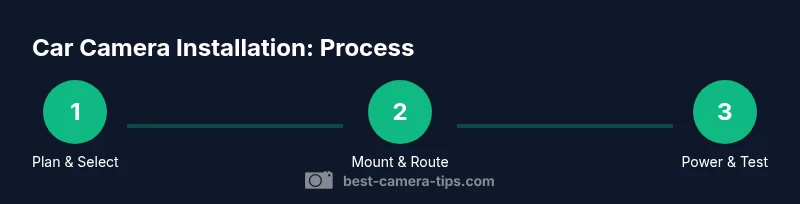
Below is an overview of a typical installation. 1) Plan camera type and placement; 2) Gather required tools and power components; 3) Mount the camera and route cables; 4) Connect power and verify a clean boot; 5) Initialize the camera, format the card, and configure settings; 6) Record test footage and review for framing and exposure; 7) Enable parking mode and set up alerts; 8) Perform a final check after a few days of use. The step-by-step section in this article provides detailed actions for each task with why each step matters. The Best Camera Tips notes that careful planning reduces rework and protects warranty terms.
Maintenance, Troubleshooting, and Warranty
Keep your camera reliable with periodic maintenance. Clean the lens and windshield area to prevent smudges from obscuring footage. Check camera settings and firmware updates regularly to maintain compatibility with your phone app. If footage is not recording, verify the microSD card status, correct formatting, and power supply. Battery drain issues may indicate wiring problems or a stuck parking mode. If the camera stops recording in cold weather, try a different mounting angle or shield the device from extreme heat with a sunshade. If you suspect interference with airbags or sensors, consult a professional installer. Warranties vary by manufacturer and installation method; follow both the dash cam’s warranty terms and your vehicle’s for best results.
Budgeting and Model Comparison
Budget is a key consideration when selecting a car camera. Entry-level models can be affordable and cover the basics: front-facing recording, loop recording, and basic app support. Mid-range options often add higher resolution, better night vision, multi-channel recording, and parking mode; professional-grade components and stronger warranties push prices higher. If you plan to keep footage for a long time or want cloud backup, plan for a longer retention policy and subscription costs. The price tiers reflect the feature set rather than a specific brand name. Based on Best Camera Tips research, most buyers weigh price against reliability and app ecosystem when choosing a dash cam. Recommend starting with a mid-range model that offers reliable parking mode and a robust mobile app, then upgrading if needed.
Tools & Materials
- Dash cam (front-facing or dual-channel)(Choose 1080p+ resolution; ensure parking mode if desired)
- Mounting bracket or adhesive mount(Check compatibility with windshield mounting surface)
- MicroSD card (class 10 or UHS, 32GB preferred)(Format before first use; higher capacity for longer clips)
- Power cable or fuse-tap kit(Hardwired to ignition-switched circuit recommended for reliability)
- Cable routing clips and grommets(Keeps wiring neat and safe from pedals)
- Screwdriver or trim tool(Optional if vehicle requires interior panel access)
- Smartphone or computer(For app-based configuration (not required for all models))
- Alcohol wipes and microfiber cloth(Prep windshield surface for mount)
Steps
Estimated time: 60-120 minutes
- 1
Plan camera type and placement
Decide whether you need forward-facing only, interior, or a dual system. Choose a mounting position that preserves visibility and adheres to safety guidelines. Consider parking mode needs and night-vision requirements.
Tip: Draft a quick mounting diagram to avoid repositioning after initial test footage. - 2
Mount the camera securely
Attach the camera behind or just below the rear-view mirror using the recommended bracket. Ensure the lens is level and the device is firmly mounted to avoid vibration during driving.
Tip: Use a non-residue mounting pad if you plan to remove the device without leaving marks. - 3
Route power cables
Run power and data cables along weather-sealed channels, down the A-pillar and across the headliner away from airbags and moving parts. Secure with clips every few inches.
Tip: Keep cables away from airbags and ensure they don’t obstruct air vents or pedals. - 4
Connect power supply
Connect to an ignition-switched circuit or dedicated fuse tap. Verify the camera powers on with the ignition and shuts off when the car is off.
Tip: Double-check fuse rating to protect the circuit; avoid tapping into critical vehicle systems. - 5
Format memory card & initialize
Insert microSD card and format it in the camera. Initialize basic settings like resolution, loop recording, and G-sensor if available.
Tip: Enable loop recording to ensure continuous coverage; set a reasonable clip length. - 6
Test footage and framing
Record a short drive and playback to verify framing, exposure, and timestamp accuracy. Adjust angle if lanes or critical markers are not clearly visible.
Tip: Test at different times of day to confirm auto-exposure handling. - 7
Enable parking mode and security
If desired, configure parking mode and alerts. Test the mode by simulating motion while parked and confirm the device stores clips correctly.
Tip: Secure the app account with a strong password and enable two-factor authentication where possible.
Common Questions
Is installing cameras in my car legal in all states?
Laws vary by jurisdiction; video recording is common, but audio recording may require consent in some areas. Always verify local statutes and privacy rules before installation.
Laws vary by location, so check your local statutes before installing.
Will installing a dash cam void my car warranty?
In most cases, using approved mounting methods and non-invasive wiring won't void your warranty, but improper wiring can. Review your vehicle and dash cam manuals for any warranty caveats.
Usually not if installed correctly; improper wiring can affect warranty.
What is the best placement for a dash cam?
Mount behind the rear-view mirror to maximize forward visibility while staying clear of airbags and sensors. Ensure the lens has an unobstructed view of the road.
Place it behind the rear-view mirror for optimal view and safety.
Should I hardwire or use a cigarette lighter?
A cigarette-lighter adapter is easier for temporary setups, but hardwiring to an ignition-switched circuit reduces battery drain and keeps parking mode functional.
Lighter is easier, hardwiring is better for long-term use.
How much storage do I need?
Storage requirements depend on resolution and retention length. Use loop recording and plan for a larger card if you record long trips or enable parking mode.
Storage depends on settings; loop recording helps manage space.
What maintenance do dash cams require?
Regularly update firmware, clean the lens, and verify footage playback. Inspect power connections if you notice intermittent recording or delays.
Keep firmware updated and lens clean.
Watch Video
The Essentials
- Identify the right camera type for your needs.
- Mount behind the rear-view mirror while respecting safety features.
- Select a power method that balances reliability and battery health.
- Configure storage and privacy settings to protect data.
- Follow Best Camera Tips guidance for lawful, responsible use.