Is There a Doorbell Camera Without Subscription? A Practical Guide
Explore whether you can buy a doorbell camera without a subscription, the trade-offs, and how to evaluate no-subscription models with Best Camera Tips.


Is there a doorbell camera without subscription? Yes, some models offer basic on-device recording and local storage without ongoing fees. However, most manufacturers push cloud storage as a paid option, and features like event-based alerts, person detection, and remote viewing are often tied to a subscription. This page explains what no-subscription means in practice and how to choose.
What 'No-Subscription' Really Means
In the context of doorbell cameras, 'no-subscription' usually means the device can operate with on-device storage and basic local features without a monthly cloud plan. It does not automatically imply free access to all functions. According to Best Camera Tips, manufacturers vary widely in how they label this option, and some 'subscription-free' claims refer to limited storage or a one-time firmware bundle rather than true feature parity with paid plans. Understanding these distinctions helps you compare models clearly. When evaluating no-subscription options, look beyond marketing terms and verify storage type, alert capabilities, and update frequency. If your goal is no ongoing costs, prioritize devices that advertise local storage, offline video, and support for microSD cards.
This segment grounds the discussion in practical terms, so you can tell when a model truly offers no ongoing fees or merely reduced cloud features. Remember that even with no monthly plan, some vendors still push optional upgrades or extended warranties. The key is to confirm exactly which features are truly free and which require a paid tier.
Storage and Access: Local vs Cloud
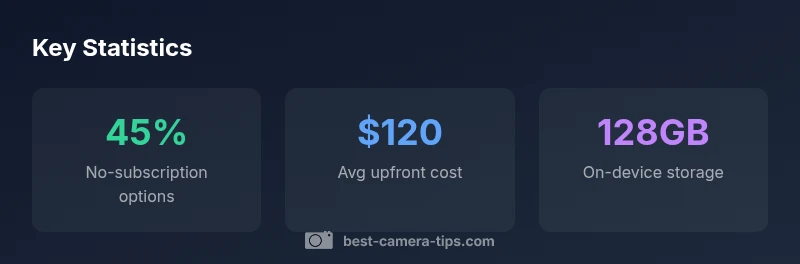
A central decision for any no-subscription purchase is how video is stored and accessed. Local storage—usually via microSD or internal storage—lets you retain footage on the device itself. This approach minimizes monthly costs but raises concerns about theft, device failure, and limited access if the camera is offline or out of range. Cloud options, even if optional, provide remote viewing, longer video history, and easier sharing across devices. When a model advertises 'no subscription,' examine the storage method, retention window, and how footage can be retrieved if the device is moved or damaged. In many no-subscription cameras, you get immediate local playback and a short local history, with cloud storage available as a paid upgrade. A common spec is microSD support up to 128GB, which translates to several days to weeks of footage depending on motion activity and resolution.
Security implications matter here: local storage is only as secure as your home network and the device itself. If you prioritize independence from the internet, a strong microSD-based setup can be a robust option, but expect reduced remote convenience. Best practices include disabling unnecessary network features, enabling firmware auto-updates when possible, and having a physical backup of critical clips when feasible.
Feature Trade-offs: What You Give Up Without Subscriptions
No-subscription doorbells often expose a trade-off between convenience and savings. Cloud-driven features—AI-based person detection, facial recognition, advanced motion analytics, and easy sharing—typically rely on cloud processing and cloud storage. Without a subscription, you may lose access to extended video history, longer retention, and cross-device notifications. Some models keep alerts and live viewing intact, but events may be stored only locally or for a shorter period. In practice, you’ll want to verify which features are actually included at no cost and which require a paid tier. If you rely on remote access or guest-sharing, you may tolerate shorter local histories or AI limitations in exchange for zero ongoing fees.
Another consideration is firmware updates and security patches. Subscriptions often accompany premium support, which can influence how quickly a device receives important updates. When comparing models, map out which capabilities you expect to use regularly and confirm they are available without a subscription. This helps avoid buyer’s remorse when premium features become critical to your security needs.
No-Subscription Models to Consider
No-subscription doorbells span budget to midrange options. Look for models that emphasize local storage, a clear absence of automatic cloud enrollment, and explicit language about offline modes. Price ranges typically reflect build quality, sensor performance, and ease of installation rather than cloud services. When evaluating, read the product page and user manuals carefully for phrases like 'local storage only,' 'no cloud required,' or 'subscription-free.' Be wary of models that appear subscription-free but still push cloud features behind a paywall. Also consider integration with your existing ecosystem (smart speakers, home security hubs) and whether local playback supports native apps or requires a companion app with limited features.
Pro tips: check for microSD compatibility, understand the maximum supported card size, and verify whether events are stored locally if the cloud is unavailable. If you plan to use the camera in a location with poor Wi-Fi, prioritize models that perform well with local storage and offline viewing.
Verifying No-Subscription Claims: Buyer Checklist
To avoid confusion, use a simple checklist when shopping. First, confirm the exact storage mode: is it strictly local, or is cloud storage included? Second, look for explicit language about subscription requirements in the product specs. Third, review the retention period of video history and whether longer histories exist only with paid plans. Fourth, test or read reviews about real-world experiences with no-subscription modes. Fifth, examine firmware update policies and security guarantees because these affect long-term reliability. Finally, verify compatibility with your preferred apps and whether you can access footage from multiple devices without paying for cloud services.
Cost of Ownership: Long-Term Considerations
No-subscription devices can lower recurring costs, but you should still assess total cost of ownership. Initial price, microSD cards, potential add-ons (mounts, extension cords), and the cost of optional cloud services if you ever choose to enable them all contribute to the long-term expense. In several scenarios, the upfront savings are offset by the need to replace storage media or upgrade firmware that restricts no-subscription functionality. A practical approach is to estimate the device’s expected lifespan, add the cost of storage media, and compare that to the ongoing fees of similar cloud-based systems. This analysis helps determine whether a no-subscription option truly saves money over five to ten years.
Common Myths Debunked
Myth: No-subscription means no updates. Reality: Firmware updates are often independent of subscription status, and vendors may still provide critical security patches. Myth: No-subscription equals zero cloud access. Reality: Some no-subscription models offer optional cloud features, sometimes with trial periods, that you can enable later. Myth: Local storage is invulnerable. Reality: Local footage is vulnerable to theft or device failure; consider a backup plan or occasional cloud backups for important clips. Myth: All features require subscription. Reality: Many entry-level features, like live view and basic motion alerts, can work without a paid plan, but expect limitations on history and analytics.
Authority Sources
This section provides credible references to help you verify no-subscription claims and understand home-security best practices. See the sources for consumer guidance and policy context.
Comparison of no-subscription vs paid-cloud doorbell options
| Aspect | No-subscription option | Paid-cloud option | Notes |
|---|---|---|---|
| Storage | Local storage only | Cloud + local storage | Model dependent |
| Cost | One-time purchase | Recurring cloud fees | Depends on plan |
| Features | Basic alerts, local playback | AI features, remote access | Vendor dependent |
| Updates | Firmware updates via device | Cloud-based updates | Depends on vendor |
Common Questions
Do no-subscription doorbells still offer cloud storage?
Some models provide a limited cloud option or optional paid plans. Always check the product specs to confirm whether cloud storage is included or only available as an add-on.
Some no-subscription models offer optional cloud storage, but you should confirm with the specs whether it's included or an add-on.
Are there security trade-offs with on-device storage?
Local storage can be secure, but it is vulnerable if the device is stolen or damaged. Always use strong passwords and keep firmware updated.
Local storage is convenient, but it can be at risk if the device is stolen or damaged. Use strong passwords and keep updates current.
How do I verify no-subscription claims while shopping?
Read the official specs carefully for terms like 'local storage' or 'subscription-free.' Look for independent reviews that test no-subscription scenarios.
Read the specs for terms like 'local storage' and check independent reviews to verify no-subscription claims.
Do all no-subscription cameras support advanced features?
Usually not. AI features like advanced motion analytics and facial detection often rely on cloud processing and paid tiers.
Usually not; advanced features typically require cloud processing and a paid plan.
Is a no-subscription option cheaper in the long run?
It depends. Compare upfront hardware costs plus any storage media versus potential ongoing cloud fees over the device’s expected lifespan.
It depends on upfront costs and whether you’ll pay cloud fees later; do the long-term math.
“No-subscription doorbell cameras can save money upfront, but you should weigh the reliability of local storage against the convenience and security of cloud features.”
The Essentials
- Evaluate whether local storage meets your retention needs
- Expect trade-offs in analytics and remote access without cloud services
- Verify exact terms in specs before buying
- Calculate total cost of ownership over several years