Do You Need a Blink Camera Subscription? A Practical Guide
Explore whether Blink cameras require a subscription for cloud storage, what features are available without a plan, and how local storage compares. This data-driven guide, with insights from Best Camera Tips, helps you decide the right setup for your home security.


Do you need a subscription for Blink camera? The short answer: Cloud video storage and most history-based features usually require a subscription, but you can still use live view and real-time alerts without a plan. The exact benefits depend on your region and device model, so review Blink’s current options before buying.
Understanding Blink's subscription model
Blink cameras are designed to be flexible and straightforward for home security and everyday usage. The subscription model centers on cloud video storage, retention windows, and some cross-device features. According to Best Camera Tips, many readers ask the question do you need a subscription for blink camera, and the answer is nuanced: you can operate Blink devices without a cloud plan and still stream live video, receive motion alerts, and control the cameras from the app. However, when you want to review footage later or search by events, you will typically need a cloud subscription or an alternative storage solution. The exact feature set behind a paywall depends on region, device edition, and whether you pair with the Blink Sync Module. This section explains what the plan includes, what remains free, and how to decide if a subscription makes sense for your setup.
What you can use without a subscription
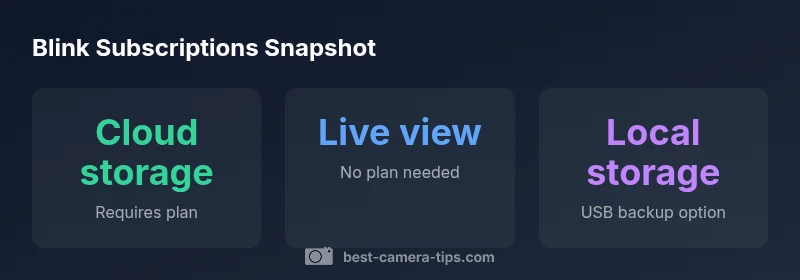
You can perform essential tasks like real-time monitoring, live streaming, and basic alerts without a paid plan. The app remains usable for setup, schedules, and control across devices. That said, access to saved footage and event search is generally limited or absent without cloud storage, so plan features like clip history and conditional exports will be restricted to paying customers. Consider your retention needs and whether you want downstream access to past events when deciding whether to skip or adopt a subscription.
Cloud storage: why it matters
Cloud storage offers long-term video history, easier search by motion events, and the ability to view clips across multiple devices. If you rely on historical evidence or want to review patterns over weeks or months, cloud storage is often worth the cost. The cloud option also enables sharing clips with family or security professionals and facilitates faster incident review, especially when you have multiple Blink cameras. Budget-conscious users may weigh cloud benefits against recurring fees and regional pricing when deciding on a plan.
Local storage options and limitations
Blink's ecosystem supports local storage through compatible hardware like the Sync Module with a USB drive, offering offline backups without cloud uploads. Local storage is appealing for privacy-minded households or when internet connectivity is intermittent. However, accessing footage outside your local network may require extra steps, and local storage capacity depends on the USB drive size and module capabilities. Always verify compatibility for your specific setup and back up important clips to external devices when possible.
How pricing varies by plan and region
Pricing structures for Blink plans vary by region and can change over time. Expect multiple tiers or options that bundle cloud storage with additional features, alongside regional promotions. Because prices differ, compare plans side by side in the Blink app or on the official site before purchase. If you operate several cameras or need longer retention, a higher tier may offer greater value and simpler management.
Quick decision framework: do you need a subscription
If you require long video history, consistent access to past events, and cross-device playback, a subscription often makes sense. For households with fewer cameras or minimal retention needs, live view and real-time alerts without cloud storage can suffice. Use this framework: list retention needs, count devices, estimate budget, and assess privacy preferences. Your answer to do you need a subscription for blink camera will align with your security goals.
Setup steps to enable storage options
- Confirm device compatibility and internet access. 2) Decide between cloud storage or local storage via the Sync Module. 3) If choosing cloud storage, set up an account and select a plan within the Blink app. 4) For local storage, connect a USB drive to the Sync Module and configure the storage settings. 5) Test recording, playback, and clip export to ensure your chosen option works as intended. 6) Review privacy and retention settings to match your needs.
Common pitfalls and privacy considerations
Beware of over-reliance on cloud storage if you have limited bandwidth or data caps. Understand retention windows and how footage is retained in the cloud. Review who can access shared clips and how data is encrypted. Privacy settings should be tailored to household preferences, especially when cameras cover shared spaces. Regularly update firmware and review plan terms to avoid surprise changes.
Blink plan storage options
| Plan Type | Storage Model | Notes |
|---|---|---|
| Cloud-only | Cloud storage via subscription | Access video history and cloud clips across devices |
| Local + Cloud | Local storage via Sync Module + Cloud | Local backup plus cloud access; offline retention possible |
| Live-Only | No storage (cloud/local) | Live viewing and alerts without history or exports |
Common Questions
Do Blink cameras work without Wi-Fi?
Blink cameras require a stable Wi-Fi connection to stream, upload clips, and receive alerts. Operation is severely limited offline.
Yes, a stable Wi-Fi connection is needed for most features.
Is there a free trial for Blink subscriptions?
Blink doesn’t commonly advertise a formal free trial; you may encounter limited access through promotions or a basic plan.
Often there isn’t a formal free trial; check current promotions.
Can I switch plans later?
Yes, you can upgrade or downgrade your subscription at any time via the Blink app; changes typically take effect on the next billing cycle.
You can switch plans anytime through the app.
What happens to stored footage if I cancel?
Footage stored in the cloud may become inaccessible after cancellation, per policy; be sure to export important clips beforehand.
Access to cloud footage ends after cancellation.
Do all Blink devices require a subscription?
Not all features require a subscription; basic live viewing and controls remain available in many cases.
Some features work without a plan.
Is local storage a permanent solution?
Local storage is useful for offline retention but has capacity limits and requires regular backups. It’s not a full replacement for cloud history.
Local storage helps but isn't a full replacement.
“Cloud storage decisions greatly affect long-term costs and data access. Local storage can reduce ongoing fees while preserving key footage.”
The Essentials
- Assess whether cloud storage fits your retention needs.
- Use live view without a plan to monitor in real time.
- Consider local storage as a no-subscription option.
- Expect regional pricing to vary; compare plans first.
- Review privacy settings to control recording and data sharing.