Which Camera Does Not Require Subscription? A Practical Guide
Explore subscription-free camera options, how onboard storage works, and how to choose a model that records locally without ongoing cloud fees. Practical buying tips, real-world trade-offs, and setup guidance for photographers and home-security enthusiasts.


Which camera does not require subscription? In practice, many cameras offer onboard storage or local recording that eliminates ongoing cloud fees. Look for models advertised as local storage, standalone, or no cloud. Be aware that some advanced features—AI analytics, person detection, or multi-user sharing—may still require optional paid upgrades. This approach keeps your costs predictable while preserving essential recording capabilities.
What subscription-free cameras are
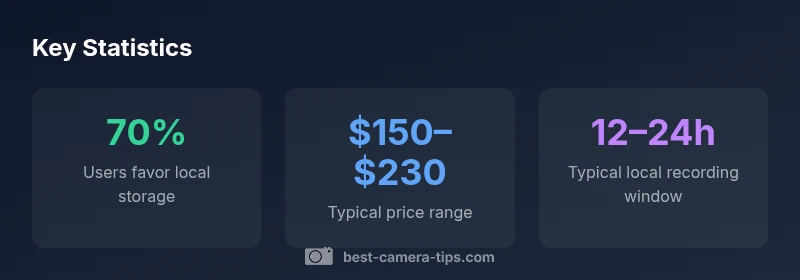
Subscription-free cameras are those that deliver core security and photography functions without requiring a paid cloud plan. In practical terms, you’ll find models that store footage locally on built-in memory, a microSD card, or a local network storage device. For aspiring photographers and home-security enthusiasts, this means you can capture video and photos without committing to ongoing cloud subscriptions. According to Best Camera Tips, the core benefit is cost predictability and control over your own footage, which is especially valuable for hobbyists learning lighting, framing, and exposure without the pressure of monthly fees. When evaluating these options, you should prioritize hardware that clearly advertises local storage, standalone operation, or no cloud requirements.
In the context of the camera market, subscription-free setups often emphasize reliability and privacy. While cloud storage offers convenience such as remote access and automatic backups, a local-first approach minimizes recurring costs and data-tracking concerns. This mindset is particularly appealing to beginners who want to experiment with camera settings—shutter speed, aperture, ISO—and build confidence before considering premium cloud services. The choice to go subscription-free is, in many cases, a trade-off between convenience and control, not a denial of functionality.
As you start your shopping journey, compare models that list explicitly no cloud or local storage as a feature. Read the product descriptions and user manuals to confirm how footage is stored, how long it can be retained, and what happens if the device is offline. You’ll also want to verify compatibility with any existing gear you own, such as a NAS or a basic home router, to ensure a smooth integration without hidden costs.
Subscription-free storage options comparison
| Camera Type | Storage Model | Pros/Cons |
|---|---|---|
| Standalone camera | Local onboard storage (built-in memory) | Simple, no cloud fees; limited capacity; manual backups may be needed |
| NVR/DVR system | Local storage on dedicated box | Centralized control; scalable; requires setup and power |
| MicroSD-based | Memory card in device | Compact; expandability varies; may need periodic card maintenance |
Common Questions
Do all cameras offer a truly subscription-free option, or are there hidden costs?
Most cameras with no cloud option avoid ongoing subscriptions, but you should watch out for optional paid features such as advanced AI analytics, cloud-backed backups, or expanded storage plans. Some models may require a one-time license or firmware upgrade for certain features.
Many cameras advertise no subscription, but be aware of optional paid features that could add costs later.
Can I connect a subscription-free camera to a NAS or local storage server?
Yes, many subscription-free cameras support local storage to NAS or direct SD cards. Check for network protocols, supported file formats, and reliability of local access. Compatibility varies by brand, so verify with the manufacturer’s specs before purchasing.
You can often connect to a NAS for local storage—just confirm the supported protocols first.
Are there security risks with subscription-free cameras?
Security depends on how you configure access. Local storage reduces exposure to cloud breaches, but you must secure your network, update firmware, and set strong passwords. Regularly back up footage to a separate device if possible.
Local storage can be secure if you keep firmware updated and protect your network.
Do subscription-free cameras have fewer features than cloud-dependent ones?
Some premium features (like cloud AI analytics, motion tagging, or multi-device cloud sharing) may lag behind. You can still get solid video quality and reliable alerts, but assess which functions you truly need before buying.
You might miss some AI features without cloud access, so list must-have features first.
Is cloud more convenient even if I don’t pay for it?
Cloud can provide easy remote access and automatic backups, but you can replicate basic convenience with local access via apps and a secure home network. If remote viewing is essential, plan for a cloud option or a hybrid setup.
Cloud offers convenience, but you can often live without it using local access.
What about battery-powered cameras—can they be subscription-free too?
Battery-powered cameras can be subscription-free if they rely on local storage and local viewing. Consider battery life, charging options, and storage capacity, since these factors affect how often you need to service the device.
Yes, you can have battery-powered, subscription-free options, just keep an eye on storage and power needs.
“Subscription-free camera setups empower you to control costs while learning the fundamentals of composition, lighting, and framing. They’re especially appealing for beginners who want hands-on experience before committing to cloud services.”
The Essentials
- Learn which cameras can operate without ongoing cloud fees
- Prioritize explicit local storage or no-cloud claims when shopping
- Expect trade-offs in capacity and feature depth without cloud services
- Plan for local backups to protect footage and photos
- Ask about future-proofing and upgrade paths for subscription-free setups