Can You Put Cameras in Your Child's Room? A Practical Guide
Learn how to approach in-room camera use with safety, privacy, and trust in mind. This educational guide covers legality, setup best practices, alternatives, and conversation strategies for aspiring photographers and home security enthusiasts.


Yes, you can install cameras in your child’s room in many situations, but you must balance safety with privacy. Use privacy-friendly setups (video-only, local storage, encryption), avoid audio recording unless legally allowed, and discuss boundaries with your child. Always follow local laws and your family rules, and periodically review camera use with your child.
Safety, Privacy, and Permission
According to Best Camera Tips, the decision to place cameras in a child’s room should balance safety goals with privacy and trust. Before installing anything, review local laws and guardian policies, then involve your child in age-appropriate conversations. A transparent approach helps build trust and reduces the risk of resentment or fear. When used responsibly, cameras can support safety during sleepovers, medical needs, or rare safety concerns. Always document agreed boundaries and review them periodically with your child to ensure ongoing comfort and consent.
What counts as a 'child's room' surveillance?
Cameras intended for a child’s room should be privacy-conscious and purpose-driven. Favor devices that monitor general room activity or sleep patterns without recording sensitive moments. Disable or mute audio by default unless you have explicit permission and a clear, lawful basis. Prefer on-device processing and local storage, with automatic deletion after a defined period. Use end-to-end encryption and limit who can access footage. This helps protect your child’s privacy while still achieving safety goals.
Best practices for setup
Place the camera high on a wall or corner to avoid eye-level interactions while still capturing the essential area (door, bed vicinity, and play space). Point away from the child’s desk or personal belongings to minimize privacy intrusions. Turn off audio unless there’s a documented, consent-based reason. Use devices with encrypted storage and strong passwords, and keep firmware updated. Specify retention rules (e.g., delete after 14 days unless needed for a safety incident) and limit access to trusted adults only. This careful setup aligns with responsible monitoring practices.
Alternatives to in-room cameras
If the primary aim is safety rather than constant surveillance, consider alternatives that respect privacy:
- Door and window sensors that alert you to entry without recording visuals.
- Motion sensors placed in common areas rather than directly in the private bedroom.
- Baby monitors or sleep trackers that focus on environmental factors (sound level, temperature) rather than video.
- Regular check-ins and structured routines that reduce the need for constant monitoring.
How to have the conversation with your child
Open a dialogue about why monitoring is considered, what data is collected, who can access it, and how long it’s stored. Emphasize that monitoring is a safety tool, not surveillance of personal moments. Involve age-appropriate explanations and invite questions. Offer opt-out options where feasible and set clear review dates to revisit rules as your child grows. This fosters trust and teaches responsible digital habits.
Maintenance, privacy, and data management
Review device settings quarterly and after any software updates. Keep a documented data-retention policy and practice good cybersecurity: strong, unique passwords; two-factor authentication where available; and regular access audits. If your child expresses discomfort, pause or adjust usage and have a follow-up discussion. Remember to remove devices when they’re no longer needed for safety or if privacy concerns persist.
Decision matrix: when monitoring is appropriate
- Safety incidents (nighttime safety, medical needs, or dangerous situations) justify temporary monitoring.
- Chronic disputes over space or routines may warrant structured checks, with consent-based limits.
- If a child expresses a desire for privacy (therapy sessions, homework time, reading), switch to non-video tools and prioritize trust-building.
- Always document decisions, set clear rules, and revisit them regularly to ensure ongoing consent and safety.
Tools & Materials
- Privacy-friendly indoor camera (video-only with local storage)(Prefer devices with on-device processing, encryption, and no mandatory cloud storage by default.)
- Mounting hardware (brackets, screws, anchors)(Choose tamper-resistant hardware and command strips for easy removal.)
- Power supply and cable management(Secure cables to prevent tampering; consider battery-powered options where feasible.)
- Router with strong security (WPA3)(Keep firmware up to date; enable isolation between IoT devices.)
- Access control and passwords(Create separate accounts for caregivers; enable two-factor authentication if available.)
- Child discussion script(Prepare age-appropriate talking points and boundaries to share with your child.)
Steps
Estimated time: 45-90 minutes
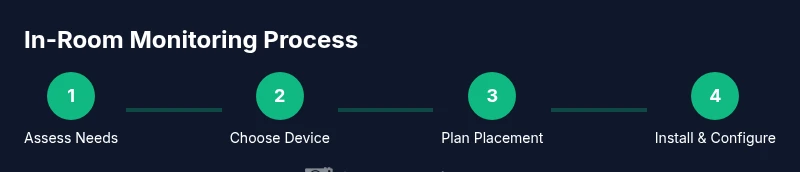
- 1
Assess needs and legal considerations
Identify safety concerns that monitoring would address and confirm what laws or school policies apply in your location. Discuss the plan with your partner or caregiver and prepare a simple script for talking to your child.
Tip: Document the exact safety goal (e.g., night-time safety) to justify monitoring. - 2
Choose a privacy-friendly device
Select a camera that records video only, supports local storage, and offers strong encryption. Disable audio by default and verify cloud options can be disabled entirely.
Tip: Favor devices with end-to-end encryption and local-only storage options. - 3
Plan placement and mounting height
Mount the camera high enough to cover entryways and the room’s activity area without capturing intimate spaces. Avoid pointing directly at the bed and private items.
Tip: Use adjustable mounts to tweak the view after testing at night and day. - 4
Install and configure security settings
Install the device, update firmware, create strong passwords, and enable access controls. Set a clear retention period and automate deletion where possible.
Tip: Enable notification controls that alert you without streaming constantly. - 5
Test, review, and document rules
Run tests to confirm coverage and ensure privacy boundaries. Document rules in a shared family agreement and schedule regular reviews.
Tip: Test during different activities (sleep, play, study) to verify usefulness. - 6
Open conversation with your child
Discuss what’s being monitored, why it’s important, and how long footage will be kept. Offer opportunities to adjust settings as trust grows.
Tip: Keep the tone collaborative, not punitive.
Common Questions
Is it legal to place cameras in a child’s room?
Laws vary by country, state, and district. Before installing, check local regulations and school or guardian policies. Involve a caregiver and be transparent with your child about the purpose and limits of monitoring.
Laws differ by location; check local rules and consult trusted adults before installing a camera.
Should I record audio in my child’s room?
Audio recording in private spaces is often restricted. If you’re unsure, disable audio and focus on video-based monitoring with strict access controls.
Audio is usually restricted in private spaces; prefer video-only monitoring unless you have explicit permission.
At what age should monitoring stop?
There’s no universal age. Base the decision on your child’s maturity, safety needs, and comfort level. Revisit and adjust as they grow.
There’s no fixed age—reassess with your child as they grow up.
What should I do with the footage?
Store footage securely, limit access, and set a defined retention period. Delete data after the period or after safety concerns have passed.
Keep it secure and limit who can view it; delete when no longer needed.
How can I make in-room cameras less invasive?
Use video-only mode, avoid sensitive angles, and involve your child in decision-making. Provide opt-out options where feasible.
Aim for a privacy-respecting setup with open dialogue.
What features should I look for in a privacy-friendly device?
On-device processing, local storage, strong encryption, clear retention policies, and transparent data-access controls are essential.
Seek devices that protect data and give you clear control over it.
Watch Video
The Essentials
- Define safety goals before installation
- Choose privacy-focused devices with local storage
- Involve your child in the discussion and revisit rules
- Limit access to trusted adults and secure data
- Regularly review the need for monitoring and sunset plans