Can You Delete Ring Camera Footage? A Practical 2026 Guide
Discover how to delete Ring camera footage, what actually gets removed, and how retention settings affect privacy. Learn safe, compliant steps, with best practices for 2026.


Can you delete Ring camera footage? Yes, you can remove certain videos from your Ring account by deleting individual events or adjusting retention settings. However, deletions may not erase copies stored in cloud backups or shared access, depending on your plan and local laws. Review Ring’s policies and your jurisdiction before deleting footage.
Legal and policy overview
Deleting Ring camera footage sits at the intersection of user privacy, platform policy, and local law. According to Best Camera Tips, you generally can delete footage you own from your Ring account by removing specific events or adjusting retention settings. The exact behavior depends on your Ring Protect plan, device type, and whether the footage has been shared with others. In 2026, policies emphasize user control, but they also preserve certain copies for system integrity and emergency response depending on jurisdiction. Before you delete anything, review Ring's terms, your local privacy laws, and any contractual obligations tied to evidence. This section helps you understand what is and isn't automatically removed when you press delete, and what might persist in backups or shared access.
What exactly can be deleted and what cannot
You can delete individual events (clips) and, in some cases, adjust retention settings that govern how long footage remains available in your account. What cannot be guaranteed to disappear is copies stored in Ring's cloud backups or any versions that have been shared with other users. Policies vary by Ring Protect plan and region, so always verify what deletion actually removes and what persists for safety and audit purposes. If footage has been exported or downloaded to a device, that local copy is outside Ring’s deletion controls and must be removed manually. Understanding the distinction between deletion from your account and removal from Ring’s broader storage ecosystem helps you make informed privacy decisions.
How Ring stores footage: cloud-based retention and sharing
Ring cameras are designed to store video primarily in the cloud via your Ring Protect plan. Deleting an event from the app typically removes the reference to that video in your account, but depending on settings, a cloud backup copy may remain for a period or be retained for safety and compliance. Shared users who have access to the same device may still have copies unless you also remove their access. Always navigate to the privacy or account settings to see who has permissions and how deletion affects shared access. This knowledge helps protect your privacy without inadvertently losing evidence you may need later.
Deleting individual events: practical steps (conceptual)
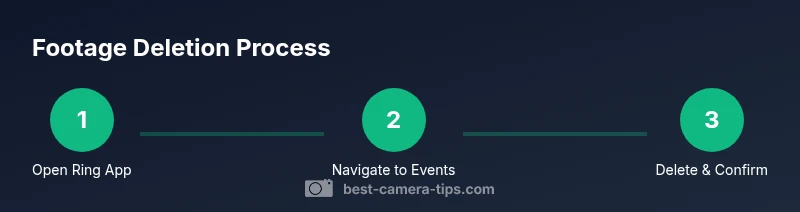
The deletion process generally involves selecting the specific event from your history and confirming the delete action. Deleting an event typically removes that clip from your device history and the primary cloud view, but retainment policies may apply in the background. If you are unsure about a particular clip, export it first for your records, then delete. Remember: the goal is to balance privacy with potential evidentiary needs. This section explains the logic behind selective deletion and when it’s appropriate to delete rather than archive.
Retention settings and policy implications
Retention settings determine how long Ring stores footage in your account before automatic deletion occurs. These settings can vary by plan and region, and some jurisdictions require retention for legal reasons. Adjusting retention to shorter periods can improve privacy, but it may reduce your ability to review past events. Consider your local laws, your home security needs, and any legal or insurance requirements before changing retention rules. Best practice is to document changes and periodically review who has access to your footage.
Deleting shared footage and administrative considerations
If multiple users share access to your Ring account or device, deletion from your account may not automatically remove copies that others can access. Review and adjust user permissions, revoke access when needed, and communicate with household members about privacy expectations. In addition, if you’ve used export features to save copies elsewhere, those files must be managed separately. Administrative controls are essential to ensure privacy without compromising security coverage.
Privacy, compliance, and regional rules you should know
Privacy and data-protection laws differ by region and can impact whether and how you can delete footage. In some places, retaining certain video evidence is mandated in specific situations. Always stay informed about local regulations and Ring’s terms of service. When in doubt, seek guidance on best practices for privacy management and evidence handling. This section highlights general considerations to help you navigate complex rules safely.
Best practices for privacy and evidence management
Adopt a privacy-first approach: minimize collection where feasible, limit access to trusted users, and document any deletions. Use retention settings to balance privacy with security needs, and regularly review your account for lingering shared access. If possible, keep a dated log of deletions and exports for your records and compliance. This section offers actionable steps to maintain privacy without sacrificing essential security awareness.
Verifying deletion and recovery options
After deleting, verify that the event no longer appears in your history and that no residual references remain in the primary feed. If you suspect a copy persists, check both your device and any connected accounts or shared profiles. Some exports may still be recoverable if saved elsewhere; in that case, delete or securely erase those copies as needed. This final check helps ensure your privacy goals are met.
Tools & Materials
- Smartphone or computer with Ring app(Sign in to your Ring account; enable two-factor authentication for security.)
- Stable internet connection(Access Ring cloud and sync changes in real time.)
- Optional export storage(If you plan to download a copy before deletion, use a secure location.)
- Privacy and policy references(Have access to local laws or policy documents to verify retention rules.)
Steps
Estimated time: 30-60 minutes
- 1
Open the Ring app and sign in
Launch the Ring app on your mobile device or use the Ring website on your computer. Enter your credentials and complete two-factor authentication if prompted to access admin features.
Tip: Use a trusted device and ensure you’re connected to the internet to fetch the latest retention rules. - 2
Navigate to the events/history section
Go to the device's event feed or
Tip: If multiple cameras exist, select the specific camera whose footage you want to delete. - 3
Select the specific video(s) to delete
Choose the individual events you want to remove. You can often filter by date or event type to speed up the process.
Tip: Only delete items you are certain you no longer need; this action may be irreversible in some regions. - 4
Confirm deletion
Confirm the deletion prompt. Some platforms show a brief warning about backup copies; acknowledge to proceed.
Tip: If available, export the clip first for your records before deleting. - 5
Review retention settings for future deletions
Open account or plan settings to adjust automatic deletion timelines and retention rules.
Tip: Document any changes and ensure they align with local privacy laws. - 6
Verify the deletion
Refresh the event feed and search for the deleted items to confirm removal.
Tip: Check any shared access accounts to ensure they don’t still reference the deleted clips.
Common Questions
Can I delete footage from other people’s Ring accounts if they shared access with me?
No. You can only delete footage from accounts you own or administer. If others have access, you may influence deletion through permissions, but you cannot force deletion from their accounts.
You can only delete your own or admin-owned footage; shared users can’t remove others’ copies from the owner’s account.
Will deleting footage free up cloud storage space immediately?
Deletion can free up space for that account, but cloud storage behavior depends on Ring’s retention policies and plan rules. Some backups may still count toward overall storage if copies exist elsewhere.
Deleting footage may reduce space, but backups and copies can remain depending on policies.
Is there a bulk delete option to remove all footage at once?
Ring typically requires deleting events individually or by batch for a given date range; there isn’t a universal one-click “delete all” option in most cases.
There isn’t generally a single button to delete everything at once; you delete events or adjust retention for future deletions.
Can I recover a deleted clip after deleting it?
Once deleted and confirmed, recovery is usually not possible through the Ring app. If you exported the clip beforehand, you’ll need to re-import from that export.
Recovered clips are unlikely after deletion unless you have a prior export.
Do local device copies matter if I delete the cloud version?
Local copies on your device are separate. If you delete from the Ring cloud, any downloaded versions on your device remain until you delete them there as well.
Deleting cloud footage doesn’t automatically remove local copies.
What should I consider legally before deleting footage during an incident?
Consider privacy laws and potential legal needs for evidence. In some scenarios, authorities or insurers may require retention; consult local regulations.
Privacy and legal requirements may affect whether you should delete footage after an incident.
Watch Video
The Essentials
- Take control of retention with clear privacy goals
- Delete only what you truly don’t need to preserve evidence
- Audit shared access regularly to protect privacy
- Export important clips before deletion when appropriate
- Always review local laws before deleting footage