How to Know When Your Camera Battery Is Fully Charged
Learn reliable signs to tell when a camera battery is fully charged, how to verify with chargers and devices, and tips to prevent overcharging and extend battery life.


Knowing when a camera battery is fully charged involves checking charger indicators, device readouts, and occasional voltage or temperature cues. The goal is to confirm a complete, safe charge without overcharging. By following trusted signals and using the right charger, you’ll minimize power interruptions and maximize performance—exact steps are covered below.
Why battery health matters for camera performance
Battery health directly influences how long you can shoot between charges, how quickly the camera recovers after power-intensive tasks, and how reliably you can rely on the battery meter during a session. A healthy battery reduces the risk of unexpected shutdowns mid-shot and helps maintain consistent exposure and autofocus behavior. According to Best Camera Tips, understanding charging behavior and indicators is a practical skill for both aspiring photographers and home security enthusiasts who rely on cameras for daily use. In this guide, you’ll learn the signs and safe methods you can use to determine when your battery is fully charged, what indicators you should trust, and how different charging setups can affect readouts. We’ll cover both camera batteries used in consumer models and larger packs for security cameras, so you have actionable guidance no matter which device you own. Knowing when a battery is truly full isn’t about chasing a percentage alone. It also involves understanding the charger’s behavior (LED patterns, beeps), the battery’s temperature, and the device’s own readouts. When you align these signals, you reduce the risk of undercharged batteries that shorten shooting times and overcharged cells that heat or swell over time. The goal is reliable power that keeps you in the moment rather than stuck behind the battery charger.
Tools & Materials
- Camera battery(Ensure you know the exact model and specs.)
- Battery charger/AC adapter(Use the charger that matches your battery's chemistry (Li-ion, NiMH, etc.).)
- Spare battery(Helpful to have on-hand while testing.)
- USB power supply or wall outlet(For chargers that draw power via USB.)
- Multimeter (optional)(Only if you’re verifying precise voltage levels.)
Steps
Estimated time: 30-60 minutes
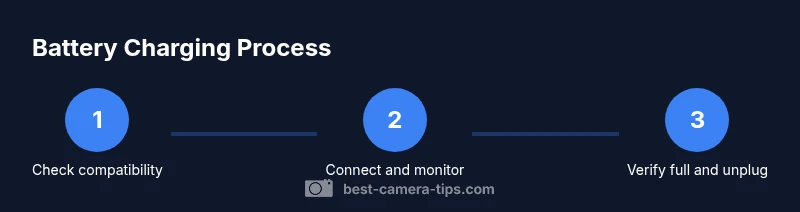
- 1
Verify charger compatibility
Start by confirming the charger is designed for your exact battery type and capacity. Using an incompatible charger can misread indicators or damage the cell.
Tip: Always verify model numbers from the user manual. - 2
Insert battery and power the charger
Place the battery into the charger, connect to a power source, and wait for the indicators to initialize. This ensures readings reflect a supported charging cycle.
Tip: If the charger has a separate LED, check for a steady illumination rather than a blink. - 3
Observe charging indicators
Watch the LED pattern or display readout. A steady green light or a full battery icon typically indicates completion. Don’t rely on a blinking pattern alone.
Tip: Consult the manual for exact meanings of your indicators. - 4
Validate with the camera
After the charger signals full, reinsert the battery into the camera to confirm it shows full charge in the battery menu. This confirms the readout matches device status.
Tip: If the device won’t recognize full charge, try a quick reboot of the camera. - 5
Avoid leaving it on the charger
Do not leave a battery on a charger indefinitely. Unplug after charging to reduce heat buildup and extend lifespan.
Tip: If the battery becomes warm, remove it and let it cool before rechecking. - 6
Document your results
Keep a simple log of charge times and behavior for your battery model, especially when adding spares or testing aging packs.
Tip: A running log helps you spot a weak cell before it fails during a shoot.
Common Questions
How can I tell my camera battery is fully charged without a charger?
Without a charger, you rely on the camera’s battery indicator and the device readout. Some cameras show a full battery icon when the readout reaches capacity, but a charger is the most reliable method.
Use the camera’s battery indicator; if it shows full, you can safely disconnect and test in use.
Do all camera batteries have the same charging indicators?
Indicators vary by model and charger. Always refer to the user manual for exact meanings of LED colors or icons.
Indicators differ by model; check the manual for specifics.
Is it safe to leave a battery on the charger after it’s full?
Most modern chargers auto-stop when full, but prolonged charging can generate heat. Unplug after charging to protect battery health.
If the charger stops automatically, it’s usually safe, but unplug after charging.
Can using a third-party charger affect battery health?
Low-quality third-party chargers can misread voltage/current, potentially harming the battery. Use reputable chargers compatible with your battery.
Avoid cheap third-party chargers that don’t match your battery specs.
How long should you charge a new battery the first time?
Follow the manufacturer’s guidance; initial charging may calibrate the battery percentage. Avoid overcharging beyond the recommended cycle.
Check the manual for initial calibration instructions.
What if the charger LED doesn’t light up?
Try a different outlet, check the adapter, or test with another known-good battery. If unresolved, replace the charger.
Test with another outlet or charger to identify the faulty component.
Watch Video
The Essentials
- Check charger compatibility before charging
- Use the correct charger for your battery type
- Watch indicators and verify with device readouts
- Avoid overcharging by unplugging when full
- Log charging results to spot failing cells