How Much Camera for Vlogging: A Practical Guide for Creators
Discover how much camera gear you actually need for successful vlogging. This analytical guide covers budgets, essential features, and upgrade paths—from budget setups to pro rigs—for aspiring creators.


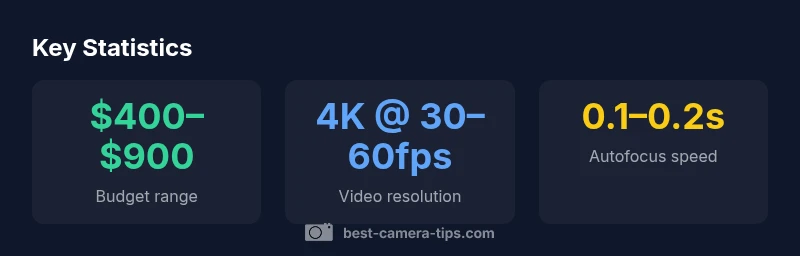
Typically, a mid-range setup is enough to start vlogging. Best Camera Tips Analysis, 2026 suggests most creators spend about $400–$900 on a starter package that includes a camera, a kit lens, and a basic mic, plus light. For 4K with reliable autofocus and good stabilization, a compact or mirrorless body in this range offers the best balance of cost and quality.
How much camera for vlogging? Budgeting and expectations
If you're asking how much camera for vlogging, you’re not alone. The right gear is about balancing image quality, portability, and cost rather than chasing the newest model. According to Best Camera Tips Analysis, 2026, most creators start with a mid-range setup that covers video quality, autofocus, and audio without breaking the bank. The goal is to minimize setup friction so you can focus on content, not gear. You’ll notice that the fastest way to level up isn’t always buying the most expensive body; often, a well-chosen kit lens and a solid external microphone make a bigger practical difference than an incremental sensor upgrade. As you scale your channel, you’ll want to plan for features that compound over time: reliable autofocus, good stabilization, and a microphone-friendly port layout. In practice, many beginners find that a compact mirrorless body paired with a single versatile lens hits the sweet spot for travel, on-location shooting, and desk setups.
For most creators, the initial question is not “what camera should I buy?” but “which combination gives me consistent results with minimal hassle?” Start with a camera that delivers usable 4K, dependable autofocus, and clean audio. The right balance of light, sound, and storytelling will drive engagement more reliably than chasing a marginally sharper frame.
Key features to prioritize for vlogging
When evaluating a camera for vlogging, several features consistently separate good options from great ones. First, autofocus performance matters—faces and eyes should lock quickly, even as you move toward and away from the lens. Look for phase-detection AF or reliable continuous AF with subject tracking. Second, stabilization reduces shake in handheld shots; in-body stabilization (IBIS) or lens-based stabilization helps keep footage smooth during walking shots. Third, a flip-out or vari-angle touchscreen makes framing yourself easier, especially when you’re recording solo. Fourth, ensure there’s a clean HDMI output and microphone input; external mics (lavaliers or compact shotgun mics) dramatically improve audio quality. Fifth, battery life should cover a full shooting day; check real-world numbers rather than optimistic CIPA ratings alone, and consider a spare battery or USB power options. Finally, ergonomics and weight influence long-form shooting and travel comfort. The best choice balances these practical needs with your content style (sit-down talking heads vs. on-the-go vlogs).
Camera types that work well for vlogging
Many aspiring vloggers start with one of several camera categories, each with strengths and compromises. Compact point-and-shoots are incredibly portable and often affordable, but they may lag on autofocus performance and mic options in some models. Entry-level mirrorless cameras offer interchangeable lenses, great image quality, and modern video features, including 4K and reliable autofocus, at reasonable prices. Mid-range mirrorless bodies typically deliver the best balance of autofocus, stabilization, battery life, and ecosystem—allowing growth as your channel expands. Budget DSLRs can still serve early-stage creators who value a durable body and longer battery life, though they may lack some modern video features. For action-oriented or travel-centric content, action cameras and small camcorders can complement a primary camera. In all cases, you should consider lens availability, microphone compatibility, and portability. Keeping a flexible setup reduces the risk of outgrowing your gear too quickly while you are still building your audience.
Lenses and audio: where your budget goes
A camera is only part of the equation; lenses and audio often determine the perceived quality of your videos. A versatile kit lens provides broad focal coverage for talking-head videos and casual B-roll, but it can be soft wide open and edge-heavy in low light. If you can, budget for at least one prime or a fast zoom (for instance, a 16–35mm or 24–70mm equivalent) to improve low-light performance and depth of field. Audio is frequently the bottleneck for vlogs; built-in mics tend to wireless echo and pickup noise. A compact lavalier, a small shotgun mic, or a plug-in USB mic can dramatically raise perceived quality. Lastly, lighting is a force multiplier; even inexpensive LED panels or a ring light can transform your footage by reducing harsh shadows and balancing color. When planning your kit, think of the camera as a gateway to better audio and lighting—these upgrades pay dividends in viewer engagement.
Practical buying scenarios and recommended setups
To help you choose confidently, here are practical setups grouped by budget. Starter kit (roughly $400–$900): a mid-range mirrorless or compact camera with a kit lens and a small external mic, plus a basic LED light. This configuration emphasizes portability and ease of use while delivering solid 4K video and reliable autofocus. Mid-range kit ($900–$1,500) adds a second lens (often a fast zoom or prime) and a better microphone, with improved stabilization and color science. Pro kit ($1,500+) focuses on premium autofocus, advanced stabilization, higher-end mic options, and better low-light performance, often including a second camera body for multi-angle setups. If your content requires on-the-go shooting, consider a camera with strong battery life and a compact form factor. Remember, upgrade paths are incremental: you can start small, then selectively invest in audio or glass while keeping the body you already know. This approach minimizes waste and maximizes your creative output as your audience grows.
Future-proofing your purchase
Future-proofing means thinking beyond today’s needs. Look for a camera system with a solid lens roadmap, a reliable autofocus stack, and a sensor size that remains relevant for your style (APS-C vs full-frame). Choose a body with abundant battery life and an active online community for troubleshooting and firmware updates. Consider a modular approach: one strong main camera, a versatile second lens, and a high-quality microphone can cover most scenarios for years. If you expect to expand into higher production value or multiple shooting locations, plan for accessories like a light kit, a sturdy tripod, and external power options. Finally, keep your eye on the ecosystem: compatibility with future lenses and continuity of firmware updates matter more over time than the latest model release.
Real-world buying checklist
- Confirm you have a primary use case (sit-down talk, travel, or action).
- Set a realistic budget and allocate 60–70% to body + lens, 20–30% to audio, and 10% to lighting.
- Check autofocus reliability with your own scenes (face-tracking, low light, backlit conditions).
- Verify that the camera accepts external mic input and offers clean HDMI if you plan to stream or output to a monitor.
- Test battery life with standard shooting profiles and include a spare battery for long shoots.
- Look for a flexible lens ecosystem and a local or online support community to shorten the learning curve.
Camera types for beginner vlogging
| Category | Typical Price Range | Best For | Key Pros | Key Cons |
|---|---|---|---|---|
| Compact point-and-shoot | "$300–$600" | Vlog on the go | Portable, simple to use | Limited manual controls, fewer mic options |
| Entry-level mirrorless | "$500–$900" | 4K, beginner autofocus | Good image quality, lens options | Lighter build may feel less durable |
| Mid-range mirrorless | "$900–$1500" | Best balance of features | Excellent autofocus, stabilization | Higher cost, heavier setups |
| Budget DSLR | "$400–$800" | Learning photography with video | Robust build, long battery life | Older video features, bulkier |
Common Questions
What is the minimum video resolution for vlogging?
4K is ideal for future-proofing and flexibility, but 1080p is still perfectly acceptable for many audiences. If you shoot in 4K, you can downscale for higher quality 1080p outputs or crop in editing. Consider your upload bandwidth and storage when deciding.
Most creators aim for 4K when possible, but 1080p is still valid for many channels.
Is a more expensive camera always better for vlogging?
Not necessarily. Features like autofocus reliability, stabilization, audio input, and lens ecosystem often matter more than sheer price. A well-chosen mid-range setup can outperform a higher-priced body with limited lenses or accessories.
More money doesn’t automatically equal better results.
Do I need a separate microphone?
Yes. External microphones substantially improve audio clarity and reduce background noise, which critics notice first. A compact lavalier or shotgun mic is usually enough to elevate most vlogs.
Yes—external mic makes a big difference.
Should I buy a kit lens or a prime lens?
A kit lens is convenient for beginners and covers broad needs. A prime lens improves low-light performance and subject separation, but it’s a longer-term upgrade that costs more and requires planning your shooting distances.
Kit is fine to start; primes are optional upgrades.
Is a smartphone enough for initial vlogging?
A smartphone can start, especially if you’re testing topics or posting quick updates. However, dedicated cameras typically offer better stabilization, more flexible audio options, and superior low-light performance for higher production value.
A phone can work, but a dedicated camera offers more control and quality.
“A vlogging camera is a tool, not a trophy. Focus on dependable autofocus, solid stabilization, and clean audio to accelerate your learning and growth.”
The Essentials
- Define your budget before shopping.
- Prioritize autofocus, stabilization, and audio.
- Evaluate lens ecosystems to maximize value.
- Invest in audio first if budget is tight.
- Choose a portable setup if you travel often.