What Camera to Vlog With: A Practical Guide for Beginners
Discover how to pick the right camera for your vlogging journey. Compare phones, compact, and mirrorless options, plus practical setup tips for quality audio, stabilization, and lighting.


By the end of this guide you will know how to choose a camera for vlogging that fits your goals, budget, and shooting style. You’ll compare smartphone options, compact cameras, and mirrorless or DSLR bodies, plus practical workflow tips. Key requirements include reliable autofocus, good audio input, solid stabilization, and dependable battery life for long shoots. This overview helps beginners decide where to start and how to grow their setup over time.
Why the Right Camera Matters for Vlogging
Choosing the right camera sets the baseline for your entire video workflow. The Best Camera Tips team emphasizes that autofocus reliability, audio input quality, and stabilization power are the three pillars of a successful vlog. When you start with a camera that handles focus smoothly, captures consistent color, and works well with an external mic, you’ll spend less time fighting the gear and more time creating content. Your camera also communicates your brand style, so consistency in look and feel helps build trust with viewers. If you’re unsure where to begin, think about your typical shooting environments—indoors with controlled light, or outdoors with variable lighting—and pick a form factor that matches those realities. In practice, beginners benefit from a setup that feels cinematic yet approachable, so you can grow without outgrowing your equipment too quickly.
Understanding Camera Categories for Vloggers
Vloggers typically choose from four broad categories: smartphones, compact cameras, mirrorless cameras, and entry-level DSLRs. Smartphones are the fastest path to publish, offering portability and instant editing, but may struggle with low-light performance and consistent audio. Compact cameras provide better ergonomics and a built-in stabilization system, with the trade-off of fewer lens options. Mirrorless cameras strike a balance between image quality, weight, and upgradeability, and they shine when paired with external mics and better lenses. DSLRs tend to be bulkier and pricier but can deliver excellent battery life and a larger selection of lenses. Your choice should hinge on your goals, whether you want ultra-compact setups or room to expand with new lenses and accessories.
Core Specs to Prioritize for Vlogging
For most beginners, prioritize autofocus performance, input options (microphone and headphone jouts), stabilization (optical or electronic), and battery life. Resolution matters, but won’t save a shaky video; 4K is nice to have for future-proofing, though 1080p is perfectly adequate initially. Frame rates matter too; 24fps delivers a filmic look while 60fps adds smooth motion for talking-heads and tutorials. Another key spec is heat management; extended recording can cause overheating on some cameras, so consider models known for cooler operation. Finally, check the lens ecosystem and weight—lighter setups are easier to run while vlogging on the move.
Budget Mapping: Which Camera Fits Your Goals
Your budget should align with your planned content and growth trajectory. If you’re testing the waters, a high-end smartphone or a compact camera can carry you through early videos. For serious growth, a mirrorless body with one flexible zoom lens and a compact shotgun mic is a common, scalable setup. If you expect frequent travel or outdoor shoots, invest in a camera with good battery life and durable build. Remember to reserve funds for essential accessories—microphone, tripod, lighting, and extra batteries—because these often influence video quality more than incremental gains in the camera body itself.
Scenario Guides: Smartphone, Compact, Mirrorless, DSLR
- Smartphone: Great for beginners and quick content; pair with a lavalier mic and a small tripod. Expect limited dynamic range and less control over depth of field.
- Compact Camera: A step up from phones; built-in stabilization helps, and you retain portability.
- Mirrorless: The sweet spot for most creators; excellent video quality, interchangeable lenses, and robust autofocus; add an external mic for best results.
- DSLR: Best for those who value battery life and optical viewfinders; heavier to carry but often more durable and affordable for entry-level models.
Essential Accessories That Unlock Better Vlogs
Accessories make a bigger difference than most expect. A good external microphone dramatically improves audio clarity beyond what a camera’s built-in mic provides. A compact tripod with a fluid head yields steadier framing, while a small LED panel can dramatically improve lighting in dim environments. An extra battery and fast memory card prevent interruptions during shoots. Wind protection for outdoor shoots and a protective bag round out a dependable kit. Keep cables organized and label your gear to simplify setup for future shoots.
How to Test and Compare Cameras Before Buying
Ask to test autofocus speed, face-tracking performance, and how well the camera handles exposure in mixed lighting. Bring a short indoor scene and a bright outdoor scene to see how well the camera maintains balance. Check the availability and quality of mic inputs, as this is crucial for voice-led content. If possible, test with your preferred lens setup and microphone to assess compatibility. Read hands-on reviews and watch real-world video samples to understand how the camera performs in typical vlog conditions. Finally, consider return policies so you can try the camera in your own studio and with your own voiceover.
Common Pitfalls and How to Avoid Them
- Overemphasizing megapixels: More pixels don’t guarantee better video. Focus on autofocus and color science instead.
- Ignoring audio quality: A great camera with poor sound will frustrate viewers; invest in a mic and wind protection.
- Skipping stabilization: Hand-held footage looks unprofessional; use a tripod or gimbal whenever possible.
- Buying beyond your needs: A feature-rich flagship camera isn’t necessary initially; match gear to your current goals and budget.
- Under testing: Skipping a test shoot can hide overheating, battery drain, or mic problems; test in conditions similar to your typical shoots.
Case Studies: Example Vlogging Setups
- Starter Setup: Smartphone with external mic and a small tripod; ideal for lifestyle and talking-head videos.
- Growth Setup: Compact camera with stabilization, one lens, external mic, and a small LED panel.
- Pro Setup: Mirrorless system with two lenses, a high-quality shotgun mic, audio mixer, and compact lighting; suitable for on-location shoots.
Next Steps and Growth Tips
Use this guide as a decision framework and begin with a setup that feels comfortable and scalable. Create a short test video series to assess what you like and identify gaps in your gear. As your channel grows, invest in better audio, stabilization, and lighting before buying another camera body. Track how changes affect your workflow and audience engagement, and keep an eye on firmware updates and new lenses that can broaden your creative options.
Tools & Materials
- Camera body(Primary device for recording video)
- Microphone (lavalier or shotgun)(Significant improvement over built-in mic)
- Tripod or gimbal(Stabilization and stable framing)
- Extra batteries and charger(Prevents mid-shoot power loss)
- Memory cards (UHS-I or faster)(Ensure ample write speed and storage)
- Lighting (LED panel)(Improves exposure in dim environments)
- Wind protection for mic(Reduces wind noise outdoors)
- Carrying bag or strap(Organizes gear for transport)
Steps
Estimated time: 60-90 minutes
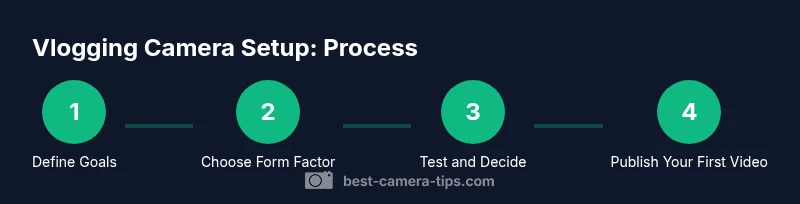
- 1
Define your vlog goals
Clarify your niche, typical shooting environments, and audience. This shapes what camera features you prioritize, such as autofocus, stabilization, or audio inputs.
Tip: Write down 3 must-have features before you shop. - 2
Set a realistic budget
Determine how much you’re willing to spend now and how you’ll allocate funds for growth (microphone, lights, spare batteries). A clear budget prevents overbuying features you won’t use yet.
Tip: Plan for accessories early; they often cost as much as the camera. - 3
Identify your form factor
Choose between smartphone, compact, mirrorless, or DSLR based on portability, weight, and upgrade path. Your choice impacts how you shoot and how easily you’ll travel with gear.
Tip: If you shoot on the move, prioritize lighter setups with good stabilization. - 4
Prioritize core specs
Assess autofocus reliability, mic inputs, stabilization, and battery life. These features directly influence how comfortably you can record long videos without interruptions.
Tip: Verify real-world autofocus performance in indoor and outdoor lighting. - 5
Check lens ecosystem
Consider whether you’ll grow with additional lenses, and whether the camera supports your preferred lens types. A flexible lens lineup expands your creative options.
Tip: Even with a single versatile zoom, you can cover multiple shooting styles. - 6
Run a hands-on test
Bring your typical lighting and mic setup to a showroom or store demo. Record short clips to evaluate color, exposure, audio, and handling.
Tip: Ask staff to simulate real-world conditions you expect in your videos. - 7
Evaluate total cost of ownership
Add up the price of the camera, lenses, mics, lights, and accessories over time. A slightly pricier body might save on upgrades later if it’s more future-proof.
Tip: Look for bundle deals that include essential accessories. - 8
Make a decision and test field user
Choose a camera you can confidently use for the next 3–6 months. Do a test vlog series to confirm you’re happy with the results and workflow.
Tip: Keep a quick-start checklist to ensure you don’t miss critical features during setup.
Common Questions
What camera do most successful vloggers use?
Successful vloggers use a mix of mirrorless cameras and high-quality smartphones, depending on their budget and goals. They typically prioritize reliable autofocus, good audio inputs, and portable form factors.
Most successful vloggers choose gear that fits their budget and workflow, usually a reliable mirrorless setup or a strong smartphone with a good mic.
Can I start with a smartphone?
Yes. A modern smartphone paired with an external mic and a small tripod can produce great results for beginners. It’s the fastest way to start publishing and testing your niche.
Absolutely—start with what you have, then upgrade as you grow.
Do I need an external microphone?
An external microphone significantly improves audio clarity. Built-in mics pick up room noise and camera handling sounds. A lavalier or compact shotgun mic is a good first step.
Yes—external audio is usually worth it for clear narration.
Is 4K necessary for vlogging?
4K is not strictly required for most beginners. 1080p is perfectly fine, and 4K helps future-proof footage and allows more flexible cropping in post.
4K isn’t mandatory now, but it can help later if you plan to crop or reframe footage.
Should I worry about stabilization?
Yes. Stabilization keeps footage smooth and professional, especially in walk-and-talk or handheld shots. If your camera has good stabilization, you’ll notice a big uplift even without a gimbal.
Stabilization makes a huge difference in viewer comfort.
New vs used gear for beginners?
For beginners, new gear offers reliability and a warranty, but used gear can be budget-friendly if inspected well. Focus on checking the microphone input and battery health.
New gear is safer for beginners, but used can work if you’re careful.
Watch Video
The Essentials
- Define goals before buying to guide feature choices.
- Prioritize autofocus, audio, and stabilization for beginner-friendly vlogs.
- Balance budget with growth plans and essential accessories.
- Test gear in real-world scenarios before committing.
- Invest in sound quality as much as image quality.