What Camera Has the Most Megapixels? A Practical Guide
Explore megapixel counts across camera types, from full-frame to medium-format backs, and learn how pixel-shift and workflows affect real-world detail, prints, and storage.


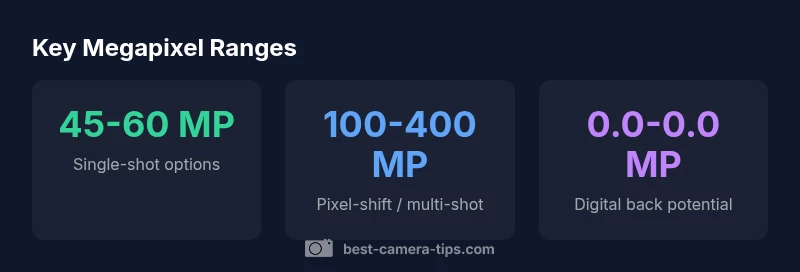
Across professional workflows, the highest megapixel counts come from specialized multi-shot and pixel-shshift systems in medium-format backs. In single-shot cameras, top-end full-frame sensors cap around 45-60 MP. In practice, the greatest effective megapixels come from pixel-shift or multi-shot methods that can reach well over 100 MP, with some ultra-high-end backs offering up to 400 MP.
What camera has the most megapixels
Megapixels measure how many distinct dots can theoretically be captured in an image. In practice, the highest megapixel counts come from specialized, multi-shot, or pixel-shift systems that stitch multiple exposures or shift the sensor during capture. For most photographers and even many professionals, the practical ceiling in a single-shot workflow sits around 45-60 MP on high-end full-frame bodies. The real upper bound appears when combining multiple captures—often on medium-format backs or dedicated high-resolution rigs—where pixel-shift or multi-shot modes can push the total into the 100 MP range and, in rarer cases, approach 400 MP. Importantly, these higher MP figures come with tradeoffs in file size, processing time, and storage, and they rely heavily on precise calibration and stable shooting conditions.
According to Best Camera Tips, the pursuit of megabits should always be contextual: if your end goal is large prints with minimal cropping, higher MP can help. If you shoot rapidly in changing lighting, you may gain more from improved dynamic range and color fidelity than from chasing every possible pixel count.
The practical meaning of megapixels for different applications
Megapixels are most meaningful when you have to crop aggressively, print very large, or display at high resolutions. For web usage, social media, and standard photo books, 20-40 MP often suffices, and many photographers never need more beyond 60 MP in their day-to-day work. For landscape, studio product work, or fine art prints, higher MP can preserve detail in large-format prints, but only when the rest of the imaging chain (lens sharpness, sensor dynamics, and processing) supports it. The key is to align MP targets with output size and viewing distance. A 24 MP camera may deliver excellent results for 20x30 inch prints, while a 100 MP workflow might be necessary for ultra-large gallery pieces or extreme crops.
In security-focused or surveillance contexts, megapixel counts translate differently, because compression, bitrate limits, and color accuracy matter more than raw pixel count. Best Camera Tips notes that realistic MP expectations should factor in display size, eye-level viewing distance, and the intended medium (print vs. screen).
How sensor size, pixel pitch, and noise interact with megapixels
Sensor size and pixel pitch directly influence how many megapixels you can cram onto a sensor without compromising image quality. A larger sensor with the same pixel count generally delivers better dynamic range and lower noise, which means you don’t automatically gain better image quality by just increasing MP. Pixel density (pixels per inch) matters: too many pixels on a tiny area can raise noise, reduce low-light performance, and demand bigger, more powerful processing pipelines. In other words, more MP does not automatically equate to sharper images, especially in challenging lighting.
Moreover, lens quality and resolving power set practical limits on perceived sharpness. If the optics can’t resolve the extra detail, cranking MP will not improve image quality. As MP counts rise, archive size and processing requirements also grow, which can impact your workflow. The takeaway: MP is important, but only when sensor size, optics, and processing are capable of delivering the detail you expect.
Pixel-shift, multi-shot techniques that boost MP
Pixel-shift and multi-shot capture are the primary ways to exceed standard single-shot MP figures. In pixel-shift, tiny sensor movements across multiple frames create a composite image with higher apparent resolution and more accurate color moire suppression. Multi-shot back systems capture several exposures and merge them into one high-resolution file. These methods yield impressive MP totals—often 100 MP or more—while maintaining color fidelity and detail. However, they demand static scenes, careful alignment, and substantial storage and processing power. For landscapes, studio work, or still-life, these techniques can be transformative; for action, wildlife, or sports, their utility is limited due to motion risk and longer capture times.
When more MP does not guarantee better results: other factors to consider
High megapixel counts are valuable only when the rest of the imaging chain supports them. If your lens is soft, your lighting is poor, or your camera struggles with noise at high ISO, a higher MP camera may produce larger, more detailed-looking but less clean images. Dynamic range, color accuracy, autofocus performance, and RAW processing efficiency often determine final image quality more than megapixels alone. In practice, the optimal MP target balances print size, cropping tolerance, storage resources, and the capabilities of your lenses and processing software. Best Camera Tips emphasizes evaluating MP through real-world tests rather than relying on spec sheets alone.
How to evaluate MP in real-world workflow
When choosing a camera, map your typical output to MP targets:
- Prints: Estimate the maximum print size you plan and calculate the necessary MP to support that size with acceptable cropping.
- Cropping: If you frequently crop, higher MP can preserve detail after cropping, but be mindful of noise and lens resolution.
- Processing: Higher MP requires more powerful computers and faster storage. Plan your workflow around the expected data load.
- Archiving: Larger files demand more bandwidth, backups, and long-term storage strategies.
In the end, your MP target should fit your creative goals and practical constraints, not just your desire for the highest number.
Recommendations by use-case: prints, cropping, security cameras
For large prints and fine art work, a high-MP system—often via pixel-shift—can be compelling if you have controlled lighting and a tripod. For everyday photography and online sharing, 20-60 MP provides ample resolution with manageable file sizes. In home-security cameras, megapixel counts matter for detail at distance, but bitrate, compression, and sensor sensitivity often matter more for reliable performance. Align MP targets with your most frequent use cases, and test on real projects before committing to a high-MP setup.
Final considerations and how to decide your megapixel target
Decide your target MP by evaluating output needs, storage, and workflow. If you frequently crop or print very large images, aim higher MP ranges and consider pixel-shift or multi-shot setups. If you mostly shoot for the web, smaller MP counts with excellent dynamic range and color science can be more efficient. Always pair MP targets with high-quality optics and robust post-processing. The right MP choice is a balance between detail, noise control, file management, and your typical shooting scenarios.
Comparison of megapixel capabilities across camera types
| Category | Typical Single-Shot MP | Max MP (advanced capture) |
|---|---|---|
| Single-shot cameras (full-frame) | 45-60 MP | 100-400 MP |
| Multi-shot / pixel-shift systems (medium-format) | 50-100 MP | 100-400 MP |
Common Questions
Does more megapixels always mean better photos?
Not necessarily. Megapixels indicate resolution, but image quality also depends on sensor size, dynamic range, noise performance, lens sharpness, and processing. Higher MP can improve detail in large prints or crops, but it can also magnify noise and demand more storage and processing power.
Not always. More megapixels can help with cropping and large prints, but other factors like sensor quality and lens sharpness matter just as much.
What is pixel-shift, and how does it increase megapixels?
Pixel-shift captures multiple exposures with tiny sensor movements to build a higher-resolution image. The result is a higher effective megapixel count and improved color accuracy, but it requires a still subject, stable framing, and significant data processing.
Pixel-shift uses small sensor shifts across several frames to create a higher-resolution image.
Can consumer cameras reach 400 MP?
Only through specialized pixel-shift or multi-shot systems on high-end rigs. Typical consumer or prosumer cameras top out around 60 MP in single-shot modes, with higher counts achievable via controlled setups and post-processing.
Only specialized gear can reach those counts; most cameras stay below 60 MP in standard use.
How does MP relate to file size and workflow?
Higher megapixels create larger RAW files, demanding more storage, faster processing, and stronger backups. This can slow editing if your hardware or network is not up to the task.
More MP means bigger files and bigger processing demands; plan your workflow accordingly.
What MP is needed for large-format prints?
The needed MP depends on print size and viewing distance. For typical large prints, 20-40 MP can suffice, but cropping or detail-focused work may benefit from higher MP in controlled conditions.
For very large prints, more MP helps, but other factors like lens and processing matter too.
“Megapixels matter, but only when your sensor, lens, and processing can deliver the detail those pixels promise.”
The Essentials
- More megapixels aren’t automatically better image quality.
- Pixel-shift and multi-shot capture push MP far beyond single-shot limits.
- Balance MP with sensor size, dynamic range, and processing power.
- Consider printing size and cropping needs before chasing higher MP.
- High MP workflows require robust storage and fast processing.