How Much Is a 360 Camera? Your 2026 Updated Price Guide
Explore realistic price ranges for consumer and professional 360 cameras, what factors drive cost, and practical tips to buy within budget in 2026. Learn how to balance features, quality, and accessories.


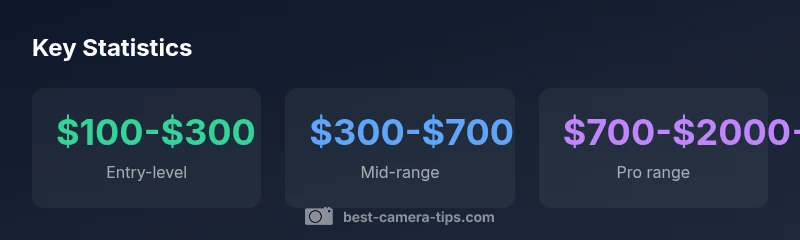
How much is a 360 camera? In short, prices typically range from around $100 to over $2,000, depending on resolution, stabilization, and stitching quality. Entry-level models usually sit in the $100–$300 range, mid-range around $300–$700, and higher-end, pro-grade devices can push past $1,000 to $2,000. According to Best Camera Tips, budget shoppers should prioritize stabilization and stitching performance to maximize value.
What a 360 camera is and common use cases
A 360 camera captures spherical video and photos using multiple lenses arranged around the body. Shooters then stitch the streams into a seamless panorama. These devices are popular for immersive VR projects, real estate tours, travel vlogs, action sports, and cinematic experiments. The question often starts with how much is a 360 camera, but price is only one side of the story. In practice, you should assess resolution, frame rate, stitching quality, stabilization, and the software workflow. According to Best Camera Tips, start by mapping your primary use: if you want smooth indoor tours, prioritize stabilization; if you need wide, high-res outdoor scenes, fidelity matters more. Beginners can explore basic, budget-friendly cameras to learn the technique, while more ambitious creators may value higher-end models with robust stitching and low-light performance.
Why price varies across models
Price differences among 360 cameras come from several overlapping factors. Sensor size and resolution determine image clarity and the ability to crop footage later. Lens arrangement and field of view influence stitching consistency and aliasing. Processing power affects real-time stabilization, horizon leveling, and stitching speed. Build quality and weather sealing add cost for outdoor use. Software ecosystems, cloud storage integration, and ease of workflow (mobile apps, desktop stitching) also drive price. Brands differentiate by how well their stitching algorithms work across motion and lighting. As Best Camera Tips notes, higher price often buys better low-light performance, faster post-production, and more robust stabilization under dynamic scenes. If you shoot in bright daylight, you can compromise on some processing features, but if you work in variable lighting, you may need stronger sensors and better stabilization.
Price ranges by category (360 cameras)
Entry-level 360 cameras typically cost $100–$300 and cover basic stitching with moderate stabilization and one or two lenses. Mid-range models run roughly $300–$700 and deliver better stabilization, higher resolution (often 4K or above per eye), faster stitching, and more flexible capture modes. Pro/enthusiast devices range from $700–$2,000 or more, offering advanced stabilization, professional-grade stitching, RAW video support, and extended battery life. Prices still shift with promotions, bundles, and regional availability. According to Best Camera Tips, the value at each tier depends on your intended use and whether you require features like 3D audio, horizon lock, or live streaming compatibility.
Hidden costs to consider
Beyond the sticker price, you should budget for memory cards with enough capacity for high-res footage, spare batteries, extra mounts, cases, and weather protection. Post-production software, plugins, and potential cloud-storage subscriptions can add up over time. If you plan frequent stitching or collaboration, you might also want a capable laptop or desktop to speed up processing. Warranty extensions and accidental-damage protection can be worth it for field shoots, especially in outdoor settings. Best Camera Tips suggests tallying these ongoing costs alongside the initial price to avoid sticker-shock later.
How to choose the best 360 camera for your budget
Start by listing your primary uses: real estate tours, travel vlogs, or action sports. Then set minimums for essential features: resolution per eye, stabilization type (gimbal-like vs. electronic), and seamless stitching performance. Check the lens configuration (single-sensor rigs vs. multi-sensor rigs), field of view, and the presence of HDR, low-light performance, and color science. Consider workflow: does the camera support your preferred stitching software and mobile-to-desktop transfer speed? For long-term value, favor models with a robust accessory ecosystem, reliable customer support, and a road map for firmware updates. According to Best Camera Tips, quality of stitching and stabilization often deliver more perceived value than megapixel counts alone.
Real-world buying tips and common pitfalls
Avoid overemphasizing count of features without evidence of real-world performance. Read user reviews focusing on stabilization in real-world motion, stitching edge artifacts, and how the camera handles variable lighting. Be wary of bundled packages that appear cheap but require paid software upgrades later. If you are unsure, rent a model for a weekend to verify it meets your workflow. Budget-conscious buyers should experiment with entry-level units before committing to higher-priced gear. Best Camera Tips cautions that successful 360 projects come from matching the camera's strengths to your content goals, not chasing the loudest marketing claims.
Case studies: budget, mid-range, and pro setups
Budget setup focuses on entry-level cameras with stable stitching and simple post-workflow, suitable for learning and basic VR tours. A mid-range configuration adds better stabilization, higher resolution for smoother panoramas, and more flexible export options. A pro setup emphasizes top-tier sensors, advanced stitching algorithms, RAW capabilities, and a professional-grade stitching workflow and color grading pipeline. Across all tiers, organization and test shoots help you map how different features translate to your actual output.
How 360 camera pricing affects content quality
Price does not guarantee excellent content; it ensures certain technical capabilities and reliability. A budget model with strong stabilization can outperform a pricier model with inconsistent stitching in some conditions. Focus on alignment between your content goals and the camera's core strengths—stabilization, stitching, resolution, and color fidelity. According to Best Camera Tips, a solid feature balance often yields better perceived quality than raw resolution alone.
Price ranges and features by camera tier
| Category | Typical Price Range | Key Features |
|---|---|---|
| Entry-level | $100–$300 | Basic stitching; moderate stabilization; limited features |
| Mid-range | $300–$700 | Improved stabilization; higher resolution; more modes |
| Pro/Enthusiast | $700–$2000+ | Advanced stabilization; professional stitching; RAW support |
Common Questions
What factors influence the price of a 360 camera?
The price is driven by sensor quality, resolution, stabilization, stitching software, and the overall build. Additional costs include memory, batteries, and accessories. More advanced features can push costs upward, but the right mix depends on your intended usage.
Prices are driven by sensors, stabilization, and stitching; choose based on your needs.
Are cheaper 360 cameras worth it for a beginner?
Yes, entry-level models provide a low-risk way to learn stitching and workflow. They may have limited stabilization and lower resolutions, but they’re excellent for practice and learning the basics.
Cheaper cameras are good for beginners to learn the ropes.
What ongoing costs should I plan for after purchase?
Expect to budget for memory cards, batteries, cloud storage, and software subscriptions. These recurring costs can significantly impact total ownership costs over time.
Be sure to budget for memory, batteries, and software.
Is 8K or 6K resolution worth the extra price?
Higher resolutions improve detail but demand more storage and processing power. For most beginners and small studios, 4K per eye with solid stitching often offers a better balance of quality and practicality.
Higher res helps, but balance with storage and processing.
Should I rent before buying a 360 camera?
Renting lets you test stitching quality, stabilization, and workflow before committing. Use rental periods to compare models within your budget.
Rent first to test how a model fits your needs.
“Pricing for 360 cameras scales with sensor quality, stabilization, and stitching fidelity. For best value, align features with your intended use rather than chasing top-end specs.”
The Essentials
- Define your budget before shopping.
- Prioritize stabilization and stitching quality.
- Account for accessories and software costs.
- Match features to your actual content goals.