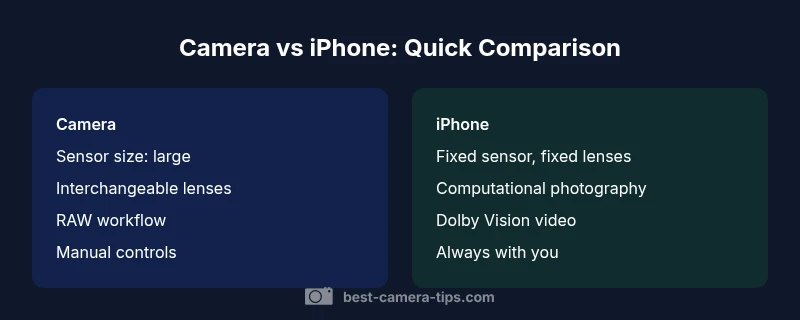
Camera vs iPhone: An Analytical Comparison
A rigorous, evidence-based comparison of dedicated cameras and iPhone photography, covering image quality, control, processing, video, workflow, and ideal use cases for aspiring photographers and home security enthusiasts.


Camera vs iPhone: a practical comparison for photographers and home-security enthusiasts. A dedicated camera usually delivers superior image quality, broader dynamic range, and lens flexibility, with strong performance in low light. The iPhone excels in portability, instant sharing, and advanced computational photography that can rival traditional rigs for many everyday scenes. Choose the camera when control and adaptability matter; choose the iPhone for speed, convenience, and consistency in everyday shooting.
Why the camera vs iphone comparison matters
For aspiring photographers and home-security enthusiasts, the choice between a dedicated camera and an iPhone influences workflow, risk, and results. The phrase camera vs iphone captures a long-standing debate between flexibility, image quality, and convenience. This comparison matters because technology is converging yet still leaves clear gaps: larger sensors and interchangeable lenses offer vaults of control, while a phone integrates processing, connectivity, and always-on portability. Understanding these differences helps you plan a realistic kit, manage costs, and design shooting routines that fit your goals. As you read, you’ll notice how sensor physics, optics, and software interact to narrow the gap in typical scenarios while preserving meaningful gaps in extreme conditions.
According to Best Camera Tips, the evolving landscape means most hobbyists can achieve compelling results with either option, but the choice should reflect your primary needs—image quality, flexibility, or convenience—rather than a single feature. This article aims to sharpen that decision by weighing the core tradeoffs without resorting to hype.
Core differences in image quality and control
When you examine image quality, a true camera typically edges out in dynamic range, color rendition, and noise performance, especially in RAW workflows and custom color grading. Dedicated sensors, larger pixel pitch, and faster lenses enable finer control over exposure and tonality. In contrast, modern iPhones compensate with computational photography, multi-frame merging, and optimized noise reduction, producing flattering results with minimal effort. The result is often a visually pleasing image straight out of the camera, suitable for social sharing, but the underlying data and post-processing options may be more limited than a RAW-capable camera. For those learning photography, this means you can practice composition and lighting on either device, but the path to professional-grade results benefits from a camera with RAW capabilities and manual controls.
Lenses, optics, and versatility
A major differentiator is lens versatility. A dedicated camera system offers interchangeable lenses—wide, standard, telephoto, macro, and specialty glass—that can dramatically alter perspective and image behavior. This flexibility is especially valuable for genres like landscape, sports, wildlife, and product photography, where precise optical characteristics matter. An iPhone, meanwhile, provides built-in multi-lens setups in newer models, often including ultra-wide and telephoto options, plus computational features that simulate depth, bokeh, and HDR. While the iPhone’s system covers many everyday tasks, it cannot replace the optical flexibility of a purpose-built lens kit. For serious work, the choice hinges on whether you need range, speed, and optical quality or convenience and compactness.
Computational photography and processing power
Smartphones excel in processing power and software-driven enhancements. The iPhone uses neural processing and sophisticated scene recognition to optimize exposure, white balance, and noise reduction in real time. This yields consistent results and advanced features like night modes and intelligent HDR without manual tweaking. A dedicated camera provides maximum control through settings, including raw capture, white balance, ISO, shutter speed, and color profiles, letting you push the image in post-processing. For volumes of work that require reproducibility and precise color management, a camera remains the safer choice; for quick-turnaround content and selfies, the iPhone’s pipeline can often outperform expectations.
Video capabilities and stabilization
Video performance highlights the practical differences. A true camera typically offers deeper control over frame rates, raw video, log profiles, and higher bitrates, along with robust stabilization when paired with gimbals and rigs. The iPhone provides impressive video capabilities, including high-quality video capture, Dolby Vision HDR, and practical stabilization that works well for vlogging and run-and-gun shooting. For cinematic projects or controlled studio shoots, a camera’s professional tools win; for travel footage or social media content, the iPhone’s simplicity and automated features are extremely compelling.
Portability, cost, and value over time
Portability matters: a single smartphone is light, unobtrusive, and always with you; a camera system adds weight, bulk, and ongoing costs for bodies, lenses, and accessories. Cost considerations vary: a dedicated camera brings higher upfront costs and maintenance, but it can retain value and deliver professional-grade results that justify the investment depending on your goals. The iPhone’s value is in its convenience and perpetual upgrade cycle; however, long-term costs may accumulate if you upgrade devices frequently to chase incremental improvements. The best approach aligns with your expected usage, budget, and whether you value future-proofing through investment in optics or convenience through device-based photography.
Practical workflows: when to shoot with which device
In field work, you might use a camera for landscapes, portraits with controlled lighting, or situations demanding precise post-processing. For street photography, travel, or casual family moments, the iPhone often delivers faster results with consistent color in varying light. For home security and surveillance-related tasks, both devices can play roles: use the iPhone for quick mobile monitoring and alerts, and a camera with proper motion-detection sensors for longer-term recording. The takeaway is to design workflows that leverage each device’s strengths and to have a plan for syncing and backing up files.
Practical tips for maximizing results on both
- Learn the basics of exposure, white balance, and composition on whichever device you choose first.
- When possible, shoot RAW on a camera to maximize post-processing latitude; on an iPhone, explore ProRAW or equivalent options where available.
- Practice lighting techniques to elevate both devices: reflectors, natural light, and controlled ambient lighting can dramatically improve results.
- Keep lenses clean and protected, and carry minimal gear so you stay ready.
- Always shoot a few test frames and review histograms to understand exposure without relying solely on the screen preview.
Summary and setting expectations
In the camera vs iphone debate, both devices deliver compelling results under different constraints. A dedicated camera remains the strongest option for image quality, dynamic range, and optical flexibility, while the iPhone shines in portability, speed, and intelligent processing. Your choice should mirror your priorities—quality and control or convenience and immediacy—while recognizing that both tools can coexist in a modern photographer’s workflow.
Comparison
| Feature | Camera | iPhone |
|---|---|---|
| Sensor size / lens system | Large sensor with interchangeable lenses (APS-C/full-frame) for broad tonal range | Fixed, compact sensor with built-in multi-lens options in newer models |
| Image quality & dynamic range | Typically superior with RAW capture and professional glass | Excellent color science and HDR; strong results with processing |
| Low-light performance | Better performance with fast lenses and sensor size | Improved in recent models through computational improvements |
| Lenses & versatility | Wide lens family; telephotos; macro; specialty optics | Built-in zooms; limited physical optics but software assists |
| RAW support | Full RAW workflows (unprocessed data) with wide editing latitude | ProRAW or RAW-like options; still sensor-limited by size |
| Portability & size | Bulkier; requires bags and carrying case | Pocket-sized; always with you for spontaneous shots |
| Video capabilities | Professional-grade profiles, higher bitrates, advanced controls | Dolby Vision HDR; excellent stabilization; easy to share |
| Price & value | High upfront cost for body + lenses; long-term value depends on use | Lower upfront cost; ongoing device upgrades; built-in value |
Positives
- Higher image quality potential with larger sensors and lenses
- Greater control over exposure, color, and depth of field
- more versatile for professional workflows and post-processing
- Longer-term value in dedicated gear when used professionally
- Advanced video capabilities with professional-grade workflows
Downsides
- Higher upfront cost and ongoing lens maintenance
- Bulkier, heavier kit and more gear to manage
- Requires technical knowledge and time to learn
- Software updates and gear depreciation can affect value
Dedicated cameras outperform for quality and control; iPhone dominates in convenience
If your priority is image quality, flexibility, and professional-grade output, choose a camera. If you value portability, speed, and built-in intelligent processing, the iPhone is a formidable choice for most everyday scenarios.
Common Questions
Is a camera necessary for professional photography if I own an iPhone?
Not always. For many professional roles, a camera with interchangeable lenses offers creative control and image quality advantages. However, a modern iPhone can handle many assignments with efficient workflows when time, space, and speed are critical.
A camera isn’t strictly necessary for all professionals, but it provides control and quality advantages that many assignments demand. The iPhone covers fast, on-the-go work well, so many shooters use both depending on the situation.
Can you shoot RAW on iPhone, and does it compare to RAW on a camera?
Yes, newer iPhones support RAW-like formats (such as ProRAW) that preserve more data than standard JPEGs. While convenient, RAW on iPhone is still limited by the sensor size and optics compared to a dedicated camera with larger sensors and a wider lens ecosystem.
Yes, there are RAW options on iPhone, but the data and flexibility aren’t identical to a dedicated camera with a bigger sensor.
What scenarios favor a camera over an iPhone?
Shooting conditions that demand maximum image quality, dynamic range, and creative control—such as studio work, landscapes, wildlife with long lenses, or fashion portraits—favor a camera. Travel or spontaneous moments favor the iPhone for speed and portability.
If you need top-notch image quality and control, choose a camera; for quick, everyday captures, the iPhone is often superior.
Do dedicated cameras have better autofocus than iPhones?
Dedicated cameras typically offer faster, more predictable autofocus in challenging scenes, especially with high-end bodies and lenses. Modern iPhones have improved autofocus through software, but they can lag in very fast, unpredictable action or low-light priority scenarios.
Cameras usually edge out in autofocus speed and reliability in tough scenes; iPhones are improving, especially in daylight and casual settings.
Are there any drawbacks to relying solely on a camera or solely on an iPhone?
Relying solely on a camera can limit everyday usability, travel convenience, and quick social sharing. Relying solely on an iPhone may restrict future flexibility in professional post-processing or expansive lens ecosystems. A hybrid approach often yields the best of both worlds.
Using only one device can limit flexibility; many shooters benefit from a hybrid setup.
How important is video quality between the two options?
Both platforms offer strong video capabilities. Cameras support advanced profiles and higher bitrates with external options, while iPhones provide excellent stabilized video, user-friendly editing, and widespread compatibility. Your choice depends on the required control versus portability.
Video on both is good; pick based on how much control you need and how portable your setup must be.
Can I mix both devices in a single workflow efficiently?
Yes. Use the camera for high-quality stills and RAW workflows, then switch to the iPhone for quick capture, social posting, or location scouting. Syncing assets digitally and maintaining consistent color profiles helps keep results cohesive.
Absolutely—use the camera for quality work and the iPhone for quick content and sharing, syncing later.
The Essentials
- Define your priority: quality or convenience
- Invest in lenses for cameras to maximize versatility
- Use RAW where possible on cameras; explore ProRAW on iPhone
- For travel and quick content, the iPhone is a practical tool
- Consider a hybrid workflow: camera for critical work, iPhone for rapid sharing