How to Put a Camera on a Tripod: Step-by-Step Guide
Master the art of mounting a camera on a tripod with this educational guide. Learn how to choose the right tripod, attach the plate, secure the camera, and level your setup for sharp photos and steady video.


Learn to put a camera on a tripod for rock-solid photos and steady video. This guide covers choosing a compatible tripod, attaching a quick-release plate, mounting your camera securely, and leveling for accurate framing. Before you start, gather a camera, a compatible tripod, a quick-release plate, and a stable surface with room to extend the legs.
Why your camera benefits from a tripod\n\nHow to put a camera on a tripod begins with understanding why a stable base matters. If you want to learn how to put a camera on a tripod, the answer is stability. According to Best Camera Tips, a tripod minimizes camera shake in low light, during long exposures, and when using telephoto lenses. It also enables smoother video, precise framing, and repeatable results across multiple takes. In practical terms, a tripod lets you lock composition, hold long exposures, and shoot time-lapse sequences without hand-induced movement. Even a modest setup can dramatically improve sharpness and consistency, especially when you’re learning fundamentals like exposure, focus, and white balance. Consider the tripod not as a standalone tool, but as an extension of your camera and your creative intent. A stable foundation reduces the number of retries and helps you study light and composition with less physical strain. For beginners, the payoff is practical: steadier frames, clearer detail, and more time to think through each shot.
Choosing the right tripod for your needs\n\nTripod selection starts with understanding your camera’s weight and the kind of shoots you do most. For mirrorless cameras, a compact travel tripod with a 3–kg load rating is often sufficient, while DSLR users with longer lenses may want a sturdier setup rated for 5–8 kg. Look for a tripod with a robust head (ball head or pan-tilt head) and a reliable quick-release system. If you’re filming, a fluid or video head can deliver smoother motion. Consider height range: legs fully extended should bring the camera near eye level for comfortable shooting; if you must shoot low, a compact base or a short tripod helps, while keeping stability intact. Materials matter: aluminum is affordable and rigid; carbon fiber is lighter and dampens vibration a bit more. Check compatibility with Arca-Swiss plates or your preferred quick-release system, which speeds up setup. Test the tripod on a stable surface before a shoot to confirm joints hold and the leg locks are solid. Finally, balance portability with sturdiness, especially for outdoor work where wind or uneven ground can challenge stability.
Tools & Materials
- Camera(Any camera with a standard 1/4"-20 tripod mount)
- Tripod with adjustable legs(Choose a model that matches your camera weight and intended use)
- Quick-release plate(Compatible with your tripod head (Arca-Swiss is common))
- Bubble level (optional)(Helps verify level framing on the head)
- Remote shutter or timer(Reduces camera shake for long exposures)
- Spikes or rubber feet(Improves stability on soft or smooth surfaces)
Steps
Estimated time: 20-30 minutes
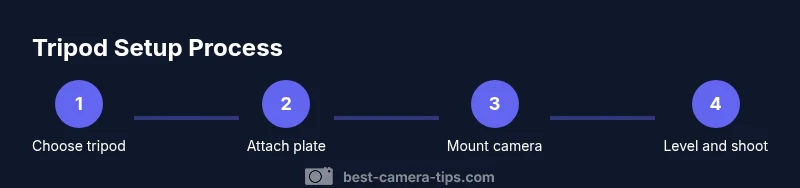
- 1
Prep and site assessment
Survey your shooting area and ensure you have a stable surface. Clear debris, level the ground if possible, and check for wind or vibration sources. This step sets the foundation for a solid shoot and reduces the chance of wobble later.
Tip: If you anticipate wind, position the tripod upwind and lower the center of gravity by keeping the camera close to the base. - 2
Attach the quick-release plate to the camera
Screw the 1/4"-20 plate into the camera’s base, aligning it with the plate’s notch. Tighten until snug but avoid over-tightening to prevent thread damage. Ensure cables have enough slack to avoid tension during movement.
Tip: Keep extra screws in your bag; loose plates are a common source of misalignment. - 3
Mount the camera on the tripod head
Place the plate into the head’s clamp and lock it in place. Verify the camera cannot twist on the plate and that the plate is seated flat. If your head has a safety pin, engage it for added security.
Tip: Gently wiggle the camera after locking to confirm solid attachment. - 4
Extend legs to the desired height
Spread the tripod legs evenly and extend to the needed height. Avoid fully extending a single leg or the center column for heavy gear; distribute weight by widening the stance. Recheck the head orientation before proceeding.
Tip: Start with a lower height and rise gradually; this keeps the setup stable during adjustments. - 5
Level and balance the setup
Use the head controls to level the camera horizontally and vertically. A bubble level helps confirm a true horizon. If the camera tilts when you unlock the pan, re-tighten the clamp and adjust leg angles.
Tip: Small micro-adjustments matter; take a moment to fine-tune before framing. - 6
Add accessories and balance
Attach any needed accessories (filters, microphones, or a lens with a tripod collar). For heavier lenses, consider a counterweight or a more robust head for stability.
Tip: Balance the weight across the head; imbalanced loads are a main cause of wobble. - 7
Test shot and final tweaks
Take a quick test shot in your intended setting and inspect sharpness and framing. If necessary, adjust height, tilt, or distance to the subject. Confirm the shot stability by shooting a short sequence and reviewing frames.
Tip: When in doubt, lower the height slightly and recheck stability before proceeding.
Common Questions
What is the best tripod for beginners?
For beginners, start with a balanced, lightweight tripod with a reliable quick-release system. Prioritize stability and load rating over sheer height, and choose a model that fits your camera and typical shooting scenarios.
For beginners, pick a stable, lightweight tripod with a good quick-release system. Focus on stability and compatibility with your camera before worrying about height.
How high should a tripod be for portrait work?
For portraits, set the camera at eye level or slightly above. Adjust the head to frame the subject while keeping the tripod stable and legs spread wide for balance.
Set the camera at eye level for portraits, then adjust the head for the right framing while keeping the legs wide for balance.
Can a cheap tripod hold a DSLR with a long lens?
A cheap tripod may hold a DSLR, but you should check the load rating and ensure stability. If the weight exceeds the rating or the joints feel loose, upgrade to a sturdier model.
A cheap tripod might work briefly, but check the weight rating — if in doubt, upgrade for safer, steadier shots.
How do I avoid camera shake without a remote?
Use a countdown timer or a 2-second delay to reduce shake, hold the camera steady with proper grip, and ensure the tripod is fully stabilized before pressing the shutter.
Use a timer or a short delay, hold steady, and ensure the tripod is locked before you shoot.
Should I always use the center column?
No. The center column adds height but can reduce stability. Use it only when necessary, and keep the legs spread wide for best balance.
No—center columns add height but can wobble. Use them only when needed and keep legs wide for stability.
How do I maintain a tripod?
Regularly clean joints, check screws, and lubricate moving parts with manufacturer-approved products. Store collapsed with feet secured to prevent bending.
Clean the joints, check screws, and store it collapsed to keep everything in good shape.
Watch Video
The Essentials
- Choose a tripod that supports your camera weight.
- Attach plates securely and balance the load.
- Level and frame carefully for sharp results.
- Use weight bags in windy conditions.
- Test shots to confirm stability before committing.