Can You Put Cameras on a Rental Property: A Practical Guide
Explore legal, privacy, and practical considerations for placing cameras on rental properties, with step-by-step guidance for landlords, tenants, and property managers.


Yes, landlords can install exterior cameras on rental properties in many cases, but not in private spaces or interiors, and not to monitor tenants. Use exterior-facing cameras for entries, perimeters, and common areas, while avoiding windows into living spaces. Always check lease terms, local laws, and obtain written consent where required; post clear signage.
Legal and Privacy Foundations
According to Best Camera Tips, rental properties require a careful balance between security and tenant privacy. Before purchasing and installing cameras, learn the local surveillance laws, lease provisions, and any homeowners association rules that apply to your building. In many places, video-only cameras aimed at exterior areas or shared entrances are allowed, provided they do not intrude into private spaces or record conversations. Always verify whether consent, notices, or disclosures are mandated for your jurisdiction and property type. If you collect identifiable information through video, implement a basic retention policy and data protection measures. Remember that privacy expectations differ: what’s permissible for a single-family home may differ from a multi-tenant building or a property managed by a third party. This balance—security without overreach—defines compliant surveillance.
Placement, Coverage, and Privacy Boundaries
Placement decisions should focus on entry points, driveways, and perimeter coverage rather than interiors. Exterior cameras help deter theft, monitor access points, and aid in incident response without invading tenants’ private spaces. Install cameras high enough to resist tampering and angled to capture doors, stairs, and sidewalks without peering into bedroom or living room windows. Use weatherproof housings and night-vision features for 24/7 reliability. If you rent a multi-unit property, coordinate with property management to align with signage and notices. Do not install cameras inside a unit, in hallways that singal privacy, or in private rooms like bathrooms or laundry areas. Some jurisdictions restrict audio recording; if supported, disable audio unless legally required or clearly disclosed. Boundaries matter for trust and compliance.
Equipment, Resolution, and Storage Basics
Choose cameras that suit exterior use: weatherproof IP cameras with clear night vision and adequate field of view. Decide between wired and wireless setups based on building structure, internet reliability, and vandal resistance. Plan storage options—local microSD, network video recorders (NVR), or cloud storage—while keeping retention policies in mind. Ensure your Wi-Fi network is secure (strong passwords, guest network for tenants if sharing is necessary). For new installations, prefer cameras with tamper detection and automatic firmware updates to reduce vulnerability. Documentation of device models, placement maps, and retention rules is essential for future audits or disputes.
Tenant Communication and Documentation
Proactive communication reduces misunderstandings and protects relationships. Provide tenants with a clear, written surveillance policy outlining camera locations, purpose, retention periods, and access rights. Include contact information for privacy concerns and explain how footage will be used in case of incidents. Attach or reference a lease addendum that covers surveillance expectations and secure storage practices. Schedule a brief walk-through with tenants if possible, so they understand what’s being monitored and why. Transparency builds trust and minimizes conflict in ongoing property management.
Installation Readiness and Step Validation
Prior to mounting any device, confirm regulatory requirements, lease language, and landlord consent. Create a placement diagram showing camera fields of view, avoiding private spaces, and mapping signage. Verify electrical power availability for wired cameras or plan battery reserves for wireless units. Test cameras in a controlled setting to verify coverage, lighting performance, and motion alerts. Document the exact locations and angles for future maintenance and for tenant inquiries. If a tenant moves out, have a procedure to preserve evidence responsibly and ensure data privacy.
Common Pitfalls and Best Practices
Common mistakes include placing cameras inside living spaces, ignoring privacy signage, and failing to document consent. Always respect tenant expectations by limiting interior surveillance and avoiding audio capture. Keep footage access strictly controlled—only authorized personnel should view recordings. Regularly review retention policies and delete footage according to policy. Maintain a clear, up-to-date privacy policy and ensure all staff or property managers understand the legal boundaries. Finally, stay informed about any changes in local surveillance laws that could affect your setup.
Tools & Materials
- Exterior surveillance cameras (weatherproof, IP66+)(Choose cameras with night vision and wide dynamic range for outdoor lighting.)
- Mounting hardware and weatherproof housings(Screws, anchors, and brackets appropriate for exterior siding or brick.)
- Power source or high-capacity battery packs(Wired cameras require outlets or junctions; wireless systems rely on charged batteries.)
- Secure network setup (router, password, guest network if needed)(Isolate cameras on a dedicated network segment; enable firmware updates.)
- Storage solution (microSD, NVR, or cloud plan)(Establish retention period and access controls; document data handling.)
- Visible signage indicating recording(Place at entry points so tenants and visitors are informed.)
- Lease addendum or privacy policy template(Useful for documenting consent and expectations with tenants.)
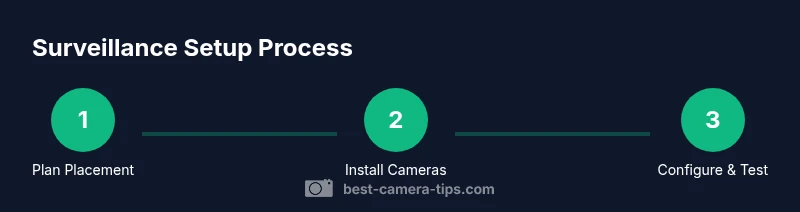
Steps
Estimated time: 45-90 minutes
- 1
Plan placement and compliance
Draft a placement map that avoids interiors and private spaces, and confirms consent and lease terms. Verify local regulations and ensure signage is in place before installation.
Tip: Create a simple floorplan overlay to visualize angles and minimize blind spots. - 2
Select equipment and secure permissions
Choose exterior cameras with weatherproofing and adequate field of view. Obtain written consent and align with lease or HOA rules.
Tip: Prefer cameras with tamper detection and automatic firmware updates. - 3
Mount cameras on exterior locations
Install cameras above eye level at entry points and along common perimeter walls. Avoid pointing at windows into private spaces.
Tip: Use sturdy mounts and conceal wiring where feasible to deter tampering. - 4
Configure recording and storage
Set up recording to a secure local or cloud storage solution. Define retention periods and restrict access to authorized users.
Tip: Test retention and access controls by attempting a login from a secondary account. - 5
Test coverage and signage
Validate angle coverage with live footage tests during different times of day. Ensure all signage is visible and legible.
Tip: Do a quick nighttime test to confirm infrared clarity. - 6
Document and communicate with tenants
Provide tenants with written policy, camera locations, and access rights. Maintain logs of consent and policy updates.
Tip: Keep a digital copy of the policy and your placement map for audits.
Common Questions
Is it legal to install cameras in rental properties?
Legality depends on local laws and lease terms. Exterior cameras are common, interior or audio recording may be restricted. Always verify requirements before installation.
Legality varies by location, but exterior cameras are common while interior cameras and audio recording often require consent and clear disclosure.
Can I record audio with property cameras?
Many jurisdictions prohibit audio recording without explicit consent. If allowed, disable audio by default and document consent requirements.
Audio recording is often restricted; if you must record audio, check local rules and get written tenant consent.
Do I need tenant consent to install cameras?
Consent requirements vary by jurisdiction and lease; providing written notice is a common best practice. Always document consent in the lease or an addendum.
Usually you need some form of consent or disclosure; keep it in writing and include it in the lease.
What areas are off-limits for surveillance?
Interior living spaces and private areas like bedrooms and bathrooms should be off-limits. Exterior cameras can cover entrances and perimeters.
Don't monitor private rooms inside the home; focus cameras on entryways and shared exterior areas.
How should footage be stored and who can access it?
Store footage securely with restricted access. Define retention periods and remove data when no longer needed, following your policy.
Keep recordings secure and access limited to authorized people; delete after the retention period ends.
What if a tenant refuses access to cameras?
Respect their rights; re-evaluate the surveillance plan, consider alternatives for security, and document any policy changes.
If a tenant refuses, revisit requirements and consider privacy-first alternatives; document decisions.
Do I need to notify buyers or lenders about surveillance?
Not typically required for sale, but landlords should ensure all disclosures are clear in the leasing documents and signage.
Disclosures in lease agreements are usually sufficient; signage should be visible to occupants.
Watch Video
The Essentials
- Understand legal boundaries before installing cameras.
- Plan placements that prioritize exterior views and privacy.
- Communicate clearly with tenants and document consent.
- Maintain secure storage and signage to build trust.