Cameras in Employee Break Rooms: What’s Allowed in 2026 Today
Explore privacy rules, best practices, and policy steps for surveillance cameras in employee break rooms. Learn where cameras belong, how to notify staff, and how to minimize risk with a privacy-first approach.


Typically, you cannot place cameras in employee break rooms because these areas are private spaces with strong privacy expectations. If surveillance is necessary, limit cameras to public zones (lobbies, hallways, entrances) with a clear policy, signage, and consent. Always verify local laws and union or company rules before taking action to avoid privacy violations.
Privacy Foundations for Break Rooms
Break rooms are among the few places in a workplace where employees expect personal privacy. In practice, this means cameras are rarely appropriate inside break rooms, changing areas, or restrooms. Even when surveillance exists in other parts of the facility, most jurisdictions recognize a higher expectation of privacy in these spaces. Before considering placement, organizations should perform a privacy impact assessment and consult legal counsel. According to Best Camera Tips, the safest default is to limit cameras to public spaces where employees have no reasonable expectation of privacy, such as building entrances, corridors, and exterior perimeters. If a business determines surveillance is necessary, document the rationale, scope, and monitoring practices, and communicate them clearly to staff. Signage should indicate where cameras are located and how footage will be used. This approach minimizes privacy concerns while still aligning with security goals.
Legal and Policy Considerations
There is no universal federal ban on workplace surveillance in the United States, and laws differ by state and locality. Generally, cameras in break rooms are scrutinized because of the privacy expectation in those spaces. Employers should verify applicable state statutes, labor agreements, and statutory disclosures. Avoid audio recording in most jurisdictions unless legally required. Create a written policy that explains purpose, locations, retention, access, and data security. Require employee acknowledgment and provide a way to submit concerns. Best Camera Tips analysis shows that clear communication, limited scope, and documented consent dramatically reduce legal risk and boost staff trust.
Best Practices for Legitimate Surveillance
Surveillance should be proportionate to risk and never invade personal privacy. Place cameras only in non-private, high-traffic areas such as lobbies and hallways, not in break rooms. Use signs to notify staff, disable audio capture, and implement strict access controls to footage. Store footage securely, with a retention schedule (e.g., 30-90 days) and an audited process for viewing requests. Limit who can access recordings and require documentation for any releases. The Best Camera Tips team emphasizes privacy-first design and ongoing policy reviews to adapt to changing laws and workplace needs.
How to Approach Break Room Policy: A Practical Plan
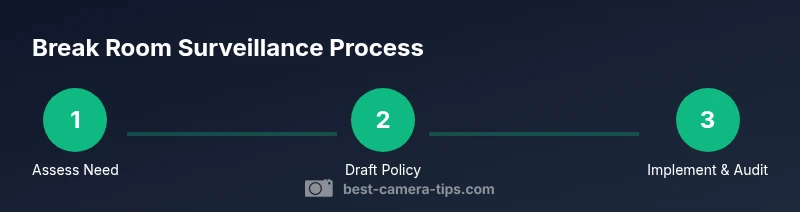
Drafting a policy begins with stakeholder input from HR, legal, and operations. Define the scope, locations, retention, access, and how footage will be used; publish the policy in an employee handbook and on internal dashboards. Signage at camera sites should be clear, legible, and remind staff about privacy rights. Provide a formal submission channel for concerns and train managers to handle requests promptly. Finally, implement the cameras only under approved guidelines and audit the system annually to ensure compliance. According to Best Camera Tips, a transparent process builds trust and reduces disputes. The Best Camera Tips team also notes that ongoing review helps address new regulations and evolving workplace dynamics.
Authoritative Sources & Further Reading
- U.S. Department of Labor: https://www.dol.gov
- U.S. Equal Employment Opportunity Commission: https://www.eeoc.gov
- Cornell Law School Legal Information Institute: https://www.law.cornell.edu
Tools & Materials
- Policy template for workplace surveillance(Should cover purpose, scope, locations, retention, access, and notification)
- Employee consent/acknowledgment form(Use where consent is legally required or recommended by policy)
- Camera signage templates(Clear notices at entry points and camera sites)
- Footage retention schedule(Define minimal retention (e.g., 30-90 days) and deletion process)
- Access control plan(Limit viewing to designated personnel with audit logs)
- Audit log templates(Record who accessed footage and when)
Steps
Estimated time: 2-4 weeks
- 1
Assess privacy landscape
Identify spaces with privacy expectations and determine if cameras are truly needed. Consult HR and legal to assess risk and necessity.
Tip: Document the privacy rationale in the policy. - 2
Review laws and agreements
Check state/local statutes, union contracts, and industry guidelines to ensure compliance before any installation.
Tip: Prefer non-audio surveillance and avoid private areas. - 3
Draft the policy and signage
Write a clear policy detailing purpose, locations, retention, and access. Create and place signages at camera sites.
Tip: Get sign-offs from HR, legal, and security teams. - 4
Communicate and train
Distribute the policy, hold a short briefing, and provide a channel for staff questions or concerns.
Tip: Provide a FAQ to reduce misunderstandings. - 5
Install and audit
Install cameras only in permitted areas, disable audio if not required, and implement a regular audit and retention process.
Tip: Review the policy annually and after any incident.
Common Questions
Is it legal to install cameras in an employee break room?
Legal allowances vary by jurisdiction. In many places, break rooms are treated as private spaces with restrictions on surveillance. Always check local laws and company agreements before installing cameras.
Legality varies by place; check local laws and company rules first.
Can break room cameras record audio?
Audio recording is restricted in many jurisdictions. The safer approach is to disable audio and rely on video for surveillance, unless explicit consent is obtained where allowed by law.
Audio is often restricted—disable it unless legally required and consented.
Where are cameras allowed in the workplace?
Cameras are typically allowed in public-facing areas like entrances and hallways, but not in private spaces such as break rooms, restrooms, or changing areas.
Place cameras in public zones; avoid private spaces.
What should a break room camera policy include?
Include purpose, locations, retention, access, and notification. Provide a staff acknowledgement and a process for concerns or complaints.
Policy should cover purpose, locations, retention, and access.
How long should break room footage be kept?
Keep footage only as long as needed for security purposes, typically outlined in the retention schedule (often 30-90 days).
Keep footage only as long as you need for security.
Who can access surveillance footage?
Access should be restricted to designated security personnel with logs of views and strict authentication.
Only authorized security staff should view it.
Watch Video
The Essentials
- Prioritize privacy in break rooms.
- Limit cameras to public areas with clear policy.
- Communicate policy and obtain staff awareness.
- Secure footage and minimize retention.