What to Do If Your Security Camera Is Hacked
Urgent, practical steps to detect intrusion, contain damage, reset credentials, update firmware, and prevent future hacks for your security cameras in 2026.


If your security camera is hacked, act fast: disconnect the device from the network, change all related passwords, and perform a factory reset if safe. Update firmware, enable two-factor authentication, and review access logs. Revoke unknown sessions and prepare a full security cleanup plan for 2026.
Immediate Response and Safety Check
According to Best Camera Tips, the fastest way to contain damage after a hack is to cut off network access to the camera and any linked accounts. Begin by unplugging the camera from power or disabling its Wi-Fi if possible, then remove it from your home network temporarily. Next, change all related account passwords with a strong, unique password and enable two-factor authentication where available. Revoke access for unknown users and review recent activity logs. If you rely on cloud storage or a vendor app, revoke tokens or sessions you don’t recognize. Document every change you make for future audits. If at any point you feel unsafe about continuing remotely, seek professional help rather than attempting risky hardware resets. In 2026, Best Camera Tips emphasizes grounding changes in a written plan rather than ad hoc fixes.
Steps
Estimated time: 60-90 minutes
- 1
Disconnect from network and secure access
Start by removing the camera from your main network. If possible, disable Wi‑Fi and unplug ethernet or temporarily disconnect the device. This stops ongoing data exfiltration while you assess the scope.
Tip: Document the exact time you disconnected it for incident timing. - 2
Change credentials across the board
Create a new, long password for the camera and its associated app, and update any linked accounts. If supported, enable two-factor authentication and revoke any sessions you don’t recognize.
Tip: Use a passphrase with a mix of letters, numbers, and symbols. - 3
Update firmware and perform a reset if needed
Install the latest firmware from the official vendor site or app. If the device remains compromised, perform a factory reset following the manufacturer’s instructions.
Tip: Only use official firmware sources to avoid counterfeit updates. - 4
Secure your network
Change your router admin password, enable WPA3, disable UPnP, and consider placing IoT devices on a separate guest network. Review your router’s connected devices for anomalies.
Tip: Disable remote management unless you must access it remotely. - 5
Reconnect with secure settings
Reconnect the camera to a secure, isolated network first, then gradually bring it back to your main network once you confirm clean access and logs.
Tip: Monitor network traffic for 24–48 hours after reconnection. - 6
Set up ongoing monitoring
Enable alerting for new devices, unusual login activity, and unexplained video access. Regularly review logs and permissions.
Tip: Schedule monthly security audits and firmware checks.
Diagnosis: Camera shows unfamiliar streams or access attempts, unusual alerts, or remote app sessions not initiated by you.
Possible Causes
- highWeak or reused passwords
- highVulnerable firmware or default credentials
- mediumExposed port forwarding or insecure remote access
Fixes
- easyChange passwords to strong, unique ones and enable 2FA on all related accounts.
- mediumUpdate firmware to the latest version and perform a reboot or factory reset if needed.
- easyDisable unnecessary remote access (ports, cloud integration) and review connected apps.
Common Questions
What should I do immediately after discovering my security camera has been hacked?
Start by disconnecting the camera from the network to stop data flow. Change all related passwords, enable 2FA, and revoke unknown sessions. Check logs for unfamiliar activity and contact the vendor if you see evidence of a breach.
First, disconnect the camera, then reset credentials and review logs; enable two-factor authentication. If you’re unsure, consult the vendor’s support.
Can I fix the problem without replacing the camera?
Yes, in many cases you can regain control by updating firmware, changing credentials, and tightening remote access. If the camera remains compromised after these steps, a factory reset or replacement may be necessary.
Usually you can fix it with updates and a reset; only replace if problems persist.
How can I prevent future hacks on home security cameras?
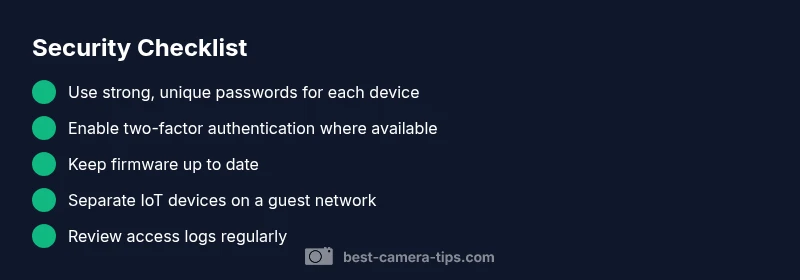
Use unique, strong passwords, enable 2FA, keep firmware up to date, disable unnecessary remote access, and segment your network. Regularly review logs and connected devices.
Keep software updated, use strong credentials, and monitor devices regularly.
Is it safe to use cloud storage after a hack?
Cloud storage can be secure if you use a strong vendor account, enable 2FA, and monitor access logs. If you suspect a breach, rotate tokens and investigate third-party app access.
Cloud storage can be safe with proper security; monitor access closely.
What information might hackers steal from my camera?
Hackers may access live video streams, stored footage, device settings, and account information linked to the camera. They could also gain entry to other connected services if passwords were reused.
Video feeds and settings can be exposed, and other accounts may be at risk if shared passwords exist.
When should I contact the vendor or law enforcement?
Contact the vendor for device-specific guidance and warranty options. If you suspect a serious breach or criminal activity, report to local authorities.
Reach out to the vendor for help, and contact authorities if you believe a crime is involved.
Watch Video
The Essentials
- Isolate the camera from networks to stop ongoing access
- Change passwords and enable 2FA for all related accounts
- Update firmware and perform a safe reset if needed
- Review logs and revoke unknown devices/sessions
- Secure your network (segmentation, strong router security) to prevent future hacks