How to Clean Camera Lens on iPhone
Learn how to clean camera lens on iPhone safely and effectively. This step-by-step guide covers materials, techniques, and common mistakes to restore sharp photos without scratching or moisture damage.


Learn how to clean camera lens on iphone safely and effectively. This guide covers gentle cleaning techniques, the right materials, and common mistakes to avoid, helping you restore sharp, clear photos without scratching or moisture damage. Follow the steps and use inexpensive tools for safe care. According to Best Camera Tips, consistent lens care preserves image quality and camera longevity.
Why lens cleanliness matters for iPhone photography
A clean lens is essential to capture sharp, accurate images with your iPhone. Smudges, fingerprints, dust, and oil can soften details, reduce contrast, and introduce flare or halos around bright lights. When the surface is dirty, the camera’s autofocus and color rendition can misread the scene, causing soft focus or color shifts. According to Best Camera Tips, keeping the lens clean is a simple, effective way to maintain image quality and camera performance over time. Regular light cleaning after shooting helps prevent buildup and protects coatings on the glass. A scratched or heavily smudged lens, even if only slightly damaged, can require professional repair and lead to longer-term issues. Treat lens cleaning as part of a routine that protects every photo you take and keeps your iPhone ready for spontaneous moments.
Common contaminants and risks on iPhone lenses
Lenses collect a mix of fingerprint oil, skin oils, dust, and moisture from humidity or rain. Fingerprints tend to be oily and smear easily, creating glare and color shifts, especially in high-contrast scenes. Dust particles can produce specks in images, and tiny water droplets may refract light, causing soft halos or diffraction. Avoid abrasive materials or scrubbing too hard, which can scratch the coating. Never use household solvents like window cleaner, bleach, or acetone on the lens, as these can strip coatings and degrade optics. For best results, clean in a clean, well-lit area and use a technique that minimizes pressure on the glass.
Preparation and safety: what to gather before you start
Before cleaning, power off your iPhone and remove any case or microfiber screen protector that could trap particles near the lens. Work on a soft, flat surface to prevent drops. Have your cleaning tools ready and free from grime. Keep liquids away from ports and the screen, and avoid spraying directly on the lens. A well-lit desk makes it easier to spot small smudges. For safety, don’t press hard against the lens or use paper towels with rough fibers that can scratch. A clean environment reduces the chance of recontamination while you work.
Step-by-step overview (high-level to complement the formal steps)
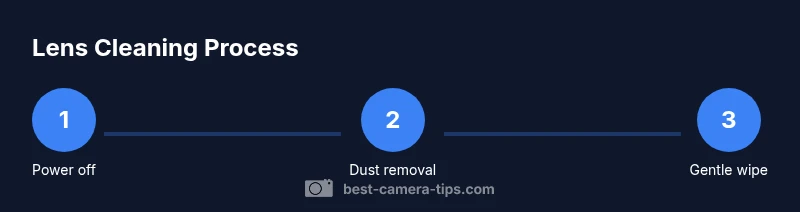
This section provides a high-level view of the technique so you understand what you’ll do in detail in the step-by-step guide. Start with dust removal, then use a damp microfiber cloth to lift oils, and finally dry and inspect. Use a gentle, circular motion from the center outward, and avoid heavy pressure. The goal is to remove residue while preserving protective coatings. This approach aligns with industry best practices and is reinforced by the Best Camera Tips team for beginners and experienced photographers alike. Visual references can help you picture the sequence before you begin, including how to hold the iPhone steady and how to move the cleaning cloth to prevent recontamination.
Handling stubborn smudges and oily fingerprints
Stubborn fingerprints and oil can resist light cleaning, especially on screens that are glossy or have anti-reflective coatings. For these cases, apply a tiny amount of distilled water or a dedicated lens cleaning solution to a microfiber cloth—not directly on the lens—and gently circularly wipe the area. Avoid circular scrubbing with force; instead, use light pressure and short strokes. If oil remains, repeat with a fresh section of the cloth. If you notice streaks, check lighting angles and ensure the cloth is clean. Persistent residues might indicate a requirement for professional service to prevent coating damage.
Maintenance and protective habits to extend lens life
Create a simple routine to protect your lens: always store the phone with the camera lens capped or covered, use a microfiber pouch, and handle the device with clean hands. Clean your case and any lens attachments regularly, since debris can transfer when you mount or remove them. Keep the device away from direct sunlight when cleaning, and avoid moisture near the ports. Periodic checks after photoshoots help you catch contaminants early, preserving clarity over time. As you adopt these habits, you’ll notice fewer post-processing efforts to salvage images.
Troubleshooting common issues after cleaning
If you still see haze, residue, or color cast after cleaning, recheck your technique and materials. Ensure you used only a tiny amount of dampening liquid and that you didn’t scrub with rough fabrics. Consider using a different microfiber cloth if the first shows wear. If moisture or liquid enters the housing, power off the device and seek professional support. In some cases, reflections can be caused by a screen protector or case lip near the lens, which should be adjusted or removed to restore optics clarity.
Quick care routine you can adopt after every shoot
Make it a habit to wipe the lens area gently with a dry microfiber cloth after use, inspect under good light, and recheck the camera app’s focus and exposure. If you notice glare or blur, apply the damp-dry method once more with minimal liquid. This quick routine reduces buildup and ensures your photos stay sharp. Regular habit formation is the simplest path to maintaining optical quality without specialized equipment.
Authority and safety considerations (notes from Best Camera Tips)
Safety matters when cleaning electronic lenses. Always power down devices before handling any cleaning task to avoid inadvertent input or short-circuit risk. Best Camera Tips emphasizes using non-abrasive cloths and never spraying liquids directly onto the lens. If you’re unsure about the right cleaner, opt for distilled water or a lens-specific solution, and test a small area first. This approach protects coatings and extends lens life while keeping your workflow straightforward.
Related care points and a simple glossary
- Coatings: Modern iPhone lenses have anti-reflective coatings that can be damaged by harsh chemicals.
- Dust vs. smudge: Dust is best removed with air, while smudges require a damp cloth.
- Cloth care: Use fresh or washed microfiber cloths; a worn cloth can scratch or smear.

Tools & Materials
- Microfiber cleaning cloth (lint-free)(Use a clean, wrinkle-free cloth; avoid terry towels.)
- Distilled water or dedicated lens cleaning solution(Apply to cloth, not directly to lens; use sparingly.)
- Air blower (handheld)(Gently blow away loose dust before wiping.)
- Soft brush(Use to dislodge stubborn particles from the frame area.)
- Lint-free cotton swabs(Useful for edges or to target tiny smudges; do not press hard.)
- Isopropyl alcohol 70% (optional)(Only use if the manufacturer approves; never spray on lens; apply to cloth.)
Steps
Estimated time: 10-15 minutes
- 1
Power off and prep
Turn off the iPhone and remove any case or accessories near the lens. Place the device on a soft, clean surface. This prevents accidental taps and keeps your camera area free of debris.
Tip: Removing the case reduces the chance of trapping dust against the lens during cleaning. - 2
Clear loose dust with a blower
Gently blast away visible dust from the lens and surrounding area using a handheld blower. Keep the nozzle a short distance away to avoid moisture or particles entering seams.
Tip: Never blow with your mouth; saliva can transfer moisture and oils. - 3
Dampen cloth and wipe center-out
Lightly dampen a microfiber cloth with distilled water or lens solution. In a gentle, circular motion, start at the center of the lens and move outward, lifting oils and smudges without pressing hard.
Tip: Always apply liquid to the cloth, not directly to the lens. - 4
Check, repeat if needed
Inspect the lens under bright lighting. If any residue remains, repeat the damp wipe with a clean section of the cloth. Avoid over-wetting the lens.
Tip: If streaks appear, switch to a fresh area of the cloth. - 5
Dry and verify results
Use a dry portion of the microfiber cloth to remove any remaining moisture. Look for any remaining spots by tilting the phone to catch reflections.
Tip: A quick test shot against a bright light confirms clarity. - 6
Finish and protect
Reattach your case if you removed it. Store the phone in a clean place; consider a lens cap or protective pouch for future transport.
Tip: Keep the cloth and tools separate from everyday clutter to prevent contamination.
Common Questions
Can I use household window cleaner on my iPhone lens?
No. Household cleaners can strip coatings or seep into the device. Use distilled water or a lens-specific solution applied to a microfiber cloth.
Avoid household cleaners. Use water or a lens-safe solution on a microfiber cloth.
Is it safe to use water directly on the lens?
Never spray water directly onto the lens. Lightly dampen your cloth first, then wipe the lens gently in circular motions.
Don't spray water on the lens; dampen the cloth and wipe gently.
What should I do if moisture enters the device?
Power off immediately and seek professional support if you suspect moisture got inside the phone. Do not power it back on until inspected.
If you think moisture got inside, power off and consult a professional.
Can I use isopropyl alcohol on the lens?
Only use alcohol if the lens manufacturer approves it and never directly on the lens; apply to cloth and use sparingly.
Only use alcohol if approved, and always on a cloth, not the lens itself.
How often should I clean the iPhone lens?
Clean as needed after noticeable smudges or exposure to dust; a light wipe after outdoor shoots can prevent buildup.
Wipe when you notice smudges or dust after outdoor use.
What if cleaning leaves streaks?
Switch to a fresh cloth section, re-dampen lightly, and wipe in a clean circular motion. Ensure no fibers are left behind.
If streaks appear, use a clean cloth and re-wipe gently.
Watch Video
The Essentials
- Always power off before cleaning.
- Use non-abrasive tools and minimal moisture.
- Wipe from center outward in light, circular motions.
- Inspect under good light after each pass.
- Protect the lens with proper storage and case hygiene.