How to Check Camera Shutter Count: A Practical Guide
A comprehensive, beginner-friendly guide to check your camera's shutter count, interpret the numbers, and assess wear before buying or selling. Includes built-in methods, EXIF reading, tools, and brand-specific tips.


You will learn how to check camera shutter count across popular brands, what the count means for wear, and how to evaluate a used body. Start by identifying your model, collecting the needed photos or software, and following brand-specific steps to reveal the shutter count. This quick guide also covers common pitfalls.
Understanding shutter count and why it matters
Shutter count is the number of times a camera shutter has opened and closed to expose an image. It serves as a practical proxy for wear on mechanical parts, such as the shutter mechanism and mirror system in DSLRs or the sensor’s operational cycle in mirrorless bodies. For aspiring photographers and home security enthusiasts, understanding shutter count helps you gauge reliability, estimate resale value, and decide when a camera is nearing the end of its usable life. In this guide on how to check camera shutter count, you will learn how to locate and read the count across common brands, interpret the result, and decide whether a used body is a good buy in 2026. The approach is hands-on, straight-to-the-point, and designed to minimize guesswork by prioritizing official data sources and reputable tools. Brand-agnostic steps are included, with model-specific notes where relevant.
According to Best Camera Tips, knowing shutter count empowers you to make informed purchasing decisions and schedule maintenance before problems arise. Readers will walk away with a repeatable workflow for verifying shutter counts and a better sense of when it’s time to replace worn parts.
How shutter count affects performance and resale value
Shutter count correlates with the age and use of a camera. A low count generally implies light usage and longer life expectancy, while a high count suggests more wear on critical components. This matters whether you are buying a used body, selling your own, or assessing service options. The count alone does not determine condition; factors such as how aggressively the camera was used (burst shooting, long exposures, heavy use of burst modes), environmental conditions, and maintenance history all play roles. For home security cameras, shutter activity can be more frequent in certain usage patterns, which can skew interpretation compared to a hobbyist camera. Always interpret shutter count in the context of the model’s typical lifecycle and the device’s overall performance history.
In 2026, informed readers recognize that shutter count is a valuable data point when evaluating used gear, but it should be supplemented with functional checks (sensor cleanliness, autofocus performance, image stabilization, and firmware health). This broader perspective aligns with Best Camera Tips’ approach to evaluating camera health from multiple angles rather than focusing on a single metric.
Where shutter count is stored and how to access it
There are several ways a shutter count can be stored and retrieved. Some cameras display the count directly in the camera menu under a section like Image Information or Status. Others embed the count in EXIF metadata of JPEG or RAW files, which you can read with an EXIF viewer on a computer or a mobile app. A few models require temporary access through a service or engineering mode, especially when built-in menus don’t expose the count. Because manufacturers implement shutter counting differently, the most reliable method is to use an official support page or model-specific instructions. When possible, verify the count using more than one method to reduce the risk of reading errors.
Best Camera Tips recommends starting with the camera’s manual or official support site to confirm where the shutter count is stored for your exact model, then cross-checking with a trusted EXIF tool.
Brand overview: Canon, Nikon, Sony, Fujifilm, and Panasonic
Brand-specific paths to shutter count can vary, but the general workflow remains similar. Canon and Nikon devices often provide the count through a menu option or via EXIF data in captured images. Sony, Fujifilm, and Panasonic cameras frequently require inspecting EXIF data or using a vendor-supported utility to reveal the count. If a model lacks an obvious in-menu readout, you can rely on a metadata reader or an established third-party service that reads shutter data from a representative file. The key is to identify the right source for your model and to avoid tools with questionable data integrity. Always favor official resources when they exist and supplement with reputable third-party readers.
According to Best Camera Tips, brand-aware checks reduce confusion and increase the likelihood of obtaining an accurate shutter count quickly.
Tools and methods: built-in menus, EXIF readers, and online services
The most straightforward way to check shutter count is to use your camera’s built-in options if available. When that isn’t possible, exporting a recent image and reading the EXIF metadata with a trusted reader is a robust alternative. Several reputable online services allow you to upload a photo to extract the shutter count, but you should validate results with at least two independent sources to confirm accuracy. For security and privacy, use reputable sites and avoid suspicious dashboards that request more data than needed. If you have access to the camera’s USB or SD card output, you can directly pull the file and run a local EXIF read on your computer for an offline check. The combination of local reads and reputable online checks offers the most reliable picture.
Best Camera Tips emphasizes using official documentation and widely recognized readers to minimize misreads and ensure a consistent approach across brands.
Interpreting the numbers: what you should look for and how to compare
Shutter count is a single numeric indicator among many. A low count typically signals less wear and longer potential life, but a high count does not automatically mean failure; modern cameras are engineered with durability in mind. When evaluating a model, compare the shutter count against the camera’s class (entry-level, enthusiast, professional) and its typical lifecycle. Consider the usage pattern: a high burst rate of short exposures may accumulate more shutter cycles in a short period than a few long exposures. Additionally, review the service history, previous repairs, and any signs of shutter issues such as misfiring, sticking blades, or inconsistent exposure. A comprehensive assessment combines shutter count with functional testing and physical inspection.
Brand context and the model’s release date help shape interpretation: newer bodies have higher expected lifespans for their shutter mechanisms, while older models may be more sensitive to high counts. Best Camera Tips advises readers to ground decisions in model-specific guidance and community experience, not just a single metric.
Troubleshooting: what to do if you can’t access shutter count
If your camera doesn’t reveal shutter count in the user interface or EXIF data remains inaccessible, start with official support resources and check for any firmware updates or known issues related to metadata handling. If the device is locked in a service mode or you can’t exit safely, avoid forcing resets or using unreliable tools, which can corrupt data or void warranties. In such cases, visiting a certified service center or using manufacturer-approved tools is the safer route. For buyers, request a recent shutter count printout from the seller or ask for a sample image taken with the camera to verify metadata externally. Context matters: a factory-fresh unit may still report a readable count, whereas a heavily used unit may require professional verification.
The Bottom Line: when data access is unclear, rely on official channels and reputable readers, then corroborate with the seller or dealer.
Authority sources
For readers who want to verify information and dive deeper, consult the following respected publications and resources:
- https://www.dpreview.com
- https://www.imaging-resource.com
- https://www.consumerreports.org
Ethical note on data integrity and privacy
When sharing shutter count data for sale or transfer, ensure you redact any unrelated personal information from example images and follow best practices for data privacy. Rely on official channels and transparent data-sharing practices to maintain trust with buyers and sellers.
Tools & Materials
- Camera manual or official support page(Identify where shutter count is stored for your exact model)
- Smartphone or computer(To access EXIF data readers or online tools)
- Reliable EXIF reader or shutter-count tool(Use reputable sources to read shutter count)
- Fresh image with metadata (JPEG/RAW)(Needed for EXIF-based reads if not reading from in-camera data)
- USB cable or SD card reader(Optional, for direct transfer of files from camera)
Steps
Estimated time: 20-40 minutes
- 1
Identify model and shutter-count location
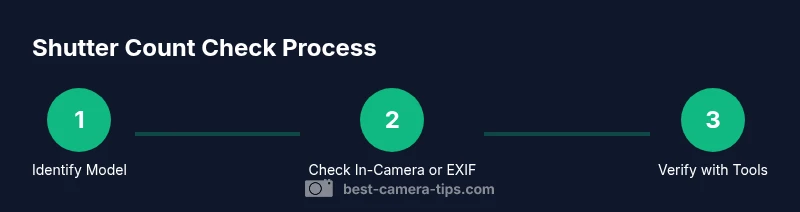
Look up your camera’s exact model and confirm where shutter count is stored. Some brands show it in a menu; others require reading EXIF data from a photo. If the model has an official app or support page, follow that route first.
Tip: If unsure, search the model name + 'shutter count' + 'official' in the manufacturer site. - 2
Prepare data and tools
Gather the camera, a power source, a recent image with metadata, and your preferred EXIF reader or shutter-count tool. Ensure you have reliable internet if using an online service, and a clean file with full metadata for accuracy.
Tip: Charge the camera battery to avoid interruptions during data extraction. - 3
Attempt in-camera reading or service mode
Navigate to the appropriate menu (often labeled Image Info, Status, or Metadata). Some models require a service mode to reveal the count. If this path exists, follow the exact steps in the manual.
Tip: If data is hidden or inaccessible, proceed to a trusted external method instead. - 4
Read EXIF data from a recent image
Transfer a photo to your computer and use a reputable EXIF reader to extract shutter count. If the count is stored in separate metadata blocks, ensure you read the correct field designated for shutter cycles.
Tip: Use a RAW or high-quality JPEG image to ensure complete metadata integrity. - 5
Cross-check with a second source
If possible, verify the shutter count with a second method or tool to confirm accuracy. Read data from a second sample image or use a second reputable service.
Tip: Discrepancies can occur; prioritize official or widely trusted tools for confirmation. - 6
Document and interpret the result
Record the shutter count, reading method, and date for future reference. Compare the result against model expectations and maintenance history to decide on next steps.
Tip: Create a simple log entry for buyer-seller conversations and future maintenance planning.
Common Questions
What is shutter count and why does it matter?
Shutter count indicates how many times the shutter has activated. It helps estimate wear on the shutter mechanism and overall longevity, especially when evaluating used gear.
Shutter count shows how much a camera has been used and helps judge its remaining life.
Can shutter count be faked or read incorrectly?
Some tools may misread data if metadata isn’t retrieved correctly. Always verify with official methods and trusted readers.
Some readings can be off; verify with reliable sources.
Is shutter count the same for all file formats?
Shutter count is a metadata value tied to capture events and is typically present in EXIF data, regardless of file format. Some cameras embed it differently.
It's usually stored in the image metadata, no matter the format.
What if my camera model doesn’t show shutter count?
If the built-in UI doesn’t show it, use EXIF readers or trusted online tools to read the data from a sample image.
If you can’t see it in the camera, read the data from a photo instead.
How reliable is shutter count for predicting life expectancy?
Shutter count is a helpful indicator but not a guaranteed predictor. Actual wear depends on usage type, environment, and maintenance.
It’s a useful clue, not a guarantee.
Watch Video
The Essentials
- Know what shutter count measures and why it matters
- Use official and reputable tools to read shutter data
- Interpret counts in the context of model class and history
- Document results for future reference
- Cross-check with multiple sources when possible