Can You Charge Nikon Battery in Camera? A Practical Guide
Learn whether you can charge a Nikon battery in-camera, when to use an external charger, and model-specific USB charging options for Nikon cameras today. Clear steps, safety tips, and model considerations.


Yes, in most Nikon cameras you cannot safely charge the battery inside the camera while you're actively shooting. Nikon typically requires an external charger, and some models offer USB charging only when the camera is off or in a dedicated charging mode. Always consult your model's manual for USB power compatibility and safety warnings.
Can you charge Nikon battery in camera?
Charging a Nikon battery inside the camera is a common question among new and intermediate shooters. The short answer is: in most situations, you should not rely on in-camera charging as your primary method. The camera is designed to run off a charged battery; powering it via USB or an internal charger is not universally supported. According to Best Camera Tips, the typical approach is to charge the EN-EL series battery with an official external charger, then insert a fresh, fully charged pack into the body. If your model does offer USB charging, it will be described in the user manual and may require the camera to be powered off or in a specific charging mode. Always verify compatibility before attempting any in-camera charging, as using unsupported methods can void warranties or cause heat buildup. Having a reliable external charger on hand provides a faster, safer, and more predictable charging experience.
How Nikon charging ecosystems work
Nikon charging ecosystems are built around three core pathways: external dedicated chargers, battery grips with charging capabilities, and USB-based charging where supported. External chargers are the most universal and fastest way to restore a battery’s capacity, and they prevent heat buildup inside the camera. Battery grips can add convenience for extended shoots, and some grips include their own charging circuits. USB charging, when available, is typically limited to powered-off states or specific firmware conditions. Best Camera Tips emphasizes using official or certified charging accessories to protect battery health and warranty status. Always verify your exact model’s charging options in the manual or on Nikon’s official support site to avoid surprises.
USB charging: model variability
USB charging is not a guaranteed feature on every Nikon model. Some newer cameras allow charging via USB while the camera is off or in a controlled charging mode, while older or entry-level bodies may not support USB power delivery at all. If USB charging is available, you’ll need a compliant USB-C or USB-A cable and a suitable power source (adapter or power bank) that matches the camera’s voltage/current requirements. Always use a manufacturer-approved cable and a reputable power source. The variability across models means you should treat USB charging as a convenience option rather than a universal standard. Best Camera Tips notes that model-specific guidance is essential for safe charging.
Model-by-model considerations
Because Nikon’s charging options are tied to hardware design and firmware, there isn’t a single universal rule. The safest approach is to consult your camera’s user manual and the official Nikon support portal for your exact model. If you’re unsure, default to external charging with the supplied Nikon charger and spare batteries. When USB charging is supported, ensure you’re operating in the correct mode and using compatible accessories. This model-focused approach minimizes risk to the battery and camera electronics, and keeps your workflow predictable during shoots. Best Camera Tips’s guidance consistently highlights avoiding unverified third-party chargers and following manufacturer recommendations.
Practical charging workflow
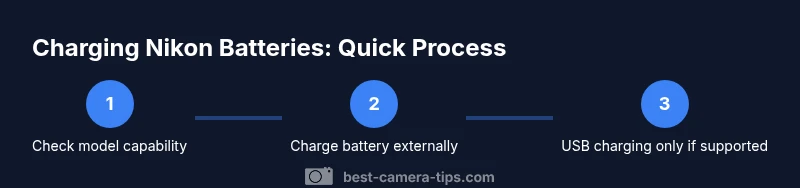
A practical workflow starts with identifying whether USB charging is available for your model. If not, plan for external charging as your primary method:
- Prepare a fully charged spare battery before a shoot.
- Use the official Nikon charger to recharge any depleted packs.
- Keep a clean, dry charging area away from heat sources.
- If USB charging is present, attach only approved cables and power sources while the camera is powered off to avoid risks.
- Monitor the charger indicators and disconnect once full to prevent overcharging.
This workflow minimizes heat, preserves battery longevity, and reduces the chance of data loss due to power interruption.
Common mistakes and how to avoid them
Avoid common missteps when dealing with Nikon charging:
- Do not mix batteries from different capacities or brands in the same charger.
- Do not attempt to charge a damaged battery in-camera or with damaged cables.
- Do not rely on in-camera charging for critical shoots; external charging remains the safest route.
- Do not ignore the manual’s safety warnings or firmware notes that affect charging behavior.
- Do not leave batteries charging unattended for long periods if the charger lacks protection features.
Verdict: best practices for Nikon charging
In short, rely on external charging as the primary method for Nikon batteries. USB charging can be a convenient backup when your model supports it, but always follow the manufacturer’s guidance. By sticking to official accessories and model-specific instructions, you safeguard battery health and camera reliability. The Best Camera Tips team recommends prioritizing external charging for routine workflows and reserving USB charging for situations where it’s explicitly supported by your device.
Tools & Materials
- Nikon camera body(Needed to identify model and charging port type)
- EN-EL series battery(Battery to be charged or swapped in)
- Nikon external battery charger(Primary charging method for batteries)
- USB-C/USB-A cable(Only if your model supports USB charging)
- USB power adapter or power bank(Used for USB charging when supported)
- User manual(Model-specific charging guidance and safety warnings)
- Battery grip with charging feature(Optional for extended shoots)
Steps
Estimated time: 30-90 minutes
- 1
Check model compatibility
Review your Nikon model’s manual or official support page to confirm whether in-camera charging or USB charging is supported. Knowing this upfront prevents unsafe attempts and protects warranty coverage.
Tip: If unsure, assume no in-camera charging until proven otherwise. - 2
Gather charging gear
Collect the official Nikon charger, the EN-EL battery you plan to charge, and a clean workspace. If you plan to use USB charging, gather a certified cable and power source.
Tip: Label batteries to avoid mixing different capacities. - 3
Charge with the external charger
Connect the charger to a stable power source and insert the battery. Allow the charger to reach full charge before the next use; remove when complete.
Tip: Never leave batteries charging unattended for long periods. - 4
Assess USB charging option
If your model supports USB charging, switch the camera to the required mode and connect a certified USB cable to a compliant power source while the camera is off or in the specified state.
Tip: Use only manufacturer-recommended cables and power banks. - 5
Monitor indicators
Watch the charger or camera indicators for status. If charging stalls or heat rises excessively, disconnect and troubleshoot or replace components.
Tip: Excessive heat is a sign to stop charging immediately. - 6
Finish and store
After charging, safely unplug, remove the battery, and store both the charger and battery in a cool, dry place away from direct sunlight.
Tip: Keep spare batteries in a protective case.
Common Questions
Can you charge a Nikon battery inside the camera?
In most Nikon cameras, in-camera charging is not supported. Use the external charger or USB charging only if your model explicitly supports it. Always follow the manual.
In most Nikon cameras, you can’t charge the battery inside the camera. Use the external charger, or USB charging if your model supports it, as directed by the manual.
Which Nikon models support USB charging?
USB charging availability varies by model and firmware. Check the user manual or Nikon’s official support page for your exact model to confirm USB charging support.
USB charging availability varies by model; check your manual or Nikon’s site for your model.
Is it safe to use third-party chargers?
Only use certified chargers and cables. Third-party or damaged accessories can damage the battery and the camera and may void warranties.
Only use certified chargers; third-party or damaged gear can cause harm and void warranties.
How long does it take to charge a Nikon battery externally?
Charging time depends on the battery and charger. Refer to the manual for expected durations and avoid leaving batteries charging unattended.
Charging time depends on the battery and charger; check the manual for guidance.
Can a power bank be used for charging Nikon batteries?
Power banks can be used for USB charging if your model supports it, provided the bank and cable meet the camera’s requirements.
A power bank can be used if your model supports USB charging and the bank meets the camera’s specs.
What safety steps should I take while charging?
Keep charging areas cool and dry, avoid heat sources, unplug when done, and inspect batteries and cables for damage before use.
Keep things cool, dry, and safe; unplug when done and inspect for damage.
Watch Video
The Essentials
- Use external chargers whenever possible.
- USB charging is model-dependent—check the manual.
- Always use official or certified accessories.
- Monitor charging to prevent overheating.