Can You Charge a Camera Without the Battery Charger? A Practical Guide
Discover safe, model-specific ways to power your camera without its charger—USB charging, dummy batteries, and power banks. Best Camera Tips explains options, risks, and best practices for beginners and enthusiasts.


Quick answer: Some cameras can be charged without the dedicated battery charger by using USB charging or external power sources, but only on models that support USB power delivery or a dummy-battery setup. The option depends on your camera’s design, and it comes with limits and safety caveats that vary by brand.
Can you charge a camera without the battery charger?
Charging a camera without the dedicated charger is a common question among photographers and home security enthusiasts. According to Best Camera Tips, the ability to do this depends on your camera’s power design. Some models support USB-based charging or external power via a dummy battery, while others require the original charger to regulate current and voltage safely. Before attempting any alternative method, identify your camera’s charging port, power requirements, and whether charging can occur with the battery removed or only when the battery is installed. In practice, you’ll find that many mirrorless and compact cameras today offer USB-C charging, while DSLR bodies or older models may rely strictly on the official charger. Always consult the manual for model-specific guidance, and acknowledge that improvising charging methods can carry risks if done incorrectly.
Understanding your camera's power options
Cameras today offer multiple ways to draw power beyond the dedicated charger. The most common alternative is USB charging, where the camera draws power through a USB-C or micro-USB port. Some cameras can also operate on external power via a dummy battery or a power adapter that connects through the battery compartment. When choosing an option, verify the voltage, current, and whether the device must be powered on to charge. For home use, a certified USB-C charger and a reliable power bank often provide a safe, portable solution. For safety, avoid cheap third-party adapters that lack proper regulation, as they can damage circuitry or shorten battery life. Best Camera Tips emphasizes always using components that meet the camera’s specifications.
According to Best Camera Tips, USB charging is increasingly common on newer mirrorless cameras, but not universal across all models. Always confirm your exact model’s capabilities before attempting any workaround.
How to determine if your model supports USB charging
Not all cameras support charging over USB, so the first step is to confirm model capabilities. Look in the user manual for charging specifications and port icons. Check the camera body and battery grip for dedicated charging indicators or instructions. If available, search the manufacturer’s official site or support forum for statements about USB charging and dummy battery compatibility. If your model supports USB charging, the manual will usually specify whether charging can occur with the battery removed or only when the camera is on. If in doubt, contact customer support before attempting to charge a charged battery using non-official methods.
Ways to charge without the original charger (overview)
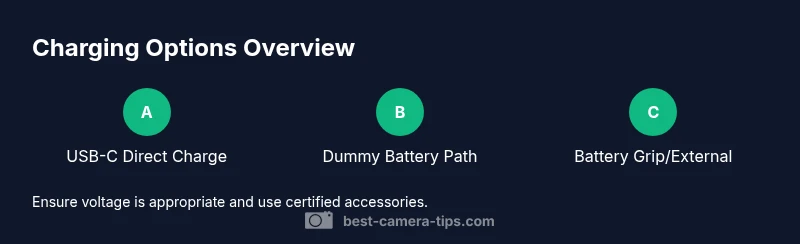
There are several practical routes, depending on your camera’s design: (1) USB-C charging directly from a powered source; (2) using a dummy battery/DC coupler connected to an external power supply; (3) charging through a camera battery grip that accepts external power; (4) using an external charger that reuses the existing battery format. Each method has prerequisites and caveats, including proper connector type, compatible voltage, and safe handling. Always start with low-power testing and monitor the camera for heat during initial attempts. If you notice unusual warmth or instability, stop immediately and revert to the official charger.
Risks and limitations you should know
Attempting to charge without the manufacturer charger can affect warranty coverage, and not all cameras tolerate improvised power sources. Using unregulated USB adapters can cause voltage spikes that degrade battery life or damage sensors. Some cameras require the battery to be in place for charging circuitry to engage, while others can accept power via the DC input only when the battery is installed. Heavy use of non-certified accessories may void warranty or complicate service options. Always weigh convenience against reliability and risk.
Safer alternatives and best practices
Whenever possible, use the official charger or a manufacturer-approved alternative. If you must go alternative, choose high-quality, certified USB chargers, and prefer devices with USB Power Delivery (PD) support to ensure proper voltage. Invest in a quality dummy battery kit that matches your camera’s model family and uses appropriate connectors. For on-the-go shooting, pair a reputable power bank with PD output and a compatible USB-C cable. Make a quick backup plan: know where the original charger lives and what to do if it fails on a shoot. Best Camera Tips reinforces choosing reliability and staying within the approved power paths to protect your gear and warranties.
Tools & Materials
- USB-C charger (official or certified)(Check that it matches your camera's charging spec (PD if supported).)
- USB-C to USB-C cable(Use a high-quality cable rated for fast charging if supported.)
- Power bank or external USB power supply(Prefer PD-capable banks; capacity depends on how long you need to charge.)
- DC coupler/dummy battery(Needed for cameras that require a dummy battery to draw power without the actual battery installed.)
- Camera manual or official support page(Reference for model-specific charging guidance.)
- Surge protector or quality outlet strip(Protects gear from power surges.)
Steps
Estimated time: 30-60 minutes
- 1
Check compatibility
Review the manual or manufacturer site to confirm whether your model supports USB charging or a dummy battery setup. If the camera requires the battery to be present for charging, you will need an alternate method. This step saves you from attempting unsafe configurations.
Tip: If you’re unsure, don’t proceed—contact support before testing any power path. - 2
Gather the right hardware
Collect a certified USB-C charger, a USB-C cable, and a suitable external power option (power bank or DC coupler). Having the correct components reduces risk and ensures stable power delivery.
Tip: Avoid cheap, non-certified adapters that may output unstable voltage. - 3
Set up a safe external power path
If using a dummy battery, connect it to the external supply following the product’s instructions. Ensure all connections are secure before powering on.
Tip: Power off the camera before connecting accessories to avoid arcing or shorts. - 4
Connect to a power source and monitor
Plug the charger or power path into a reliable outlet or PD-equipped power bank. Start with a low-wattage setting if available and watch for heat buildup during the first 15–20 minutes.
Tip: Unplug if you notice excessive warmth or smell of hot electronics. - 5
Power on and verify charging
Turn on the camera if required and check the battery indicator or charging icon to confirm power flow. If the indicator doesn’t show, recheck connections or switch to an alternate method.
Tip: If no charging indicator appears after a minute, disconnect and troubleshoot the wiring. - 6
Fallback if it fails
If charging fails, revert to the official charger to avoid risking damage. Keep a plan to always have the original charger accessible during shoots.
Tip: Document model-specific limitations so you don’t waste time on future sessions.
Common Questions
Can I charge any camera using USB charging?
Not all cameras support USB charging. Check the manual or manufacturer site to confirm. If supported, use a compatible USB charger and follow the model’s guidelines.
USB charging isn’t universal. Check your model and use the recommended charger.
Will charging without the official charger affect warranty?
Using non-official chargers or improvised power paths can affect warranties. Always check with the manufacturer and use certified accessories when possible.
Yes, warranties can be affected; verify with the maker.
Is it safe to use a power bank to charge a camera?
Safe when the power bank supports USB PD and matches the camera’s voltage. Use high-quality cables and avoid non-certified adapters.
Safe if you use a PD-supported bank and quality cables.
What is a dummy battery and when should I use it?
A dummy battery is a wired power source that fits where the actual battery sits. It’s useful for long shoots when you need constant power.
A dummy battery lets you power the camera without the actual battery.
How long does USB charging take compared to the standard charger?
USB charging is often slower than the dedicated charger and depends on the camera and port specification. Plan extra time for a full charge.
USB charging can be slower than the original charger.
My camera only charges when the battery is inserted; what do I do?
If the camera requires the battery in place to charge, use the official charger or a compatible setup that mimics the battery connection. Check the manual.
Some cameras need the battery installed to charge; consult the manual.
Watch Video
The Essentials
- Verify USB charging support before attempting power-path methods
- Use certified accessories to protect your gear
- Dummy batteries are model-specific and not universally compatible
- When in doubt, prefer official chargers to preserve warranty
- Always monitor temperature during any alternative charging method