How Big SD Card for Camera: Size and Storage Guide
Learn how big an SD card you need for your camera, with practical ranges for stills, 4K video, and burst shooting, plus speed vs capacity planning tips for pros.


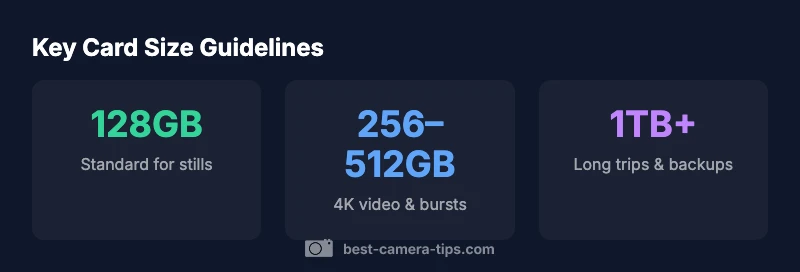
According to Best Camera Tips, the right SD card size is not one-size-fits-all. For most hobbyists, a 128GB to 512GB card balances capacity and speed for typical stills and 4K video. For heavy burst shooting or travel, plan 1TB or more. Always consider speed, not just capacity.
Why card size matters for camera storage
From a workflow perspective, the size of your SD card determines how often you must offload, how long you can shoot before stopping, and the risk of running out of space mid-shoot. The card’s capacity is not the only factor; speed, reliability, and camera compatibility are equally important. According to Best Camera Tips Team, effective SD card sizing starts with understanding your shooting style, file formats, and how you typically manage files after a shoot. For many photographers, this means balancing enough headroom for RAW files or 4K video with a card that can keep up with your camera’s write speeds. A well-chosen card reduces time spent offloading and minimizes data loss due to interrupted writes. The practical takeaway: pick a card size that fits your typical workflow, then add a margin for safety. This approach helps you stay in the field longer and stay focused on capturing moments rather than managing storage.
How to estimate storage needs for your camera
Estimating storage starts with your file sizes and your shooting cadence. The basic formula is simple: estimate the size of one file, multiply by the number of files you expect to capture in a session, and add a buffer for overhead. If you shoot RAW stills, expect larger file sizes than JPEGs; if you shoot 4K video, your per-minute data rate will be significantly higher than still photography. A pragmatic method is to select a few representative scenarios (casual weekend shoots, a week of travel, a sport event with bursts) and compute rough totals. This practical exercise helps you translate abstract “gigabytes” into concrete card sizes you can buy and carry. Also account for offload time and back-up routines when planning card capacity. The goal is to avoid interruptions while shooting while keeping the workload manageable back at your desk.
SD card speeds explained: Class, UHS, and Video Speed Class
Speed ratings indicate how fast data can be written to the card, which matters for continuous shooting and when recording video. Class ratings (Class 10) measure minimum sustained write speeds, while UHS (Ultra High Speed) classes (U1, U3) indicate higher bus speeds. For 4K video and high-bitrate footage, a card with a higher Video Speed Class, such as V30 or V60, is usually recommended. Choosing a card with UHS-II or PCIe interfaces can provide even higher sustained write speeds, which helps prevent dropped frames and buffer overrun in fast action or high-bitrate video. Always check your camera’s compatibility; some older models won’t benefit from the fastest cards.
Practical scenarios: stills vs video
Still photography and video have different storage dynamics. A modern camera shooting RAW files will accumulate data quickly, especially with long bursts or bracketing. In contrast, higher-bitrate video (4K/60p or 10-bit workflows) consumes space at an even faster rate. If your primary job is travel photography with occasional video, a 256GB card might suffice for a day’s work, but you’ll want at least a 512GB card for longer events. If you shoot sports or wildlife with fast sequences, plan for multiple cards and larger capacities (1TB or more) to minimize pauses. Always plan for extra capacity to accommodate unexpected shoots or longer-than-anticipated trips.
Capacity vs speed: how to decide for your camera
When choosing, you should weigh both capacity and speed. Capacity keeps your footage and photos, while speed ensures reliable, uninterrupted writes. For shooters who value reliability, a card with solid V30 (or higher) performance and a capacity of 256GB–512GB is a sensible default. If you plan to shoot RAW bursts or 4K video at high bitrates, consider stepping up to 1TB or more and pair it with a faster interface (UHS-II or PCIe) if your camera supports it. Budget and convenience are also factors; many photographers maintain two 256GB cards as a practical compromise between cost and capacity.
Reading card labels and avoiding counterfeit cards
Counterfeit cards are a real risk in the market, especially online. To protect yourself, buy from reputable retailers, check packaging for authenticity, and verify the card’s actual capacity and speed rating using a benchmark test or your camera’s built-in tools. Look for the card’s model number and serial, and test with a quick write/read test before a critical shoot. If something feels off (too cheap, inconsistent speeds, or packaging that looks fake), walk away. This diligence prevents data loss and saves time on the road.
Choosing between capacity and speed for different cameras
Different cameras benefit from different balances of capacity and speed. Entry-level bodies with smaller buffers can often get by with 128GB or 256GB cards if you shoot primarily JPEGs or 4K video at modest bitrates. Mid-range bodies with fast burst capabilities benefit from 512GB cards or larger, especially if you are shooting RAW or high-bitrate video. High-end prosumer and cinema cameras demand top-tier speeds and large capacities, often 1TB or more, plus multiple cards for redundancy. Always align card choice with your camera’s specifications and your typical shooting cadence. A little planning now saves a lot of downtime later.
On-the-go storage management: offloading and backups
Efficient field storage management reduces risk and keeps you shooting. Carry a small external drive or portable SSD to offload footage in the field, and maintain a simple backup routine at the end of each day. If you are traveling, consider a multi-card workflow with two cards in daily rotation and a portable backup solution. This approach minimizes the chance of losing footage due to a corrupted card or an accidental format. It also speeds up post-processing by keeping raw files organized and ready for editing.
Maintenance and best practices to extend card life
Card longevity depends on avoiding extreme conditions and regular maintenance. Keep cards out of direct sunlight and away from magnetic fields, store in protective cases, and format cards in-camera rather than in a computer whenever possible to ensure proper file system structures. Periodically check for any signs of wear or corruption, and replace aging cards before a critical shoot. Regular backups are essential; rotating storage and offloading to multiple devices guard against data loss.
Card sizing guidelines by typical use case
| Scenario | Recommended Card Size | Notes |
|---|---|---|
| Still photography (RAW) | 128GB–512GB | RAW files are large; ensure headroom |
| 4K video recording | 256GB–1TB | Higher bitrate requires faster cards |
| High-frame-rate bursts | 512GB–1TB | Burst rates drain space quickly |
| Long trips / multi-day shoots | 512GB–2TB | Plan backups and offload offline |
Common Questions
What size SD card do I need as a beginner?
For beginners, start with 128GB cards if you shoot JPEGs or 256GB for RAW. As you gain experience, you can upgrade to 512GB or larger to reduce offloads.
For beginners, start with 128GB cards for JPEGs or 256GB for RAW; upgrade to 512GB or larger as you grow.
Do cameras support 1TB SD cards?
Many modern cameras support 1TB cards, but it varies by model. Check your camera's official specs and use cards with the recommended speed classes.
Most modern cameras support 1TB cards, but verify your model's specs and speed class recommendations.
What do speed classes mean for video?
Speed classes (Class, UHS, and Video Speed Class) indicate minimum write speeds. For 4K, aim for at least U3 or V30 with a reliable card.
Speed classes show minimum write speeds; for 4K, choose at least U3 or V30.
Should I buy several small cards or one big card?
A mix is often best: use a few medium/high-capacity cards for redundancy and a large card for long shoots. Always back up regularly.
Use multiple cards for redundancy and back up often; keep a large card for long shoots if you can.
How can I detect counterfeit SD cards?
Buy from reputable sellers, inspect packaging, verify serial numbers, and benchmark speeds and capacity with your camera or a card reader.
Buy from trusted retailers, inspect packaging, and verify capacity and speed with a benchmark.
What is best practice for offloading on the road?
Offload to a portable drive or SSD at the end of each day, and keep a secondary backup when traveling to prevent data loss.
Offload to a portable drive at day’s end and keep a backup while traveling.
“SD card sizing is not just about capacity; it's a balance of speed, reliability, and workflow. Pick headroom over perfection and offload regularly to protect your work.”
The Essentials
- Match card size to your shooting style
- Prioritize speed ratings for video and bursts
- Always add a storage margin for safety
- Buy from reputable sources to avoid counterfeits
- Keep a backup plan for field shoots