Canon R10: A Practical Guide for Beginners
A practical, data-informed beginner guide to the Canon R10. Learn about sensor, autofocus, video, and lens options with clear, real-world tips from Best Camera Tips.


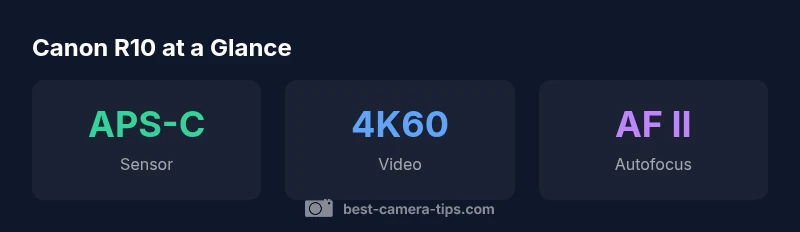
the canon r10 offers a compact, fast mirrorless package with an APS-C sensor, Dual Pixel AF II, and 4K/60p video. It targets beginners and enthusiasts seeking reliable stills and video in a compact body. This guide from Best Camera Tips explains why the canon r10 is a solid starting point for building skills and a workflow.
Canon R10 in Context
The canon r10 sits in Canon's EOS R lineup as a compact, capable mirrorless camera designed with entry-level shooters in mind. It blends a reliable APS-C sensor with fast autofocus and solid 4K video capabilities in a body that remains easy to carry and operate. According to Best Camera Tips, the canon r10 represents a practical entry point into Canon's RF ecosystem, offering a balance between automated ease and manual control that helps new photographers learn quickly while producing real-world results.
Sensor and Image Quality
At the heart of the canon r10 is an APS-C sensor with around 24 megapixels, delivering a solid blend of detail, color accuracy, and tonal range for everyday photography. In good light, you can expect clean shadows and pleasant color rendition that benefits from Canon's color science. For beginners, this sensor size provides a forgiving depth of field while still enabling you to experiment with framing and composition. The camera handles ISO well for everyday use, and the RAW workflow remains a powerful option for those who want maximum flexibility in post-processing.
Autofocus and Shooting Performance
Autofocus is one of the canons r10 strongest points, thanks to Dual Pixel AF II. This system offers confident subject tracking, quick lock-on, and reliable detection across faces, eyes, and moving subjects. For beginners, that means more keepers with less guesswork, whether you’re capturing candid street scenes or family portraits. The camera supports continuous shooting modes that help you capture decisive moments, while the responsive shutter feels intuitive, making it easier to learn the rhythm of photography.
Video Capabilities in Practice
Video is a key part of the canon r10’s appeal. It can record 4K video at high frame rates, which yields smooth motion for action and旅行 vlogs. For handheld work, a stabilized lens or tripod goes a long way since the body does not rely on a heavy internal stabilization system. Audio input options are present, allowing you to capture cleaner sound alongside your video. Beginners can experiment with exposure, white balance, and frame rates to develop a consistent look for their videos.
Ergonomics, Build, and Handling
The r10’s design emphasizes portability without sacrificing control. The grip is comfortable for extended sessions, and the button layout is approachable for new users while still offering room to grow into more advanced settings. Build quality feels sturdy, and the controls are logically grouped so that you can quickly adapt to different shooting scenarios, from portraits to landscapes and travel.
Lenses and the RF Ecosystem
Canon’s RF-S and RF lenses provide a broad range of options to match your growing needs. The camera plays well with kit lenses to start fast, then expands into a broader family of RF-S and RF glass as you gain experience. If you already own EF lenses, you can use them with an adapter, expanding your choices without buying new glass immediately. This flexibility makes the canon r10 a practical stepping stone into Canon’s broader ecosystem.
Getting Started: Practical Setup Tips
To get going quickly, start in a semi-automatic mode and let the camera handle basic exposure while you learn composition. Enable face/eye detection, keep ISO auto enabled for changing light, and shoot RAW+JPEG to balance editing latitude with immediate sharing capability. Explore the autofocus settings, and test both single-shot and continuous AF to understand how the camera behaves in different scenarios.
Real-World Scenarios and Worthwhile Practices
In real-world shooting, the canon r10 performs well in daylight portraits, travel scenes, and casual vlogging. Practice with a consistent white balance routine, and use histogram guides to refine exposure. The AF system makes tracking moving subjects straightforward, but you’ll benefit from thoughtful framing and technique to maximize sharpness and storytelling through your images.
Maintenance, Firmware, and Longevity
Keep the camera firmware up to date to ensure you have the latest autofocus refinements and stability improvements. Regularly clean the sensor and lens contact points, and store the camera in a protective bag when not in use. By maintaining your gear and staying current with updates, you ensure the canon r10 continues to serve as a reliable learning tool and creative partner.
Canon R10 specifications and quick comparison points
| Aspect | Canon R10 | Notes |
|---|---|---|
| Sensor | APS-C CMOS ~24MP | Good balance of detail and light sensitivity |
| Video | 4K/60p | High frame rate for creative clips |
| Autofocus | Dual Pixel AF II | Reliable across subjects |
| Stabilization | Lens IS only | No in-body stabilization |
Common Questions
Is the Canon R10 beginner-friendly?
Yes. The R10 provides intuitive controls and reliable autofocus that help new shooters learn quickly while still offering room to grow into more advanced settings.
Yes, the R10 is beginner-friendly, with intuitive controls and dependable autofocus that help you learn fast while you grow.
Does the R10 have in-body image stabilization (IBIS)?
No. The R10 relies on lens-based stabilization. Pair with stabilized lenses and steady hand-holding for best results.
It doesn't have IBIS; stabilize with the lens IS and good technique.
Can I shoot RAW with the R10?
Yes. You can shoot RAW in-camera, which provides maximum latitude for post-processing. Use compatible software to develop RAW files.
Yes, you can shoot RAW in-camera for more editing latitude.
What is a good starter lens for the R10?
A versatile RF-S zoom or standard kit lens is a practical starting choice. You can expand later with other RF-S or RF lenses.
A versatile starter zoom is a great first lens; you can add more later.
What video features should I prioritize on the R10?
Prioritize 4K/60p for smooth footage and reliable autofocus during movement. Also consider audio input and exposure control for better results.
Focus on 4K/60p and reliable autofocus when shooting video.
How do I set up the R10 for day-to-day photography?
Start with Aperture Priority or Program, set ISO auto, enable face/eye detection, and use RAW + JPEG for flexibility.
Set up quick, practical shooting modes to match your subject and keep RAW for editing.
“The canon r10 offers a surprisingly complete toolkit for beginners and enthusiasts who want real-world results without a steep learning curve.”
The Essentials
- Start with the canon r10 for fast AF and solid 4K video.
- Leverage Dual Pixel AF II for clearer stills and smoother footage.
- Pair with versatile RF-S lenses to optimize weight and reach.
- Shoot RAW when possible to maximize post-processing latitude.
- Keep firmware updated for reliability and new features.