Camera or Phone: A Practical 2026 Comparison
Discover when to choose a dedicated camera over a smartphone. This analytical guide covers image quality, convenience, video features, and budgeting for aspiring photographers.


For most aspiring photographers, a dedicated camera delivers superior image quality and creative control under challenging conditions, but a modern smartphone offers instant convenience and impressive computational photography. The decision hinges on your priorities: image quality, portability, and budget. This comparison clarifies how camera and phone performance stack up, so you can choose confidently.
Defining the Everyday Dilemma: camera vs phone
Choosing between a dedicated camera and a smartphone is not about one device being universally right. It’s about matching capabilities to your goals. If you’re building a workflow around dynamic range, creative control, and future-proofing your library, a camera typically delivers the most reliable results in a wide range of lighting conditions. If your priority is portability, speed, and seamless sharing, a phone is often the easiest way to capture and publish content on the fly. According to Best Camera Tips, the decision should start with a clear use case and a realistic budget. Many beginners find it useful to start with a single device and add supplementary gear as the project demands. Finally, remember that “camera or phone” is a spectrum, not a hard binary; the best choice may involve both tools at different times.
Image Quality: Sensor Size, Lenses, and Processing
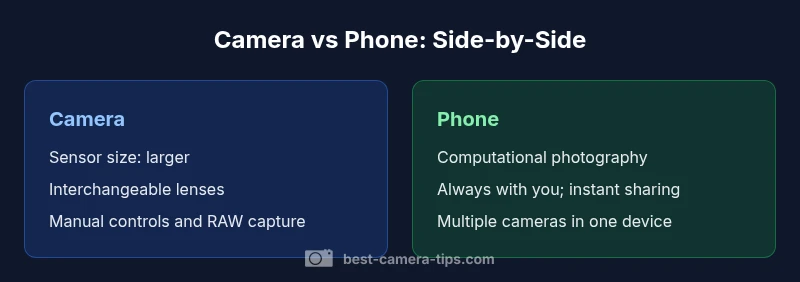
Image quality rests on three pillars: sensor size, optics, and processing. Dedicated cameras typically feature larger sensors, which deliver better dynamic range, color depth, and low-light performance. They also support interchangeable lenses, letting you tailor focal length, aperture, and depth of field. Smartphones, by contrast, rely on compact sensors and advanced computational photography to squeeze detail from small sensors. While recent phones close gaps with multi-camera rigs and AI processing, they still face limitations in extreme lighting and photography genres that demand optical flexibility. Best Camera Tips notes that understanding these fundamentals helps you select the right tool for your subject and environment.
Convenience and Setup: When Speed Beats Specs
In the real world, speed matters. Phones win on readiness: you turn it on and shoot, with immediate sharing options and automatic backups. For fast documentation, street photography, or family moments, the phone’s one-device simplicity is hard to beat. Cameras require setup time: lens selection, tripod, external flash considerations, and sometimes post-processing. Yet this investment pays off when you anticipate long sessions, controlled lighting, or the need for precise white balance and calibration. The practical takeaway is that convenience is a form of capability; if you can’t shoot when you need to, even the best optics won’t help.
Low-Light and Dynamic Range: How Each Handles Challenging Scenes
Low-light performance is where dedicated cameras often shine due to larger sensors and better native ISO performance. With a wider dynamic range, cameras preserve highlight and shadow detail more effectively, which is crucial in high-contrast scenes. Smartphones compensate with aggressive noise reduction and multiple exposure blending, producing surprisingly good results for everyday use and social media. The trade-off is that phone optimization can sometimes flatten texture or over-smooth fine detail. If your work frequently involves dim interiors or nighttime street scenes, consider a camera with a fast prime lens or a compact mirrorless body.
Video Capabilities: Resolution, Stabilization, and Audio
Video is a common comparison point. Phones routinely offer high-quality 4K footage, reliable stabilization, and excellent on-device editing. They also simplify audio capture via built-in mics and software enhancements. Cameras can provide higher bitrate recording, richer color profiles, and more robust external audio options, which matter for professional productions or serious hobbyists. If you plan to color-grade heavily or require broadcast-grade deliverables, a dedicated camera paired with an external recorder can be advantageous. For social content and quick clips, a phone often suffices.
Ergonomics and Handling: Form Factor, Controls, and Wearability
Ergonomics shape the shooting experience. Dedicated cameras typically offer tactile dials, customizable buttons, and a comfortable grip that facilitates long shooting sessions. They can be heavier, especially when paired with lenses and tripods. Phones are ultra-portable, with touch-focused interfaces and voice control, making them ideal for travel or daily use. Some users prefer a hybrid approach: a light camera for critical shoots and a phone for prompt storytelling. Ergonomics also influence steadiness; larger bodies enable steadier handling with wider lenses. These factors matter when you intend to shoot for hours without fatigue.
Durability, Reliability, and Longevity
Weather sealing and robust construction are strengths of many dedicated cameras, especially in rugged environments. Long-term reliability often hinges on lens ecosystems and service support. Smartphones, while not as rugged, benefit from rapid software updates and secure cloud integration. Both device types require maintenance—clean lenses, firmware updates, and data management—and each has distinct longevity considerations. Based on Best Camera Tips analysis, planning for future upgrades (in lenses or device line) can influence total cost of ownership and capability growth over the next decade.
Apps, Ecosystems, and File Management
A camera’s value increasingly depends on its post-processing ecosystem. RAW workflows, external editors, and compatibility with memory cards shape the creative process. Phones excel in seamless cloud backups, automatic synchronization with devices, and ubiquitous sharing. A balanced setup leverages the strengths of both: shoot RAW with a camera, then sync to a phone for quick previews and distribution. It’s also worth organizing your library around projects, subjects, and lighting scenarios so you can retrieve images quickly when you’re under pressure.
Use-Case Scenarios: Travel, Events, Street, and Everyday
Travelers often benefit from the camera’s image quality when memory preservation matters, but the phone wins for spontaneous captures and rapid sharing. Event photographers might require the dynamic range and lens options of a camera to handle venue lighting and candid moments. Street photographers often appreciate the phone’s discretion and speed for capturing decisive moments without drawing attention. For hobbyists, the best approach may be a mix: a dependable camera for controlled scenes and a phone for daily documentation, social posting, and backup coverage. The key is to map each scenario to the device that delivers the most consistent results under those conditions.
Budgeting for Your Practice: When to Invest and How to Plan
Budget constraints shape the decision more than any single feature. A dedicated camera system includes the body, lenses, and accessories, which can total well into multiple thousands of dollars. A phone bundles camera capabilities with communication, computing, and apps, offering a lower upfront investment but potentially higher upgrade costs over time as devices age. To plan effectively, list must-have features (e.g., low-light performance, video features, or portability), estimate usage frequency, and compare the total cost of ownership over a few years. The goal is to maximize value while staying aligned with your learning path and projects.
Maintenance and Longevity: Care Tips and Maximizing Life
Regular maintenance extends the lifespan of both cameras and phones. Clean lenses, guard against dust, and protect sensors with proper cases. For cameras, service intervals, sensor cleaning, and battery care matter for long-term reliability. Phones benefit from firmware updates and battery health management. Build a habit of downloading essential apps, backing up data, and keeping spare memory cards if your workflow requires it. A thoughtful maintenance routine reduces the risk of data loss and ensures consistent performance across years.
Comparison
| Feature | Dedicated Camera | Smartphone Camera |
|---|---|---|
| Sensor size | Typically larger sensors (APS-C/full-frame common) | Smaller sensors in most smartphones |
| Lenses & zoom | Interchangeable lenses and external optics | Fixed or limited zoom via multiple built-in cameras |
| Image processing | Raw workflows; extensive post-processing potential | Advanced computational photography; on-device AI processing |
| Video features | Pro-level controls; higher bitrate options; log profiles | Great stabilization; strong out-of-the-box video; easy sharing |
| Battery & storage | Dedicated battery life; removable memory cards on many bodies | Integrated battery; fixed storage with cloud options |
| Durability | Weather sealing and rugged accessory ecosystems | Typically less rugged; some IP-rated models exist |
| Portability & price | Higher upfront cost; bulky when loaded with lenses | Low upfront cost; single-device convenience |
| Ease of use | Steep learning curve; best with deliberate practice | Intuitive; fast results for beginners and hobbyists |
Positives
- Superior image quality in controlled or complex lighting
- Greater creative control with interchangeable lenses
- Better color science and dynamic range in many scenarios
- Richer selection of accessories and workflow options
Downsides
- Higher upfront and ongoing gear costs
- Heavier, bulkier kit; more setup time
- Steeper learning curve and longer setup cycles
- Maintenance and lens care add ongoing tasks
Cameras excel for quality and control; phones win on convenience and speed
Choose a camera when you need depth, flexibility, and pro-grade results. Pick a phone when you want instant capture, sharing, and portability.
Common Questions
Is a dedicated camera always better than a phone camera for photography?
Not always. In controlled lighting and for large prints, a dedicated camera often yields superior image quality and dynamic range. For casual snapshots and fast sharing, a phone can be perfectly adequate. Your subject matter and workflow largely dictate which tool serves you best.
Not always—it's about your needs. Quality, control, and print size matter as much as convenience.
When should I choose a phone over a dedicated camera?
When portability, speed, and simple sharing are your priorities, a phone is the sensible choice. It’s ideal for travel light, documenting moments, and social media-friendly shoots. If you’ll rarely shoot under controlled lighting or need spontaneous results, the phone’s convenience can be a decisive advantage.
If you value speed and ease of sharing, go with the phone.
Do phones nowadays offer competitive image quality in practice?
Modern smartphones deliver impressive image quality for everyday use and social sharing, thanks to computational photography. However, they can struggle in extreme low light or high-contrast scenes where a larger sensor and optical flexibility on a dedicated camera have the edge.
They’re very capable, but cameras still pull ahead in tough lighting.
Can I get professional results with a smartphone?
Yes, with technique, careful lighting, and post-processing, a phone can produce professional-looking results for many genres. External lenses and apps can enhance control, but some creator workflows still benefit from a dedicated camera with RAW capture and precise optics.
You can, with skill and the right setup.
What should I consider financially when comparing costs?
A dedicated camera system involves higher upfront costs but can be cost-effective over time with lenses and accessories. A phone bundles features into one device, but upgrades may require replacing the entire system more frequently. Consider total cost of ownership and future needs.
Think about overall cost over several years.
How important is lens quality and creative control?
Lens quality and manual controls on a camera enable creative techniques like shallow depth of field and precise exposure. Smartphones offer digital zoom and AI-driven enhancements, but they can’t always match optical flexibility. The choice depends on your creative goals and willingness to learn.
Lenses and manual controls matter for creativity.
The Essentials
- Assess your primary use-case before buying.
- Prioritize sensor size and lenses for image quality.
- Favor portability for everyday capture.
- Budget for gear and maintenance.
- Practice with RAW workflows to maximize results.