How Big Are Disposable Camera Photos? Frame Sizes, Prints, and Scans
A detailed, data-driven guide to the physical and digital sizes of photos from disposable cameras, covering frame size, typical print formats, and scanning resolutions for archival quality.


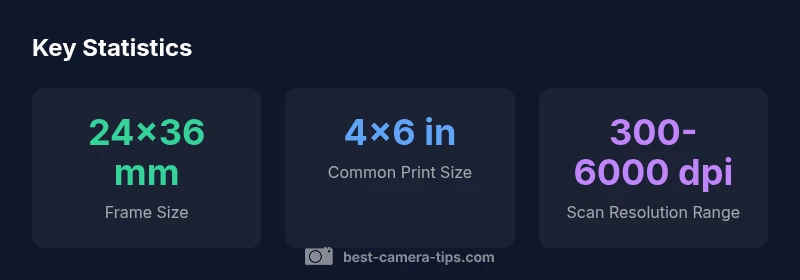
Disposable cameras use standard 35mm film with a 24x36 mm image frame. In print, photos typically measure about 4x6 inches, while digital scans vary by DPI and will determine file sizes. This article explains the specifics of frame size, print options, and digital sizes to help you understand how big your disposable camera photos can be.
The 24x36 mm frame: what it means for print size
How big are disposable camera photos? The short answer is that they’re defined by a 24x36 mm image frame on 35mm film. That tiny rectangle becomes the building block of every photo you shoot with a disposable camera. The 24x36 mm frame yields a 2:3 aspect ratio, which aligns neatly with standard 4x6 inch prints. In practical terms this means most labs will place your image on a 4x6 sheet with minimal cropping if you choose the default settings. If you want larger prints, you must be mindful of the extra cropping that occurs when moving beyond 4x6 and you’ll often need to crop or adjust during the scanning or printing stage. When you’re planning a project, keep an eye on the subject’s position within the frame and consider the extra border area that some services add when converting negatives to prints.
From frame to print: common sizes and cropping
The transition from a 24x36 mm frame to a physical print is where size debates start. The most common print size for 35mm images is 4x6 inches because its aspect ratio matches the frame, reducing the need for cropping. Many labs offer 3:2 crops that preserve most content but trim edges; others default to cropping to square or slightly different ratios, which can cut off a corner or a person’s head if you’re not careful. If you request a 5x7 or an 8x10, expect some cropping or white borders, and in some cases you’ll be directed to crop the image yourself. For wallet-size or mini prints, labs typically produce 2x3 inch images by cropping the 4x6. The key takeaway is that your print size choice should reflect your framing needs and how much edge detail you’re willing to lose. This is particularly important for group shots or candid moments where heads near the edge can be affected by cropping.
Print quality, paper types, and perceived size
Size perception is not only about inches; it’s also about print quality. A 4x6 on standard photo paper can feel large enough for casual display, while the same frame on glossy premium paper may appear crisper and slightly larger to the eye due to higher perceived detail. The thickness of the paper, the finish (gloss vs matte), and the printing process all influence how big the image looks on the wall. If you plan to show several frames together, consistency in print size and paper type helps the viewer interpret each photo at a similar scale. For archival projects, acid-free paper and proper storage are essential to prevent color shifts that could alter your perception of size when you eventually display the image.
Scanning and digital sizes: pixels and DPI explained
Converting a disposable camera photo to a digital file introduces a new dimension of size: pixels. When you scan a 24x36 mm frame, the resulting image size depends on the scan resolution. In practical terms, 24x36 mm at 300 dots per inch (DPI) yields about 283x425 pixels, roughly a 0.3 megapixel image, suitable for web use. At 600 DPI you get about 567x850 pixels, still modest for personal sharing. If you scan at 2400 DPI or higher, you can reach around 2268x3400 pixels or more, enabling larger prints or high-quality archival scans. Of course, scanners with higher DPI also increase file size. If you plan to crop later or print large formats, aim for a higher DPI during scanning and preserve a color profile for accurate results.
Estimating print sizes from a disposable photo: quick rules of thumb
To estimate the practical print size of a disposable photo, consider two factors: the subject’s distance and how much you want to crop. If the subject fills most of the frame and you print at 4x6, you’ll get a clean, balanced result with minimal cropping. If the subject leaves space around the edges or a lot of background activity is present, you may prefer a larger print like 5x7 or 8x10, understanding that some content will be trimmed. When you’re working with a batch of prints, you can simulate different crop options on a computer before committing to a lab order. This foresight helps you avoid wasting film and ensures your images appear at the intended size.
Practical tips for maximizing print size and quality from disposable cameras
Here are practical steps to get the most out of your disposable photos: 1) When shooting, compose with the most important subject in the center or away from edges to limit critical cropping. 2) If you know you’ll print large, consider leaving extra space on the frame to allow cropping. 3) Use high-quality lab services that offer 4x6 or larger with consistent color and no automatic cropping. 4) When scanning, choose a DPI setting that matches your intended output; for large prints, use 2400-4000 DPI. 5) Preserve originals by scanning in high-bit-depth formats if your lab offers it, and back up digital copies in multiple locations.
Workflow: from camera to print or digital archive
The typical workflow is straightforward: shoot with the disposable camera, have the film developed, decide on print sizes, determine whether you’ll scan, choose a scanning DPI, and finally either print or archive digitally. Planning ahead helps maintain consistent output across several frames. If you are compiling a small portfolio, align print sizes and cropping across all images to keep a cohesive look. While disposables aren’t designed around modern pixel counts, careful processing can yield satisfying results for both prints and screens.
Handling and preserving prints and scans for decades
Physical prints degrade over time if not stored properly. Store prints in acid-free sleeves and away from direct sunlight. For digital copies, back up the scans to multiple locations and consider using lossless formats like TIFF or PNG for archival copies, with JPEG copies for everyday viewing. Color profiles matter when you scan or print; apply consistent profiles to avoid color shifts that can alter perceived size and impact. With a solid archiving routine, your disposable camera photos can remain legible and true to size for years to come.
Common misconceptions and quick tips
Misconception: Disposable camera photos are always small. Reality: print size depends on how you crop and print; 4x6 is common, but you can go larger with proper scanning. Tip: Always check cropping options before ordering a batch of prints. Misconception: Color quality is fixed by the film stock alone. Reality: Scanning and printing processes influence color, so plan for a consistent workflow from shoot to final print. Quick tip: Save a high-resolution digital copy of your scans to preserve sizing flexibility in the future.
Relation of film frame to print sizes
| Category | Frame Size (mm) | Common Print Size | Notes |
|---|---|---|---|
| Image frame | 24x36 | 4x6 inches | Standard 35mm frame; widely used |
| Digital scans (typical) | — | 4x6 inches @ 300dpi | Depends on scanner resolution and cropping |
| Large-format potential | — | 8x10 inches | Requires high-res scan or cropping |
Common Questions
What size is a disposable camera photo?
The image frame is 24x36 mm, which typically yields a 4x6 inch print with minimal cropping. If you print larger or crop, you’ll alter the final composition. When digitized, the size depends on the scanning resolution.
The frame is 24 by 36 millimeters, and most prints are 4 by 6 inches unless you crop or scan differently.
Can you print on 5x7 or larger from disposable camera film?
Yes, you can print larger formats like 5x7 or 8x10, but expect some cropping or borders. Larger prints typically require cropping or careful framing during the shoot and may depend on cropping options at the lab.
You can print larger sizes, but you should expect some cropping or borders.
What DPI do I need to scan disposable camera negatives?
For decent 4x6 prints, scanning at around 300 DPI works well. For larger prints, scanning at 2400–4000 DPI yields more detail and keeps options open for cropping or big displays.
Start with 300 DPI for small prints and go higher if you plan large prints.
Are there differences between disposable cameras in size or frame?
All standard disposable cameras use the same 24x36 mm frame; differences usually come from the lens, color balance, and film stock, not frame size. Cropping during printing or scanning determines final composition.
Frame size is the same; difference comes from lens and film choices, not image size.
Do images printed from disposable camera look digital or film-like?
Quality depends on film stock, development, scanning, and printing. With good scanning and proper printing, you can achieve a clean, sharp look comparable to digital photos, though color and grain may reflect the film’s characteristics.
They can look sharp, but grain and color shifts may reveal film origin.
“Understanding how the frame size translates into prints and digital sizes helps photographers plan shots and lab orders.”
The Essentials
- Know the frame: disposable cameras use 24x36 mm film frames.
- Most prints default to 4x6 size with minimal cropping.
- Digitizing expands size possibilities through DPI and cropping.
- Plan ahead when printing to avoid unwanted cropping.
- Archive both prints and digital scans for longevity.