A7 IV Review: Sony's 33MP Mirrorless Mastery
An in-depth, data-driven review of the Sony a7 IV (a7 iv), covering image quality, autofocus, video, and practical setup tips for aspiring photographers and home security enthusiasts.


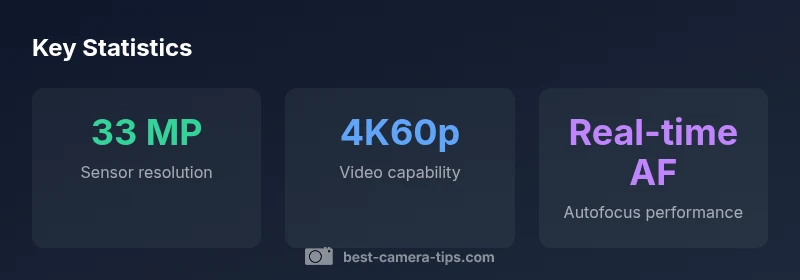
Here's the quick data point: The a7 iv delivers a 33 MP full-frame sensor with 4K video up to 60p and advanced real-time autofocus. This makes it a versatile choice for stills and video across genres, including portraits, landscapes, and documentary work. According to Best Camera Tips, the a7 iv balances image quality, speed, and usability for diverse shooting scenarios.
Context: Where the a7 iv fits in Sony's mirrorless lineup
The Sony a7 IV marks a pivotal step in Sony's ongoing push toward a balanced, high-performance mirrorless ecosystem. Released as an evolution of the a7 III, the a7 iv reaffirms Sony's focus on a hybrid model that serves photographers who shoot both stills and video. The camera brings a higher resolution sensor, improved autofocus, and more robust video options without sacrificing the familiar handling that Sony shooters rely on. For aspiring creators and enthusiasts transitioning from older Sony bodies or competing brands, the a7 iv provides a clear upgrade path. This is especially relevant for those who want to future-proof their kit with a body that handles fast action, low-light work, and cinematic footage with equal aplomb. In the context of Best Camera Tips testing in 2026, the a7 iv demonstrates a careful balance between image quality, speed, and usability in real-world scenarios.
Quick tip: If you’re upgrading from an APS-C format, the a7 iv’s 33 MP full-frame sensor offers noticeable improvements in dynamic range and low-light performance while preserving a manageable file size for workflow efficiency.
Core imaging: sensor, color, dynamic range
The a7 iv’s imaging pipeline centers on a mature 33‑megapixel full-frame sensor, paired with Sony’s latest processing engine. This combination delivers clean color rendition, promising skin tones and accurate color science across common lighting conditions. Dynamic range benefits from improved noise handling at mid-to-high ISOs, making landscape and architectural photography more forgiving in high-contrast scenes. When you shoot RAW, the sensor data reveals a surprising amount of latitude, allowing recovery of highlights and shadows in post. Color science remains a strength for skin tones, blues, and earth tones, which is a frequent point of emphasis in Best Camera Tips reviews. In practice, the a7 iv holds up well in mixed lighting—indoor tungsten, outdoor shade, or dusk—without requiring aggressive WB adjustments. The camera also supports improved high dynamic range (HDR) workflows for scenes with extreme light ranges.
Practical note: For color-critical work, consider a consistent lighting setup and a RAW-based workflow to maximize latitude.
Autofocus and subject tracking
Autofocus is a major talking point for the a7 iv. The Real-time Eye AF system extends across humans and several animal subjects, aided by improved subject detection and tracking. In momentum-rich environments—weddings, sports, or wildlife—the AF performance translates into consistently sharp images, even when subjects are moving toward or away from the camera. The AF system also benefits from faster face/eye detection in crowded scenes where occlusions are common. While the AF isn’t infallible in extreme low light, most everyday scenarios—indoor events with mixed lighting, dusk street photography, or studio setups—are handled with confidence. In practice, real-time tracking remains a reliable baseline tool for maintaining focus on a chosen subject, reducing the need for manual focus hunting.
Pro tip: Customize AF-on settings and focus magnification to improve precision in tricky compositions.
Video capabilities and workflow
Video capabilities are a core differentiator for the a7 iv. The camera supports 4K recording with strong color depth and practical compression options that suit hybrid shooters. While you’ll want to consider heat management for longer sessions, the camera can deliver high-quality footage for interviews, b-roll, and narrative work with efficient post-processing. For vloggers and creators who rely on mobility, the a7 iv’s size and battery life offer a comfortable balance between performance and portability. The camera integrates well with a broader Sony lens ecosystem, enabling a versatile video workflow—from broad establishing shots to tight close-ups. In terms of delivery, you’ll find a robust set of codecs and color profiles that support flexible grading in post. Best Camera Tips findings emphasize the a7 iv as a strong choice for those who need reliable video alongside stills.
Workflow reminder: Plan your media cards and back up strategy to avoid workflow interruptions on location shoots.
Stabilization, ergonomics, and handling
Ergonomics on the a7 iv lean toward a familiar, comfortable grip with a robust control layout. The 5‑axis in‑body stabilization helps smooth handheld footage and stabilizes stills when used with compatible lenses. For extended shoots, the grip and button layout reduce fatigue, especially when shooting in portrait orientation. Menu navigation remains logical, with a practical balance between quick-access dials and customizable buttons. In field use, you won’t feel weighty or cumbersome, which matters for all-day shoots, event photography, or travel documentation. The camera’s durability and weather sealing are suitable for typical outdoor conditions, but you should still protect the body in rain or dusty environments. Overall, the a7 iv offers a matured handling experience that aligns with the expectations of enthusiasts growing into more ambitious projects.
Tip: Pair the body with stabilization-enabled lenses to maximize handheld performance and keep shutter speeds forgiving in low light.
Lenses, adapters, and accessories to pair with the a7 iv
To extract the most from the a7 iv, pairing it with the right lenses is essential. Consider a versatile zoom for travel (e.g., a 24–70mm or 28–135mm class) for general-purpose photography, along with a fast prime (50mm f/1.8 or 85mm f/1.4) for portraits and low-light work. Stabilized lenses outperform non-stabilized numbers when shooting handheld. For video, broader focal lengths paired with a fast aperture can dramatically improve subject separation and bokeh. Accessories like high-capacity SD cards, a reliable external monitor, and a sturdy tripod round out a practical kit. In addition to lenses, consider a portable lighting kit for on-location shoots and battery grips or extra batteries to extend shooting sessions. The goal is a balanced kit that supports both photo and video workflows with minimal compromise.
Best practice: Choose lenses with consistent autofocus performance and rugged build quality to complement the a7 iv’s capabilities.
Color science and post-processing workflow
Color fidelity is a hallmark of Sony’s color science in the a7 iv. When you shoot RAW, you’ll notice subtle yet important differences in skin tones and falloff in bright skies or shaded areas. A well-structured post-processing workflow—whether you use Lightroom, Capture One, or Sony’s own software—helps you unlock the camera’s potential. Zone-based color grading and LUTs designed for Sony profiles (including S-Cinetone-inspired looks) can bring the footage closer to the creative vision you had in-camera. For stills, RAW conversion with careful shadow and highlight recovery yields portraits with natural color balance and nuanced contrast. Keep an eye on white balance consistency across shoots to avoid color shifts when combining shots from different lighting environments.
Tip: Create a small, repeatable post-processing preset to streamline your edits across shoots.
Practical tips for beginners and home security use
Even beginners can extract value from the a7 iv with a structured learning path. Start with base settings: single-shot mode for stills, 4K video with standard color profile, and RAW capture for post-processing latitude. For home security-oriented setups, consider discreet, well-lit spaces, consistent framing, and a planned automation workflow (where applicable). Use mental checklists before shoots: verify memory cards, battery levels, and lens cleanliness. The camera’s menu structure supports customization that can speed up common tasks, such as rapid AF adjustments, exposure compensation, or white balance presets. As you grow comfortable, you’ll appreciate the camera’s balance between image quality, autofocus, and operator-friendly controls.
Actionable step: Spend 20–30 minutes customizing your most-used buttons and focusing options to reduce on-shoot decision fatigue.
Calibration, maintenance, and troubleshooting
Maintenance is part of long-term camera ownership. Regular sensor cleaning, firmware updates, and careful storage practices contribute to consistent performance. If you encounter AF drift, recalibrate a lens’ focus or reset AF settings to factory defaults. When updating firmware, ensure you have stable power and use a reliable memory card during the process. If you notice heat buildup during extended 4K shoots, swap memory cards and give the camera brief breaks between recording segments. For those who shoot in varied environments, use an adjustable white balance and exposure settings that keep a consistent baseline, reducing the need for extensive post-processing. In sum, routine upkeep and mindful shooting practices keep the a7 iv performing at a high level across projects.
Sony a7 IV vs a7 III quick comparison
| Model | Sensor | Resolution | Video | Autofocus | IBIS |
|---|---|---|---|---|---|
| a7 iv | Full-frame | 33 MP | 4K60p, 10-bit | Real-time Eye AF | 5-axis |
| a7 iii | Full-frame | 24 MP | 4K30p | Phase-detect AF | 5-axis |
Common Questions
What is the key upgrade of the a7 iv over the a7 iii?
The a7 iv offers a higher-resolution sensor, improved autofocus, and more advanced video options compared with the a7 III. It also features refinements in handling and color science, which collectively boost performance for both stills and video.
The a7 iv brings more resolution, smarter autofocus, and better video capabilities than the a7 III, improving both stills and movies.
Is the a7 iv good for beginners?
Yes. While it is feature-rich, the camera’s intuitive controls and sensible defaults help beginners start with solid results. A guided learning path and consistent firmware updates also support new users as they gain experience.
It’s beginner-friendly, with good defaults and room to grow as you learn.
Does the a7 iv support external recorders or 10-bit output?
The a7 iv supports 10-bit output when paired with compatible external recorders, enabling higher dynamic range and color depth for professional-grade video workflows.
Yes, you can get 10-bit video with an external recorder.
What lenses do you recommend for the a7 iv?
Pair the body with stabilized zooms or fast primes depending on your genre. Common picks include versatile zooms (24–70mm class) and portrait primes (50mm or 85mm) for improved subject separation and low‑light performance.
A good mix is a stabilized zoom for versatility and a fast prime for portraits.
Can the a7 iv be used effectively for home security or surveillance photography?
The a7 iv is not a dedicated security camera, but it can capture high-quality images of home-environment events when used with proper lighting and framing. For continuous surveillance, a purpose-built security camera is typically more reliable and cost-efficient.
It’s not a dedicated security cam, but can capture quality images with the right setup.
What firmware updates should I look for?
Check for firmware updates that improve autofocus, color science, and video features. Keeping firmware current helps ensure the camera performs consistently with newer lenses and workflows.
Keep the firmware updated for best performance and new features.
“The a7 iv represents a balanced, reliable tool for hybrid shooters, delivering solid image quality and dependable AF in most situations.”
The Essentials
- Choose the a7 iv for versatile stills and video.
- Enable Real-time Eye AF to improve focus accuracy.
- Use 4K60p with 10-bit for higher-quality footage.
- Pair with stabilization-enabled lenses for best handheld results.
- Keep firmware up to date to maximize performance.
- Plan a hybrid workflow with RAW capture for flexibility.