Can You Change Lenses on Film Cameras: A Practical Guide
Learn when you can swap lenses on film cameras, which mounts fit, and step-by-step safety tips to keep dust and light leaks at bay for reliable, high-quality results.


Yes—many film cameras support interchangeable lenses, including classic 35mm SLRs and rangefinders. If your camera has a compatible mount, you can swap lenses by releasing the current lens, aligning the new one, and locking it into place. Always protect the mount from dust and perform a quick check for light leaks after swapping.
Is changing lenses on film cameras practical?
According to Best Camera Tips, lens changes on film cameras are practical when the body supports an interchangeable lens system. Many 35mm SLRs and some rangefinder models allow you to swap lenses to adapt to different focal lengths or creative needs. Fixed-lens cameras, like most point-and-shoots or compact models, do not offer this flexibility. Before attempting a swap, confirm that your camera has a removable lens and an available mount. This knowledge helps you plan compatible lens options and avoid costly mistakes when buying used glass.
Interchangeable lens systems and their ecosystems
Interchangeable-lens ecosystems are defined by the mount types and the era of the camera. Popular 35mm systems include longer-standing mounts like Nikon F, Canon FD, Minolta MD, Pentax K, and Olympus OM. Each system has a distinct flange distance and mounting interface, which affects compatibility with lenses from other brands. Some cameras are more forgiving with adapters, while others rely on precise alignment for infinity focus. When studying a system, also consider the optical quality and curvature of the lens, which can influence image rendering and color rendition in film. Always verify that a lens is physically compatible with your body or note any required adapters to preserve focus performance.
Mount types commonly used on 35mm film cameras
Common interchangeable mounts include: Nikon F, Canon FD, Minolta MD, Pentax K, and Olympus OM. Rangefinder systems like Leica M and certain early Canon R or Nikon RF bodies used different engagement styles and shorter flange distances. For example, Nikon F lenses usually require Nikon bodies, whereas third-party lenses often require adapters for use on non-native mounts. Understanding the mount family helps you assess compatibility and potential image quality trade-offs before purchase. If you plan to use vintage lenses, research the specific glass design and its effects on focusing accuracy and vignetting on your camera.
Understanding flange distance and why it matters
Flange focal distance (FFD) is the distance from the lens mounting surface to the film plane. It governs whether a lens can focus to infinity on a given body. A mismatch in FFD between a lens and body can prevent infinity focus or require an adapter with optical elements that may degrade image quality. When using adapters, always confirm the effective focal distance and test the setup with the film in mind. Some adapters preserve metering, while others do not, so you may need to estimate exposure manually or rely on the camera’s built-in meter if available.
Check compatibility before you buy an adapter
Before purchasing any adapter, confirm the mount compatibility and whether the adapter preserves infinity focus. Creative photographers sometimes use adapters to reuse modern glass on vintage bodies, but this can introduce optical compromises. Read product notes and user feedback for your specific body-lens combination. If possible, try the adapter with a few test shots in a controlled environment to ensure the framing and focus are as expected, especially for critical projects.
Step-by-step: how to safely change a lens on a film camera
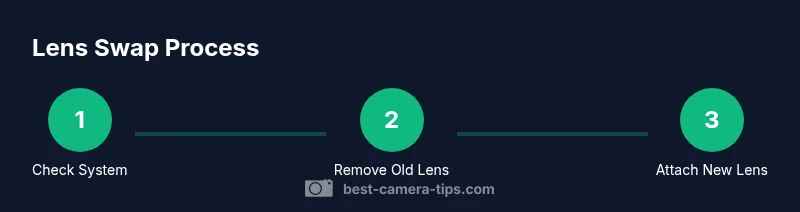
Changing lenses on a film camera is a precise operation. You should perform it in a clean, dust-free area and avoid exposing the film chamber to bright light. Start by powering down (if applicable), then detach the current lens by pressing the release button or collar and turning counterclockwise until it clears the mount. Align the new lens with the mount, matching alignment marks, and rotate until you hear a click indicating secure attachment. Check alignment and gently wipe any visible dust from the lens surface and mount. Finally, re-check the camera’s operation by performing a quick test exposure or wind to the next frame. If you’re using an adapter, confirm infinity focus and test with a calm subject at distance.
Handling dust, fingerprints, and light leaks during a lens swap
Dust and fingerprints on the lens or mount can degrade image quality on film. Use a dust blower and microfiber cloth to clean both surfaces before and after swapping lenses. When outdoors or in bright light, shield the camera body and mount from direct sun to minimize light leaks and avoid fogging the film by accidentally exposing frames. Keep lens caps nearby and cap the lens and body when not actively swapping. Regularly check seals around the mount and viewfinder for wear that could invite dust or light leaks.
Metering, focus calibration, and lens compatibility notes
Manual cameras or those with built-in meters may require manual exposure adjustments when using certain lenses. Some older glass can cause metering inaccuracies due to different optical coatings or design quirks. If you notice exposure inconsistencies, compare readings with a handheld light meter or current in-camera meter readings and adjust accordingly. High-quality glass often renders better contrast and sharpness, but always verify that your chosen lens covers the frame as intended and that focus accuracy remains consistent across distances.
Real-world scenarios: common systems and how to approach them
In practice, most beginners start with a reputable standard zoom on an affordable body with a well-supported mount. If you’re exploring legacy primes, research common distortion and corner sharpness to anticipate close-up performance. On rangefinder setups, mind that some lenses require specific alignment and calibration for precise focusing. When using adapters, be mindful of potential optical degradation and infinity focus limits. A practical approach is to assemble a small kit of two lenses per body to cover a wide focal range without complicating swaps.
Maintenance and long-term care after lens changes
After a swap, store lenses with caps on, keep the mounts clean, and use a soft brush to remove stray particles from the camera body and lens hood. Periodically inspect the mount for wear and the adapter if used, and consider professional service if you notice persistent focus or exposure issues. Preserve the original lens caps and packaging to maintain value and protect optics during storage. Regular maintenance helps ensure reliable performance over years of shooting with film.
blockKeyTakeawaysShownInIntroOnly":false}
toolsMaterialsDontApplyInThisBlock
Tools & Materials
- Lens cleaning kit(soft brush, microfiber cloth, lens cleaner suitable for optics)
- Lens caps for both lenses(protect lens surfaces during swaps)
- Clean microfiber cloth(wipe mounts before mounting)
- Body cap(covers camera body when lens is removed)
- Dust blower(optional to blow away particles without contact)
- Gloves or clean workspace(optional to reduce fingerprints)
Steps
Estimated time: 5-10 minutes
- 1
Power off and prepare
Power down the camera (if applicable) and set up a clean, dust-free workspace. This reduces the risk of accidental exposure and protects delicate surfaces. If your camera is mechanical, you can proceed without electronics, but ensure the body is stable.
Tip: Work in a clean area and lay out a lens cap for the next lens to prevent accidental dust exposure. - 2
Release the current lens
Press the lens-release button or collar while gently rotating the lens counterclockwise. Keep your fingers away from the front element and hold the mount steady as it disengages to prevent misalignment or damage.
Tip: Support the lens with your other hand during removal to avoid dropping it. - 3
Clean mount and inspect
Wipe the mount area with a microfiber cloth to remove dust. Check for scratches or debris that could scratch the mount or affect firing and alignment.
Tip: If you see grit, stop and clean again before continuing. - 4
Attach the new lens
Align the lens alignment marks with the mount and gently insert. Rotate clockwise until you feel or hear a click that confirms secure engagement.
Tip: Take care to not force the lens; if it doesn’t seat naturally, remove and re-align. - 5
Lock and verify fit
Ensure the lens is firmly attached by giving it a light twist and checking for wobble. Look through the viewfinder or frame lines to confirm the lens sits correctly.
Tip: Check for any gap between the lens and the mount; a misfit can cause light leaks. - 6
Test and inspect for light leaks
Fire a quick frame or observe the viewfinder in bright light to ensure there are no leaks around the mount. If possible, take a frame and inspect the negative for any stray light.
Tip: If light leaks appear, re-seat the lens or inspect seals around the mount.
Common Questions
Can all film cameras have interchangeable lenses?
No. Only cameras designed with removable lenses and compatible mount systems support lens changes. Fixed-lens models and certain rangefinder designs may not be adaptable without significant modification or adapters.
Not all film cameras can swap lenses; only those with removable mounts permit changes.
Do I need an adapter to use lenses from another brand?
Adapters exist but they vary in effectiveness. They must maintain correct flange distance to preserve infinity focus. Some adapters preserve metering; others do not. Check product specs and reviews for your exact body-lens combination.
Adapters are available, but infinity focus and metering can be affected depending on the pairing.
Will changing lenses affect metering?
Some lenses expose the meter to different light patterns, which can affect readings. Film bodies with integrated meters may read differently with certain glass. When in doubt, compare with a handheld meter or test shots.
Metering can be impacted by the lens; verify readings with a test shot.
How should I handle dust after swapping lenses?
Dust on film can ruin results. Use a blower and microfiber cloth to clean lenses and mounts before reattaching. Work in a dust-free area and cap both lenses when not in use.
Dust can ruin film frames; clean and cap everything properly.
Is it risky to swap lenses in bright sunlight?
Yes, bright light increases the risk of accidental film exposure. Shield the camera during swaps and consider performing changes in a shaded area or with the camera pointed away from the sun.
Yes—shading during swaps helps prevent accidental exposure.
What should I do if a lens won’t mount smoothly?
Stop and re-check the alignment marks. Avoid forcing the lens; remove and re-seat after cleaning mounts. If it still won’t seat, the mount or lens may be incompatible.
If it won’t mount, don’t force it—recheck alignment or seek compatibility guidance.
Watch Video
The Essentials
- Confirm mount compatibility before swapping lenses
- Protect lenses and mounts from dust during swaps
- Verify alignment and seal after each change
- Test a frame to ensure proper exposure and focus