What Camera Records 24/7: A Practical Guide
Learn what camera records 24/7, how continuous recording works, and practical tips for storage, power, bandwidth, and reliability to avoid gaps in surveillance footage.


A camera that records 24/7 is a surveillance camera configured for continuous operation, typically part of an NVR or cloud-backed system. These setups rely on constant power, reliable storage, and efficient video compression to manage footage without gaps. Expect features like continuous recording modes, motion-triggered backups, and periodic health checks to ensure no blind spots.
what camera records 24 7
In today’s security landscape, the phrase what camera records 24 7 sits at the core of dependable surveillance. A true 24/7 recorder isn’t defined by a flashy feature but by a transparent, reliable ability to capture uninterrupted footage. Some vendors market cameras with continuous recording as the default mode, while others offer it as an optional setting tied to an NVR or cloud storage plan. In practice, a 24/7-capable camera collects continuous video streams and stores them for a defined retention period. The quality of that retention depends on compression, frame rate, and the storage tier you choose. The goal is to minimize gaps, which means you should design for power stability, ample storage, and robust network access. When evaluating a candidate, ask how it behaves during power outages, how long it can retain footage without overwriting, and how easily you can retrieve clips from a specific date. This mindset helps ensure the system truly records 24/7 rather than intermittently.
For homeowners and small offices, the setup often includes an NVR or a cloud-integration option. An NVR centralizes recording, indexing, and playback, while cloud storage offers off-site redundancy. A hybrid approach—on-site storage with a cloud backup—can provide both fast local access and protection against device failure or theft. As you plan, map out your ideal retention window (e.g., days, weeks, or months) and translate that into storage requirements and network planning. Remember, continuous recording is as much about system resilience as it is about the number of cameras on your property.
Power and backup for 24/7 recording
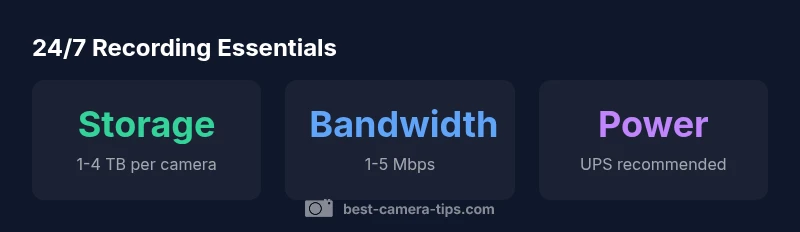
Continuous recording places a premium on a stable power source. The most reliable setups run cameras from a dedicated electrical circuit or a PoE (Power over Ethernet) switch that can deliver consistent power. In environments where outages are possible, a UPS (uninterruptible power supply) or backup battery solution for the NVR/POE switch becomes essential. Power stability prevents clock drift, footage gaps, and abrupt reboots that can complicate playback. For outdoor installations or areas with unreliable mains, a small solar-powered or hybrid backup system can extend uptime, but it should be sized to support only the essential devices during an outage.
Another practical approach is to implement redundant power paths. Using dual power supplies or a second power source for critical cameras minimizes downtime. When evaluating power options, consider the total wattage of all devices, the expected outage duration, and the ease of testing backups. Documenting a simple failover procedure—what to switch to and how to verify uptime—reduces the risk of human error during an emergency.
Finally, check that all components support safe shutdown and restart without data corruption. This includes confirming that cameras and NVRs gracefully close files and complete write operations before power cycles. With solid power and backup, your 24/7 recording system becomes genuinely reliable rather than fragile under stress.
Storage and retention strategies
Storage is the backbone of 24/7 recording. The ideal solution balances cost, access speed, and retention length. On-device storage options include high-capacity HDDs or SSDs in NVRs, with larger volumes favored for longer retention. For home setups, plan for enough capacity to cover your intended time horizon—remember that higher resolutions and frame rates consume more space. Many users start with 1–4 TB per camera for 30 days of continuous recording and scale up as needed. To optimize space, embrace modern codecs such as H.265/HEVC, which significantly reduce the bit rate without sacrificing clarity, especially in well-lit scenes.
Retention policies play a crucial role: shorter windows for low-risk areas and longer windows for entry points, asset protection zones, or high-traffic spaces. A rolling or circular recording approach can overwrite oldest footage automatically, while still preserving important events if you enable event-based exports. Consider a layered strategy: keep critical clips longer (e.g., motion events around doors) while using shorter retention for routine corridors. If you opt for cloud storage, ensure you understand the upload bandwidth requirements and the associated costs, and consider a hybrid model to reduce monthly fees.
Network considerations for uninterrupted footage
A smooth 24/7 recording experience hinges on a robust network. Sufficient bandwidth, low latency, and predictable QoS (quality of service) ensure video streams arrive at the NVR or cloud storage without interruption. For households with multiple cameras, run separate VLANs or dedicated switches to isolate security traffic from streaming, gaming, and other bandwidth-heavy tasks. Enable proper port configurations and firewall rules to protect access while allowing legitimate remote viewing. If you rely on cloud storage, confirm the cloud service’s uptime guarantees and regional data centers to minimize latency when you access footage.
Reduce retransmission and packet loss by using wired ethernet wherever possible instead of relying on Wi‑Fi for primary streams. If you must use wireless connections, select cameras that support robust wireless standards, strong antennas, and MIMO technology, and place them within optimal range of the access point. Regularly test your network during different times of day to identify bottlenecks and adjust bandwidth allocation accordingly. A well‑designed network not only supports 24/7 recording but also speeds up live viewing and quick export of clips when needed.
Camera features that support 24/7 recording
Not all cameras are equal when it comes to around-the-clock duty cycles. Look for cameras engineered for continuous operation with a high endurance image sensor, reliable night vision, and solid weather sealing for outdoor use. Key features include 24/7 continuous recording support, a robust processor for real-time encoding, and the option to select a high bitrate or a balanced mode that preserves details in both bright and shadowed areas. Infrared illumination or starlight sensors help maintain visibility at night, while wide dynamic range helps prevent blown-out highlights when entrances are backlit. Robust housing, tamper detection, and an ability to operate reliably across extreme temperatures further contribute to dependable all-day performance.
Consider cameras with built-in diagnostics and self-healing capabilities. Some models can auto-restart after a crash, report health issues, or trigger alerts when storage usage reaches a threshold. Finally, verify the device’s compatibility with your chosen storage solution—whether an NVR, NAS, or cloud service—and ensure that firmware updates don’t disrupt ongoing recording. The better your camera’s core design, the more likely your 24/7 plan will stay intact through years of use.
Setup patterns: NVR, NAS, and cloud options
A solid 24/7 system often combines three pillars: NVR-based local recording, NAS-backed storage for larger libraries, and optional cloud backups for off-site redundancy. An NVR centralizes recording from multiple cameras, indexes metadata, and provides unified playback. A NAS can store enormous archives with flexible RAID configurations, enabling long retention without a steep price tag. Cloud options give off-site safety and ease of remote access but require reliable bandwidth and ongoing subscription costs. When planning, map out your access needs: how often you’ll export clips, who will view footage, and whether you need remote access during outages.
Architecture choices should align with your retention goals and risk profile. For example, a home setup might favor a compact NVR with cloud backups for important events, while a business could leverage a NAS for extended retention and a tiered storage strategy that moves older footage to cheaper storage. Finally, document your setup with clear naming conventions, retention policies, and a testing schedule to ensure everything remains accessible and legible when it matters most.
Maintenance and monitoring to avoid gaps
Even the best 24/7 systems can experience gaps if maintenance is neglected. Establish a routine to verify that cameras are online, storage is healthy, and backups are performing as expected. Schedule monthly checks to confirm that all devices boot correctly, firmware is up to date, and that there are no failed writes to the drive. Implement automated health alerts: if storage capacity reaches a critical threshold, if a camera loses connection, or if there’s a sudden drop in frame rate, you should receive an immediate notification. Regularly test playback by exporting sample clips to ensure that footage remains readable and complete.
Documented maintenance plans reduce downtime and improve long-term reliability. Maintain spare drives, testing routines, and a clear escalation path for issues. In practice, combine proactive monitoring with reactive troubleshooting. A well-maintained 24/7 system not only records data but also helps you respond quickly when incidents occur, minimizing the risk of gaps in critical footage.
Key infrastructure considerations for 24/7 surveillance
| Aspect | Guidance | Notes |
|---|---|---|
| Power source | UPS and redundant supply | Ensure uninterrupted operation during outages |
| Storage capacity | Plan for retention length and codec efficiency | Consider tiered storage and NAS/cloud options |
| Network readiness | Wired Ethernet preferred; QoS for security traffic | Test bandwidth and latency regularly |
Common Questions
What is 24/7 recording in surveillance?
24/7 recording refers to cameras that capture and store video continuously without relying solely on detected events. This requires reliable power, sufficient storage, and a robust plan for data retention and retrieval.
24/7 recording means the cameras keep capturing all the time, with a plan for continuous storage and easy access to clips.
Do I need an NVR for 24/7 recording?
An NVR is a common and convenient way to manage continuous footage, but alternatives exist, such as NAS-based local storage or cloud-based solutions. The best choice depends on retention needs, budget, and remote access requirements.
An NVR is typical for continuous recording, but NAS or cloud options can work if they meet your retention and access needs.
Is cloud storage suitable for 24/7 recording?
Cloud storage can back up footage off-site and protect against local hardware failure, but it adds ongoing costs and requires stable bandwidth. A hybrid approach often balances cost with reliability.
Cloud storage helps with off-site backups, but you’ll need steady bandwidth and budget for ongoing costs.
How long should I keep footage from 24/7 recording?
Retention length varies by risk and policy. Common ranges are weeks to months; longer retention requires more storage and sometimes tiered storage strategies.
Retention depends on risk—often weeks to months with scalable storage.
Can cameras run 24/7 on battery power?
Most cameras require a continuous power source for 24/7 recording. Battery backups can help during outages, but ongoing operation generally depends on mains power or PoE with reliable backups.
Battery alone isn’t usually enough for continuous 24/7 recording; you need reliable power plus backups.
What features matter most for 24/7 recording?
Look for continuous recording support, robust low-light performance, durable housing, reliable compression (like H.265), and health monitoring. Later, ensure compatibility with your storage and network plan.
Key features are continuous recording, good night vision, and reliable health checks.
“"Continuous recording is only as reliable as your power, storage, and monitoring. A well-designed 24/7 system minimizes gaps and protects footage."”
The Essentials
- Plan for true continuous power and redundancy
- Choose storage and codec settings that fit your retention goals
- Design a network with dedicated paths for security data
- Match camera features to 24/7 duty cycles
- Use a hybrid storage setup for reliability