Live Camera in Los Angeles: A Practical Guide
Explore how live cameras in Los Angeles work, where to access feeds safely, and practical tips for photographers and home-security enthusiasts seeking real-time city views.


Definition: A live camera in Los Angeles is a real-time video feed from city-operated or authorized cameras that show current streets, weather, and traffic. Access is typically through official portals or partner apps, with privacy and security restrictions. These feeds help photographers plan shoots and residents stay informed about conditions.
Understanding LA's live camera landscape
Live camera feeds in Los Angeles come from a mix of municipal networks, regional transportation feeds, and weather or security cameras. The most visible feeds are city-operated traffic cams, managed by agencies such as the Los Angeles Department of Transportation (LADOT) and Caltrans. These feeds typically focus on major corridors and intersections, providing real-time views of congestion, incidents, and road conditions. In addition to traffic, many feeds capture weather conditions or public spaces. According to Best Camera Tips, this ecosystem is a blend of publicly accessible feeds and restricted streams used for security, research, or official transparency. For photographers and home-security enthusiasts, understanding which feeds are open to the public and which require credentials is foundational to safe, legal usage.
Accessibility varies by source type and jurisdiction, but the common thread is that public feeds operate under policy frameworks designed to balance utility with privacy and security. When using these feeds, always check the terms of use and respect any limitations on caching, redistribution, or commercial usage. The landscape is dynamic: feed availability and access policies can change with city priorities, emergency needs, or privacy considerations. This context matters when you’re planning shoots, scouting locations, or monitoring conditions for security purposes.
Popular sources for LA live camera feeds
LA’s live camera ecosystem spans municipal, state, and commercial feeds. The most reliable sources include official city and state portals that aggregate traffic cam feeds for real-time traffic analytics and safety monitoring. Look for sources such as LADOT Traffic Cameras for city corridors, Caltrans Live Traffic Cameras for interstates like I-5 or I-405, and weather/citywide feeds from county or NOAA-affiliated platforms. Some feeds are publicly accessible via city portals or partner apps, while others require credentials for restricted viewing. For photographers, these feeds offer a snapshot of conditions, lighting, and crowd activity that can inform timing and location choices. For security enthusiasts, feeds provide situational awareness of outdoor spaces and corridor vulnerabilities when used within the terms of service. Always verify the feed’s source and licensing before use, and prefer feeds with clear timestamps and reliable uptime indicators.
Beyond public feeds, you may encounter neighborhood or campus cameras that are publicly viewable but labeled with specific access rules. This variety means you should maintain a mental map of which feeds are appropriate for your project and which are not, and ensure you’re operating within legal boundaries. As Best Camera Tips notes, building a curated list of trusted feeds helps you stay efficient and compliant across different LA neighborhoods.
How to evaluate feed quality and reliability
Quality and reliability matter when you’re relying on live feeds for planning, photography, or security. Start with resolution and refresh rate: higher resolution and brisk frame rates produce crisper, more useful views but can impose bandwidth demands. Next, assess uptime and latency—consistent uptime and minimal delay are essential for real-time planning. Check for overlays (timestamps, location labels, weather data) that aid interpretation, and confirm that the feed uses time-synced data to avoid mismatches during planning. Finally, review privacy controls and licensing terms. Public feeds should clearly state usage rights, redistribution allowances, and anyCommercial restrictions. In practice, prefer feeds that publish a licensing summary and have a public contact for use permissions. When possible, test multiple feeds across different LA districts to gauge consistency and latency, and document any noticeable fluctuations or outages. The goal is to build a shortlist of feeds you can rely on under typical conditions, and to know where to find backups when a source goes offline.
Practical use cases for photographers and security enthusiasts
For photographers, LA live camera feeds can inform location scouting, lighting predictions, and timing for street photography or landscape shoots. A midday sun angle in certain districts may be favorable on specific days, and feed noise can indicate crowd size and potential disruption. For security enthusiasts, feeds provide situational awareness around entry points, outdoor spaces, and transit hubs. Use feeds to monitor weather changes, surge conditions, or unusual activity patterns, but always respect privacy and comply with terms of use. A practical workflow is to create a rotating feed checklist: prioritize feeds by reliability, categorize by content (traffic vs weather vs public space), and annotate observations for future shoots or security planning. Across both audiences, the most valuable feeds are those with clear timestamps, reliable uptime, and explicit usage guidelines that align with your project’s needs.
Troubleshooting common issues and how to fix them
Feeds can go offline or appear inconsistent for a variety of reasons: network restrictions, maintenance windows, or changes in public policy. If a feed is offline, first verify you’re using the official source and check the provider’s status page or social channels for outage notices. If latency fluctuates, rule out your network: test other feeds, switch networks, or use a wired connection if possible. Caching restrictions or geo-blocks can also affect access; in these cases, rely on official portals or partner apps that publish status updates. If a feed reappears only intermittently, document the pattern and reach out to the portal’s support or the agency that operates the camera.
Best practices for accessing and using feeds responsibly
Always respect privacy, licensing, and terms of use when accessing LA live camera feeds. Avoid capturing faces or license plates for redistribution without consent, and refrain from using feeds for monitoring individuals in a way that could be construed as harassment. When possible, rely on feeds with explicit terms for educational or research use, and credit the source when sharing screen captures or stills. For photographers, maintain a workflow that prioritizes ethics and compliance, and avoid exposing restricted locations. For security enthusiasts, treat feeds as a planning tool rather than a surveillance solution, and coordinate with property owners or local authorities for any sensitive deployments.
Comparison of LA live camera feed types
| Feed Type | Accessibility | Latency | Typical Use |
|---|---|---|---|
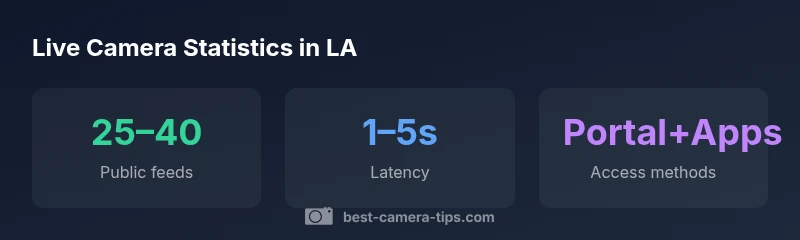
| Public city feed | Public portal | 1–5 seconds | Traffic monitoring, public planning |
| Traffic-camera feed (state/Caltrans) | Public portal/embedded | 2–6 seconds | Congestion analytics |
| Indoor/outdoor weather camera | Public or commercial access | 2–10 seconds | Weather tracking, photography planning |
Common Questions
What exactly is a 'live camera' in Los Angeles?
A live camera is a real-time video feed from a camera operated by a city, state, or authorized entity. It shows current conditions such as traffic or weather and is intended for monitoring or planning. Use is governed by the provider’s terms of service and privacy policies.
A live camera is a real-time feed from an approved operator showing current conditions for planning and monitoring. Always check the terms before use.
How can I access LA live camera feeds legally?
Access is typically through official city portals or partner apps that publish feeds. Some feeds require registration or credentialed access for security reasons. Always read the terms of use and respect any redistribution limitations.
Go through official portals or partner apps, and follow the terms of use.
Are all feeds free and publicly accessible?
Most public feeds are free to view, but some feeds may be restricted or require credentials for security or privacy reasons. Check the provider’s site for access details and usage rights.
Most public feeds are free to view, but some may require credentials.
Can I use these feeds for commercial photography or video projects?
Commercial use depends on the feed’s licensing terms. Some feeds permit educational or non-commercial use only, while others allow broader usage with attribution. Always verify licensing and obtain written permission if needed.
Check the license and obtain permission if required.
Do feeds reveal private areas or personal information?
Reputable feeds avoid private data and provide privacy protections. Do not use feeds to identify individuals or sensitive locations beyond what is publicly allowed by the terms.
Feeds avoid private data; respect privacy limits and terms.
What should I do if a feed is offline or outdated?
Check the official status page or provider channels for outage notices. If issues persist, use alternative feeds from the same source or another credible provider and document outages for planning.
Check status pages and switch to alternatives if needed.
“Live camera feeds in Los Angeles are invaluable for real-time planning, weather assessment, and location scouting, but they must be used with respect for privacy and legal terms.”
The Essentials
- Identify credible LA feeds with clear licensing terms
- Prioritize feeds with low latency and visible timestamps
- Use feeds for planning, not for personal data gathering
- Respect privacy and comply with terms of use
- Maintain a short, verified list of go-to feeds