How Many Cameras on One Blink Module: Capacity, Limits & Setup
Learn the exact per-module limit for Blink Sync Modules, how to safely expand with extra modules, and best practices to maintain performance as your system scales.


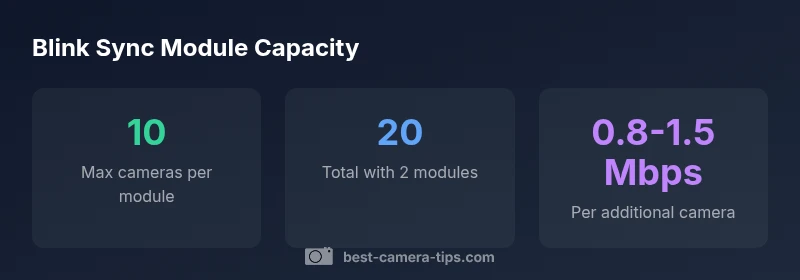
Most Blink setups cap the number of cameras per Sync Module at 10. If you need additional cameras, connect another Sync Module and link it to your Blink account. Real-world limits may vary with firmware, network quality, and recording settings, so monitor performance as you expand.
How many cameras can one Blink Sync Module support?
The most common question is: how many cameras on one blink module? The official ceiling per Sync Module is typically 10 cameras. This limit reflects the module’s ability to manage multiple streams, alerts, and local processing. In practice, plan for some headroom if you’re aiming for comprehensive coverage across rooms, yards, and entry points. As you approach the 10-camera mark, monitor live feeds, battery life (for wireless cams), and network responsiveness. If you need more than ten, add another Sync Module and connect additional cameras to your Blink ecosystem. A modular approach keeps performance predictable and simplifies troubleshooting.
Official limits vs practical performance
According to Best Camera Tips, the documented ceiling per Sync Module is 10 cameras, but real-world performance is influenced by network conditions, recording quality, and firmware. In many homes a stable 2.4 GHz Wi‑Fi network and a solid internet connection help sustain ten streams without noticeable latency. If your network is congested or your cameras push high-resolution recordings continuously, you may see occasional delays or gaps. For critical surveillance zones, it’s prudent to plan for spare capacity by adding an extra Sync Module rather than forcing several cameras onto a single hub. A measured approach, including testing each camera under typical daily usage, is a reliable way to avoid surprises as your system grows.
Planning a setup: calculating capacity for your space
Start by listing the zones you want covered and the camera types you’ll deploy. With the common cap of 10 cameras per Sync Module, a two-module system yields about 20 cameras under ideal conditions; three modules can approach 30, and so on. Realistically, allow a contingency buffer (about 10–20%) to account for firmware updates, notification bursts, and occasional network fluctuations. If you anticipate expanding to more than 20 cameras, map out an architectural plan that groups cameras by area, assigns distinct SSIDs or VLANs if possible, and keeps critical feeds on a separate module for resilience. This planning helps ensure you know how many cameras on one blink module you’re likely to deploy in each room.
Expanding with multiple Sync Modules: layout and management
When growing beyond ten cameras, add one Sync Module per roughly 6–8 cameras you anticipate per room’s needs—though the official limit remains 10 per module. Use named groups (e.g., “Living Room,” “Perimeter”) in the Blink app to simplify management. Each module acts as an independent hub, so it’s wise to place it near the cameras it serves or near your Wi‑Fi router to minimize latency. Document the assignment of cameras to modules, update firmware across devices, and test live feeds after switching on new cameras. A clean modular approach reduces cross-talk, improves battery life in wireless cameras, and helps preserve reliability as your system scales.
Network considerations when expanding
Expansion increases data traffic. Each camera’s stream consumes bandwidth, and multiple active feeds can saturate home networks. In practice, plan for peak usage where several cameras record or stream simultaneously. A typical second-order estimate is 0.8–1.5 Mbps per stream for standard-quality video, though this can vary with resolution and motion activity. To maintain responsive alerts, ensure your router supports enough concurrent connections, enable QoS for Blink, and consider dedicating bandwidth to Blink devices during security-prone hours. Expect some improvement in reliability as you distribute cameras across modules rather than piling them onto a single hub.
Storage, recording settings, and power considerations
Blink’s camera storage and recording behavior is tied to your subscription level and cloud plan. When expanding, think about how many camera feeds will compete for cloud storage and notification bandwidth. In practice, lowering video resolution slightly or enabling motion-triggered recording can dramatically reduce continuous bandwidth needs, making expansion feel more responsive. Keep in mind that battery-powered cameras may have different cadence than wired ones, which affects how many devices your system can handle without dropped events. A methodical approach to adjustments helps preserve performance across the entire installation as you scale.
Security, privacy, and maintenance when scaling
With more cameras, you’ll want to tighten access controls, ensure unique login credentials, and routinely audit shared access. Regular firmware updates across all modules and cameras are essential to patch vulnerabilities and improve efficiency. Consider setting up a maintenance schedule: verify playlists, run test recordings, and ensure each camera feeds into the intended module. A disciplined approach to security supports reliable expansion and reduces the risk of misconfigured feeds or privacy gaps as your Blink setup grows.
Troubleshooting expansion issues
If you encounter issues after adding cameras, isolate the problem by testing one new camera at a time and monitoring the module’s CPU and network load. Check the Blink app for error codes, confirm firmware versions, and verify that the new devices are paired correctly to the intended module. Common symptoms of overloading a single module include delayed alerts, inconsistent recordings, and occasional disconnects. Rebalancing cameras to peripheral modules often resolves most performance headaches. If problems persist, consult the official forum or customer support for guidance on advanced networking or device-specific configuration tricks.
Blink module capacity at a glance
| Setup Option | Cameras Supported | Notes |
|---|---|---|
| Sync Module 2 (single unit) | Up to 10 | Standard home setup |
| Multiple Sync Modules (1 per room) | Up to 10 per module | Scale by adding modules |
| Total capacity with n modules | Up to 10n | Subject to network and firmware |
Common Questions
How many cameras can I connect to one Blink Sync Module?
Per Blink's official guidance, a single Sync Module supports up to 10 cameras. To expand beyond that, add another module and connect additional cameras. Real-world performance varies with firmware and network conditions.
You can connect up to ten cameras to one Sync Module. If you need more, add another module.
Can I mix different Blink camera models on the same module?
Blink generally supports the ecosystem, but mixing different camera models on one module isn’t officially documented; consider using separate modules for different models.
Mixing models on one module isn't officially documented; use separate modules for variety.
What factors limit the effective camera count per module?
Firmware version, network bandwidth, and recording settings can reduce the practical limit from the theoretical maximum.
Firmware, network speed, and recording quality affect how many cameras you can reliably run.
What should I do if I exceed the per-module limit?
You can't add more cameras to that module; you need to install an additional Sync Module and connect cameras to it.
If you hit the limit, add another module.
Do subscriptions affect how many cameras I can connect?
Camera count is independent of Blink subscriptions; subscriptions primarily affect cloud storage and features, not the per-module cap.
Subscriptions don't change the per-module limit.
“A Blink Sync Module can handle up to 10 cameras reliably under typical home network conditions.”
The Essentials
- Know the per-module limit: 10 cameras
- Add modules to scale up
- Monitor firmware and network during expansion
- Plan storage and bandwidth for more cameras