Leaving SD Cards in Cameras: A Practical Guide for You
Learn whether it's safe to leave an SD card in your camera and how to protect data. Practical tips for beginners and home security setups, plus maintenance guidance.


Yes, you can generally leave an SD card inserted in a camera without harming the device. It won’t damage the card or the camera during normal use, and it reduces wear from repeated ejects. However, avoid leaving it in during long storage if the environment is hot, humid, or prone to temperature swings.
Why it's generally okay to leave SD cards in cameras
If you're asking is it ok to leave sd card in camera, the general answer is that it's fine for everyday use. Most cameras are designed to operate with a card inserted, and leaving it in can reduce wear from repetitive insertion and removal. This is especially true for beginners who shoot regularly and don't want to constantly handle the card. The practical takeaway is that for normal day-to-day shooting, leaving the card in is safe, as long as the device is in a stable environment. However, there are conditions that merit removing the card, especially during long storage, shipping, or exposure to extreme heat or humidity. In addition, different camera types may respond differently under stress, so consult your manual for model-specific guidance.
How SD cards interact with cameras (data integrity)
SD cards function as the primary temporary storage for image files and video data. Cameras write data to the card in blocks as you shoot, review, and transfer files. The risk of data loss increases if power is interrupted during a write operation or if the card is physically damaged. Modern cameras frequently perform write buffering to protect data, but the best practice is to ensure you power down properly before removing the card or moving data to another device. Leaving a card in normally does not increase the risk of corruption by itself, but abrupt power-offs and removing a card mid-write can.
When you should remove the card
There are clear scenarios where removal is recommended. If you plan to store the camera for an extended period, remove the card to reduce exposure to environmental risks (heat, humidity, dust) and to simplify transport without exposing the card to sudden shocks. If you’re traveling with the camera and plan to swap between cards, having a spare card and a protective case is a safer approach than leaving the active card in the camera for long durations. In short, remove for long-term storage or extreme conditions; leave in during normal shooting.
Environmental considerations
Environment matters for SD card longevity. High heat or direct sun can accelerate wear on card contacts and can cause data degradation over time. Humidity can promote corrosion on metal contacts, while dust can cause read/write errors. If you must store a camera in a hot car or a damp environment, consider removing the card and placing both camera and card in protective, moisture-resistant packaging. For home use, a cool, dry place is ideal for storage.
Practical daily-use tips for SD cards
- Label cards with dates and contents to simplify rotation and backups. - Keep spare cards in a protective case to prevent ESD and physical damage. - Clean contacts gently with a dry microfiber cloth if you notice grime or fingerprints. - Do a quick format or file backup after major shoots to ensure you don’t hit a data bottleneck when you need it. - Avoid touching the gold contacts with fingers to prevent oils that can interfere with connection.
Data backup and safety practices
A robust backup routine protects you from data loss. Copy files from the SD card to a computer, external hard drive, and a cloud storage service if possible. Verify the file integrity after transfer by checking file sizes and attempting to open a sample of images or clips. Regular backups reduce the risk of losing important memories or critical security footage and make it easier to recover from card failure.
Card handling for different camera types
DSLRs and mirrorless cameras typically use standard-sized SD cards or microSD with adapters. Action cameras and drones often use high-speed UHS cards for faster write speeds. Security cameras might log footage for days or weeks, making card health even more critical. Always refer to the device’s manual for card capacity, speed class, and recommended brands. In most cases, the same basic precautions apply: protect the card from moisture, avoid abrupt temperature changes, and back up regularly.
Common myths and misconceptions
Myth: Leaving the card in damages the battery. Reality: The card does not drain the battery more than normal operation and is not likely to hurt the camera. Myth: If the camera is off, you can’t damage the card. Reality: Power-off is recommended before any physical handling to avoid data corruption or wear. Myth: All cards last forever. Reality: Cards have finite write cycles and can degrade; replace aging cards and refresh backups routinely.
Tools & Materials
- Camera (with SD/SDHC/SDXC slot)(Any camera model you use for photography or security)
- SD card (or microSD with adapter)(Match card type to device (speed class matters for video))
- Card reader (optional)(Useful for backing up footage to a computer)
- Protective SD card case (optional)(Keep spare cards safe when not in camera)
- Microfiber cloth (optional)(Wipe dust from contacts before inserting)
Steps
Estimated time: 15-25 minutes
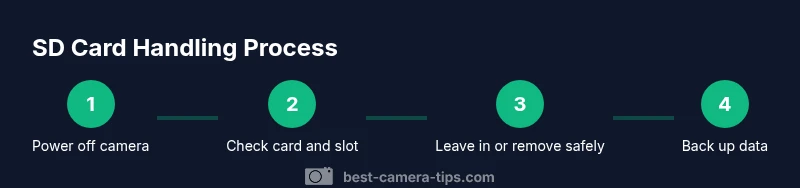
- 1
Power off the camera
Power off the camera completely to prevent data loss and to avoid writing during handling.
Tip: Always power down before touching the card or slot. - 2
Check the card's physical status
Open the memory card slot and inspect the lock switch and contacts for dust.
Tip: If the card is dirty, gently clean contacts with a dry microfiber cloth. - 3
Decide whether to leave or remove
If you plan to continue shooting soon, you can leave the card in; otherwise remove for storage.
Tip: Make the decision based on storage duration and environmental risk. - 4
Eject and store safely (if removing)
Gently eject the card and place it in a protective case to prevent scratches and static damage.
Tip: Hold the card by the edges; do not touch gold contacts. - 5
Back up important footage
Copy essential files to another storage device or cloud service to minimize data loss risk.
Tip: Verify backups by opening several files from the copy. - 6
Resume use or power down
If the card is reinserted, power on the camera; if storing, power down completely and remove the battery.
Tip: Keep a simple log of card usage to avoid overwriting important files.
Common Questions
Is it safe to leave an SD card inside my camera during everyday use?
In most cases, it’s safe to leave the card in for daily use. It reduces wear from constant removal and minimizes the chance of losing files during swapping. Remove the card only if it’s likely to experience extreme conditions or long-term storage needs.
Yes, for normal daily use you can leave the card in, but remove it for long storage or extreme conditions.
Can leaving the card in cause data corruption?
The risk is low when the camera is not actively writing. Ejecting during a write can cause corruption, so always power down or use the safe eject protocol before removing.
Low risk if you’re not interrupting a write operation.
Should I remove the card before transferring files to a computer?
Yes. Eject or unmount the card before removing it to avoid data loss or corruption during transfer.
Always eject before disconnecting.
What about security cameras or surveillance devices?
For security cameras, leave the card in if continuous recording is needed. Regularly back up footage and check the device’s instructions for card handling.
Check your device manual for card handling guidelines.
What environmental conditions affect SD cards when left in cameras?
Heat, humidity, and dust can degrade cards over time. Keep cameras in cool, dry places and avoid exposing cards to rapid temperature changes.
Keep the camera in a cool, dry spot.
How often should I back up data from SD cards?
Back up after shoots or daily if you shoot regularly, and verify that backups are accessible and intact.
Back up after shooting and verify.
Watch Video
The Essentials
- Leave SD cards in cameras for normal daily use.
- Remove cards for long-term storage or extreme environments.
- Back up data routinely to multiple locations.
- Handle cards gently and avoid touching contacts.
- Match card speed and type to your camera's requirements.