Which Camera Is Easy to Use? A Beginner-Friendly Comparison
A practical, objective comparison of beginner-friendly cameras to help you pick models that are easy to use, with guidance on UI, modes, and real-world testing.


Which camera is easy to use? For most newcomers, a compact point-and-shoot or beginner-friendly mirrorless camera offers the best mix of simplicity and learning potential. A clear quick rule is to prioritize models with auto modes, large buttons, intuitive menus, and reliable autofocus. According to Best Camera Tips, ease of use comes from a simple UI, predictable exposure, and helpful in-camera guides.
What makes a camera easy to use
If you’re asking which camera is easy to use, the answer hinges on design, UI, and learning aids as much as on image quality. According to Best Camera Tips, true ease of use comes from a lightweight workflow: simple first-time setup, reliable auto exposure, and an interface that matches how most people think about photography. A good starting point is a camera with large, clearly labeled buttons, a readable, uncluttered LCD or electronic viewfinder, and a menu that uses common photography terms rather than technical jargon. For beginners, features like guided modes, automatic scene detection, and in-camera tips can save time and reduce frustration. The best options balance approachable defaults with room to grow: you should be able to take great photos right away, then gradually experiment with exposure, white balance, and focus control as confidence builds.
Key usability factors
Ease of use is a function of several interacting factors. Consider ergonomics (grip, weight, button size), the intuitiveness of the menu system, and the clarity of the display. A camera that feels natural in your hands and offers tactile feedback makes it easier to react quickly in dynamic moments. Readability matters: large fonts, high-contrast menus, and a display that remains legible in bright light reduce fatigue. Touchscreen controls can speed up navigation, but physical dials are reliable in cold or wet conditions. Across brands, models with guided modes and built-in tips help you learn as you shoot, which shortens the learning curve and supports steady improvement. The reader should remember that an easier camera today may also offer room to grow into more advanced settings tomorrow.
Auto modes vs manual controls
A core decision is how much auto assistance you want. Auto modes are excellent for getting sharp images quickly, especially in changing light. Scene-aware modes adjust exposure, white balance, and focus points automatically. Manual controls unlock creative potential, but they require time and practice to master. The best easy-to-use cameras strike a balance: reliable auto options that gracefully hand you more control as you gain confidence. Look for models that clearly label exposure compensation, have usable auto ISO ranges, and provide quick-access exposure presets. When you eventually explore shutter speed, aperture, and ISO, the same camera should feel familiar rather than alien. This consistency lowers the barrier to experimentation and learning across scenarios.
Display and menu design
Readable menus and a logical layout reduce decision fatigue. Favor cameras with a clean home screen, obvious icons, and categorized settings (shooting, playback, and setup). A responsive touchscreen that supports swipes and taps, combined with physical buttons for critical functions, typically offers the fastest workflow. Visual cues—such as live histograms, zebra stripes for clipping, and real-time exposure previews—help beginners recognize mistakes early. Menu depth matters too: minimal nesting keeps essential controls near the front, while deeper menus can be learned gradually as you advance.
Battery life and durability
Ease of use also depends on reliability under real-world conditions. Portability matters for on-the-go shooting, and a compact body can reduce fatigue during longer sessions. A camera should offer enough battery life for a full day of shooting with typical use and include a spare battery. Durability—dust resistance, weather sealing, and reliable build quality—limits performance anxiety in the field. For beginners, a rugged beginner-friendly model reduces the need to baby the gear, so you can focus on composition rather than gear care. Always verify charging options and the availability of compatible batteries in your region.
Case studies: three exemplar choices
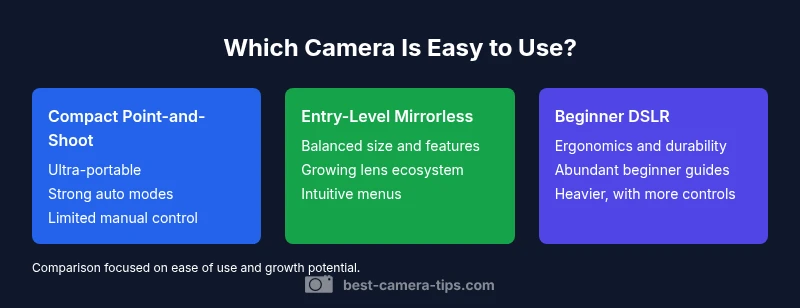
Option A: Compact Point-and-Shoot — Ultra-simple, light, and affordable. It focuses on automatic scene detection and bright LCDs, with minimal menu complexity. Best for casual snaps, travel, and quick family photos. Option B: Entry-Level Mirrorless — A balance of size, speed, and upgrade paths. It delivers fast autofocus, a versatile lens ecosystem, and guided modes that ease beginners into more control. Ideal for learners who want to grow without leaving the compact form factor. Option C: Beginner DSLR — Traditional controls with a robust grip and easy-to-find settings. It provides durable construction and a broad selection of beginner-friendly guides, good battery life, and a wider lens choice. This option suits users who value familiarity and long-term backward compatibility while learning.
Real-world scenarios: beginners, travel, home security
For a beginner planning casual photography, a compact or beginner mirrorless helps you capture memories with minimal hassle. When traveling, a light, compact body reduces fatigue, while reliable autofocus and consistent exposure help you stay in the moment. Home security enthusiasts may prioritize reliable autofocus on faces, good low-light performance within a compact system, and straightforward app integration. In all cases, choose a model with a clear, readable user interface and reasonable battery life to avoid frequent recharging during critical moments.
Practical tips to evaluate ease of use in-store or online
When evaluating ease of use, simulate real-life tasks: turn on the device, change shooting modes, adjust ISO, and review a photo in playback. Test how quickly you can switch to auto mode in a dim environment and whether auto white balance yields natural colors. Ask staff or check reviews about tactile feedback, menu depth, and how intuitive the camera feels after a few days of use. If possible, try a hands-on demo that includes a guided setup on first boot. In online shopping, watch tutorial videos and read beginner-focused guides to gauge whether the UI aligns with your learning pace. Remember, the target is a camera you can operate comfortably while you grow into more advanced skills.
Sources and additional resources
To ground your decision in credible guidance, you can consult authoritative resources such as Britannica for photography basics, National Geographic for real-world shooting scenarios, and NIST for technical guidance related to imaging standards. These sources provide context that complements hands-on testing and hands-on reviews from Best Camera Tips.
Feature Comparison
| Feature | Compact Point-and-Shoot | Entry-Level Mirrorless | Beginner DSLR |
|---|---|---|---|
| Ease of use features | One-button auto modes and guided scenes | Intuitive menus, touch screen, simplified modes | Classic controls with beginner guides |
| Size and weight | Very portable (lightweight) | Moderate in size with a comfortable grip | Heavier, with larger grip |
| Price Range | $180-$400 | $450-$800 | $500-$900 |
| Best For | Casual shooters and quick snaps | Travelers and learners who want a compact system | New photographers needing room to grow with more control |
Positives
- Low barrier to entry with minimal setup
- Portable and lightweight for on-the-go shooting
- Clear automatic modes make learning easier
- Consistent user experience across brands
- Affordable options available
Downsides
- Limited manual controls for advanced learning
- Smaller sensors can affect image quality in low light
- Battery life may be shorter in compact models
- Potential frustration when upgrading from simple to complex features
Beginner-friendly options balance ease of use with growth potential
For most newcomers, a compact point-and-shoot or beginner-friendly mirrorless offers the best blend of simplicity and learning paths. Choose based on how quickly you want to progress and how much gear you’re willing to carry.
Common Questions
What makes a camera easy to use?
An easy-to-use camera features a straightforward interface, clear labels, strong auto modes, and quick access to essential adjustments. Built-in guides help beginners learn as they shoot, reducing the learning curve. A comfortable grip and predictable performance also matter for confidence and consistency.
An easy camera uses simple menus, clear labels, and helpful guides to make shooting straightforward for beginners.
Are point-and-shoots easier than DSLRs?
Point-and-shoots are typically simpler, with fewer manual controls and more automated settings. DSLRs can be easy to use at the beginner level, but they often require some setup and learning of menus. The best choice depends on how quickly you want to grow and how much you value lenses and future upgrades.
Point-and-shoots are usually the simplest, while beginner DSLRs can also be easy but may have steeper growth paths.
Do beginner-friendly cameras sacrifice image quality?
Beginner-friendly cameras prioritize ease of use and reliability, which can slightly limit advanced controls. However, with modern sensors and processing, many still deliver excellent image quality for everyday photography. You can upgrade later without losing your learning base.
Ease often goes with good image quality, and you can upgrade features as you grow.
How important is touchscreen usability?
Touchscreens speed navigation and reduce button presses, especially for beginners adjusting settings. They should be responsive and clear, but not replace essential physical controls where reliability matters (e.g., in cold or wet conditions).
Touchscreens help a lot, but make sure critical controls still have reliable physical access.
What should I test before buying?
Test boot-up time, menu navigation, and the speed of autofocus in typical scenes. Check how easy it is to switch between auto modes and to access exposure settings. Try a low-light shot and review the result for noise and color accuracy.
Boot up quickly, navigate menus easily, and test autofocus in real-world lighting.
Is there a recommended first camera for absolute beginners?
There isn’t a single ‘one-size-fits-all’ first camera. Choose a model with a forgiving menu, strong auto modes, and a path to growth (interchangeable lenses or growing feature set). Your choice should align with how you’ll use the camera most often.
Pick a model with easy menus and good auto modes that lets you grow later.
The Essentials
- Identify your primary use case and let it guide the decision
- Prioritize UI simplicity, labeled modes, and tactile controls
- Test in-store for touch-and-feel before buying
- Choose a model with room to grow into manual controls